15
CALENDER
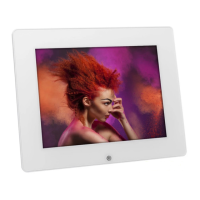
Use the navigation buttons on remote control to select “Calendar” icon, the Calendar and alarm
clock appears on the screen.
Display information:
- Monthly calendar display
- Picture display
- Time display
- Alarm display
Press ▼ or ▲ button to change the year display.
Press <– or –> button to change the month display.
Note: press ESC to return to the Main Menu.
Question & Answer
Q & A
Question Answer
What photo, music, and video formats
supported by Multimedia Digital
Photo Frame?
Photo: JPEG
Music: MP3
Video: MPEG-1,MPEG-4(avi, divx


 To Next Page