27
Operating elements
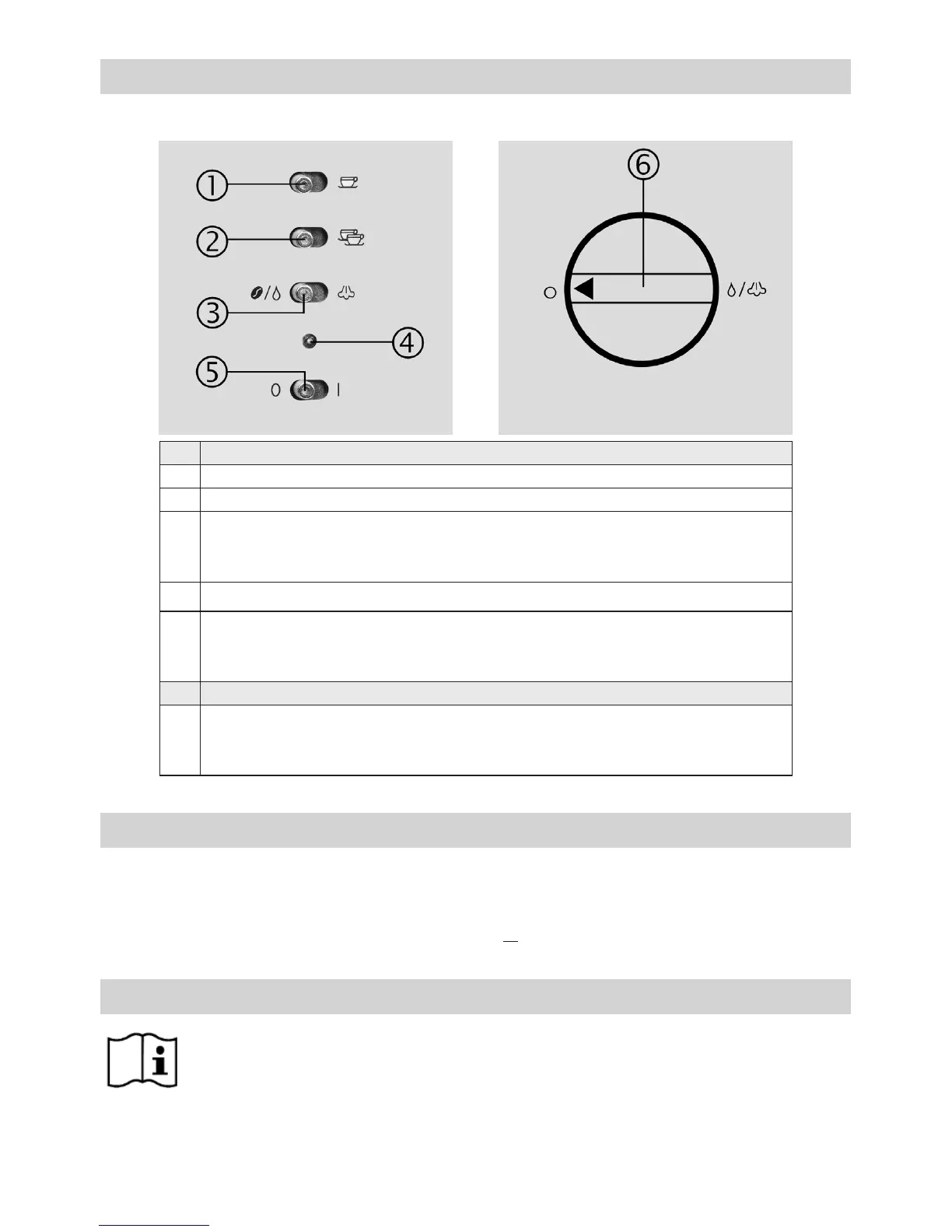
Operating panel
Operating panel:
1 switch for 1-cup supply
2 switch for 2-cup supply
3
switch for supply of
- left position: coffee/espresso and hot water
- right position: steam for milk froth
4 temperature pilot lamp
5
switch for operation
- position “0”: off
- position “I”: on
Rotary knob:
6
rotary knob for hot water/steam
- left position: off
- right position: on
Rotary knob
Status display of the temperature pilot lamp
• permanent glowing: thermoblock is ready for use
• blinking every second: heating-up period of the thermoblock
• slow blinking every 2 seconds: power save mode without heating
• quick blinking every 0.5 second: water is missing or rotary knob is not positioned correctly.
Initial use of the appliance
• Remove all stickers and tapes and clean the appliance as well as all accessories. Please refer to
“Cleaning and maintenance“ for further information.
• Bleed the system. Please refer to “Bleeding the system” for further information.
• For better water quality insert the enclosed water lter. Please refer to “Inserting the water lter” for
further information.
• The appliance can also be used without water lter.



 To Next Page