NK-Hub User Guide (v01) Operating the NK-Hub • 5–1
Operating the NK-Hub
NK-Hub User Interface
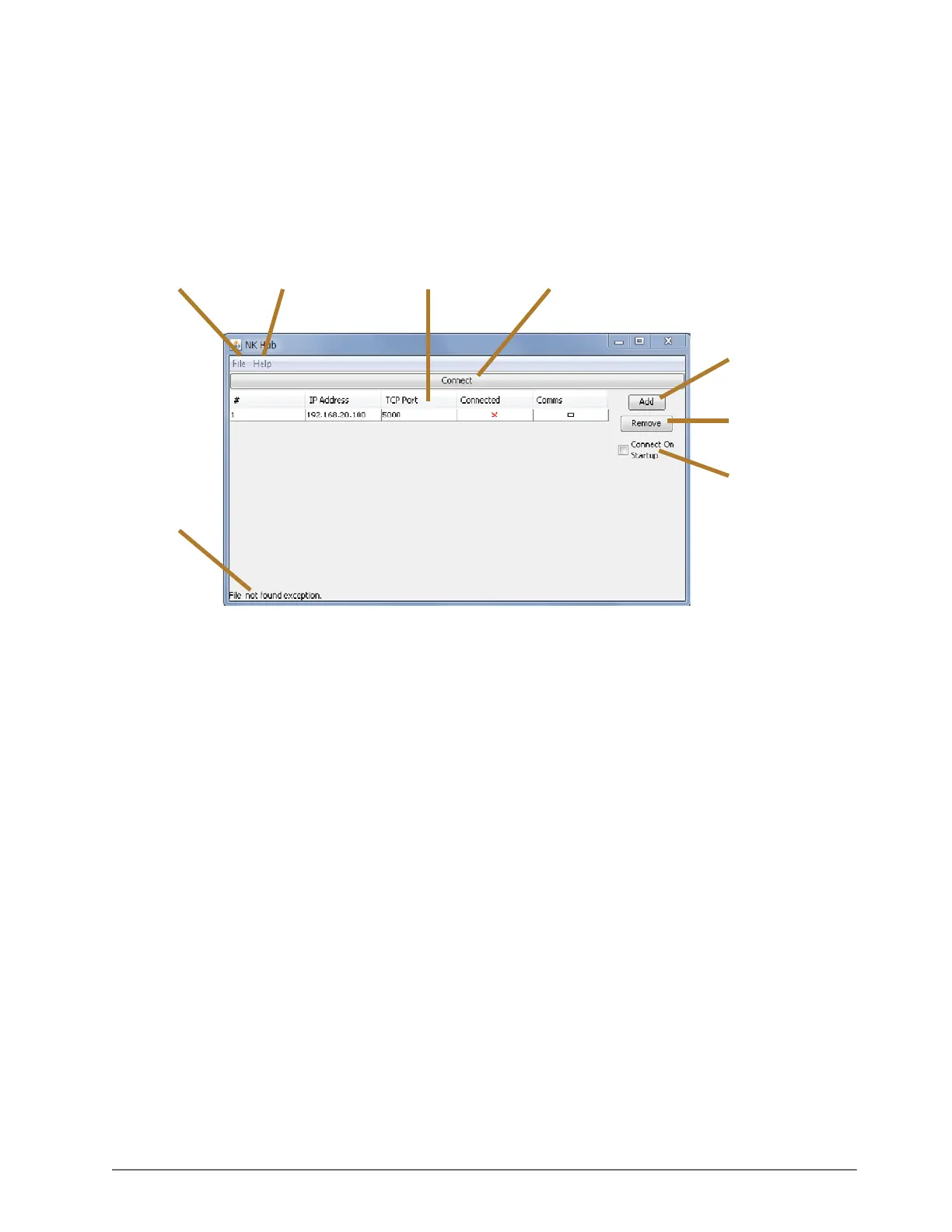
This section describes the user interface of the NK-Hub. The following image provides a general overview of the
NK-Hub user interface:
File Menu
Use the File menu to open and save configuration files.
Open Config — select this to open a saved configuration file. Once a file has been opened, the NK-Hub will
automatically open that file on future start-ups.
Save Config — select this to save the current configuration.
Exit — select this to exit and close the NK-Hub.
Help Menu
Use the Help Menu menu to access information about the NK-Hub.
About — select this to view the version information about the NK-Hub.
IPS Table
Shows list of IPS Devices that to which the NK-Hub can connect. The table contains the following information:
# — the NK-IPS number in the table.
IP Address — the IP address of the NK-IPS.
TCP Port — the TCP port that is used to connect to the NK-IPS.
The TCP port must match the Client TCP Port setting in the NK-IPS configuration.
File Menu
Help Menu
IPS Table
Connect / Disconnect
Button
Add Button
Remove Button
Connect On
Startup
Checkbox
Status Bar













 To Next Page