5
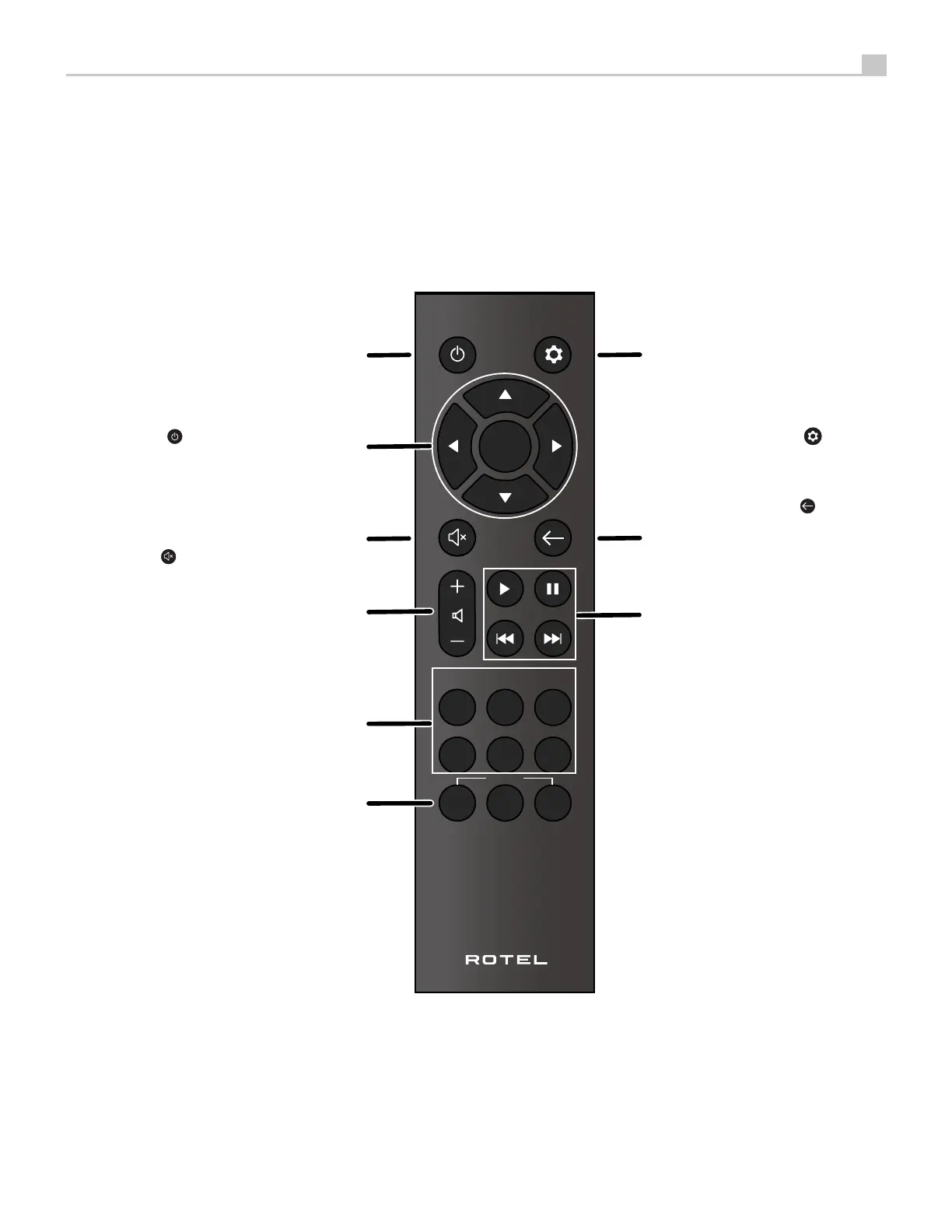
Figure 2: Remote Control
Télécommande infra-rouge
Fernbedienung
Mando a Distancia
Telecomando
De afstandsbediening
Fjärrkontroll
Пульт ДУ
A
: Power Button
Activate or deactivate the unit.
B
: Navigation and OK Buttons
Access the various menus and operate
C
: Mute Button
Mute the audio.
D
: Volume Buttons
Adjust the volume output level.
E
: Source Buttons
Selects the input signal source.
F
: Preset Buttons
Station preset and recall buttons.
G
: Setup button
Activates the setup menu on the
front display.
H
: Back Button
Return to the previous selection
screen.
I
: Playback Control Buttons
Control the play, pause, next track
and previous track of the audio.
OPT
/
COAX AUX
STREAM
PRESET
OK
VOLUME
USB
PC-USB
eARC
BT
1 2 3
A
B
C
D
E
H
G
I
F



 To Next Page