4 Operation
User reference guide
8
RHBX04+08DA
ROTEX HPSU low temperature Bi‑bloc
4P495261-1 – 2017.12
INFORMATION
In case of error code AH and no interruption of the
disinfection function occurred due to domestic hot water
tapping, following actions are recommended:
▪ When the Reheat only or Schedule + reheat mode is
selected, it is recommended to program the start-up of
the disinfection function at least 4hours later than the
last expected large hot water tapping. This start-up can
be set by installer settings (disinfection function).
▪ When the Schedule only mode is selected, it is
recommended to program a Eco action 3hours before
the scheduled start-up of the disinfection function to
preheat the tank.
To determine which domestic hot water mode you are using
(method 1)
Check the installer settings table filled in by the installer.
To determine which domestic hot water mode you are using
(method 2)
1 Go to [5]: Tank.
2 Check which items are displayed:
If… is displayed Then the DHWtank mode =…
Only [5.1] Powerful
operation
Reheat only
All items except [5.4]
Reheat setpoint are
displayed
Schedule only
All items including [5.4]
Reheat setpoint are
displayed
Schedule + reheat
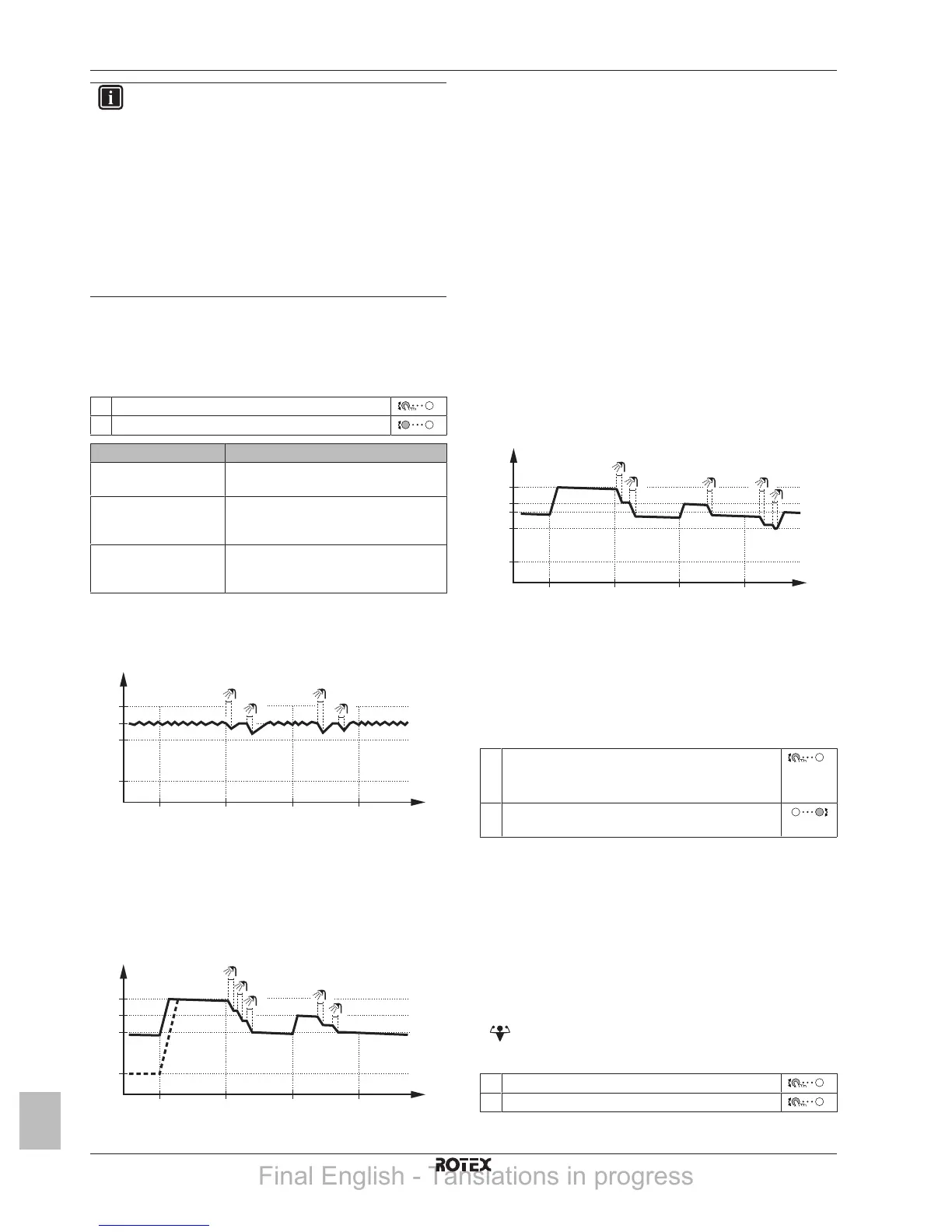
4.5.2 Reheat mode
In reheat mode the DHW tank continuously heats up to the
temperature shown on the home screen (example: 50°C).
t
60°C
00:00 07:00
50°C
15°C
40°C
14:00 21:00
1
2
3
4
T
t
T
t
DHWtank temperature
t Time
4.5.3 Scheduled mode
In scheduled mode the DHWtank produces hot water corresponding
to a schedule. The best time to allow the tank to produce hot water is
at night, because the space heating demand is lower.
Example:
t
60°C
00:00 07:00
50°C
15°C
40°C
14:00 21:00
1
2
3
4
5
T
t
T
t
DHWtank temperature
t Time
▪ Initially, the DHW tank temperature is the same as the
temperature of the domestic water entering the DHW tank
(example: 15°C).
▪ At 00:00 the DHWtank is programmed to heat up the water to a
preset value (example: Comfort = 60°C).
▪ During the morning, you consume hot water and the DHW tank
temperature decreases.
▪ At 14:00 the DHWtank is programmed to heat up the water to a
preset value (example: Eco = 50°C). Hot water is available again.
▪ During the afternoon and evening, you consume hot water again
and the DHWtank temperature decreases again.
▪ At 00:00 the next day, the cycle repeats.
4.5.4 Scheduled + reheat mode
In scheduled + reheat mode, the domestic hot water control is the
same as in scheduled mode. However, when the DHW tank
temperature drops below a preset value (=reheat tank temperature –
hysteresis value; example: 35°C), the DHW tank heats up until it
reaches the reheat set point (example: 45°C). This ensures that a
minimum amount of hot water is available at all times.
Example:
t
T
t
60°C
00:00 07:00
50°C
45°C
15°C
14:00 21:00
35°C
1
2
4
5
3
T
t
DHWtank temperature
t Time
4.5.5 To change the domestic hot water
temperature
In Reheat only mode, you can use the room temperature setpoint
screen to read out and adjust the domestic hot water temperature.
1 Go to [5]: Tank.
You can read out the desired and actual room
temperature in the center of the setpoint screen.
2 Turn the right dial to adjust the domestic hot water
temperature.
In other modes, you can only view the setpoint screen but not modify
it. Instead, you can modify the settings for the Comfort setpoint [5.2],
Eco setpoint [5.3] and Reheat setpoint [5.4].
4.5.6 Using DHW powerful operation
About powerful operation
Powerful operation allows the domestic hot water to be heated by
the backup heater. Use this mode on days when there is more hot
water usage than usual.
To check if powerful operation is active
If
is displayed on the home screen, powerful operation is active.
Activate or deactivate Powerful operation as follows:
1 Go to [5.1]: Tank > Powerful operation
2 Turn powerful operation Off or On.
Final English - Tanslations in progress



 To Next Page