4 Operation
User reference guide
9
RHBX04+08DA
ROTEX HPSU low temperature Bi‑bloc
4P495261-1 – 2017.12
Usage example: You immediately need more hot water
You are in the following situation:
▪ You already consumed most of your domestic hot water.
▪ You cannot wait for the next scheduled action to heat up the
domestic hot water tank.
Then you can activate powerful operation. The domestic hot water
tank will start heating up the water to the Comfort temperature.
INFORMATION
When powerful operation is active, the risk of space
heating and capacity shortage comfort problems is
significant. In case of frequent domestic hot water
operation, frequent and long space heating interruptions
will happen.
4.6 Advanced usage
The amount of information you can read out in the menu structure
depends on your user permission level:
▪ User: Standard mode
▪ Advanced user: You can read out more information
4.6.1 To change the user permission level
You can change the user permission level as follows:
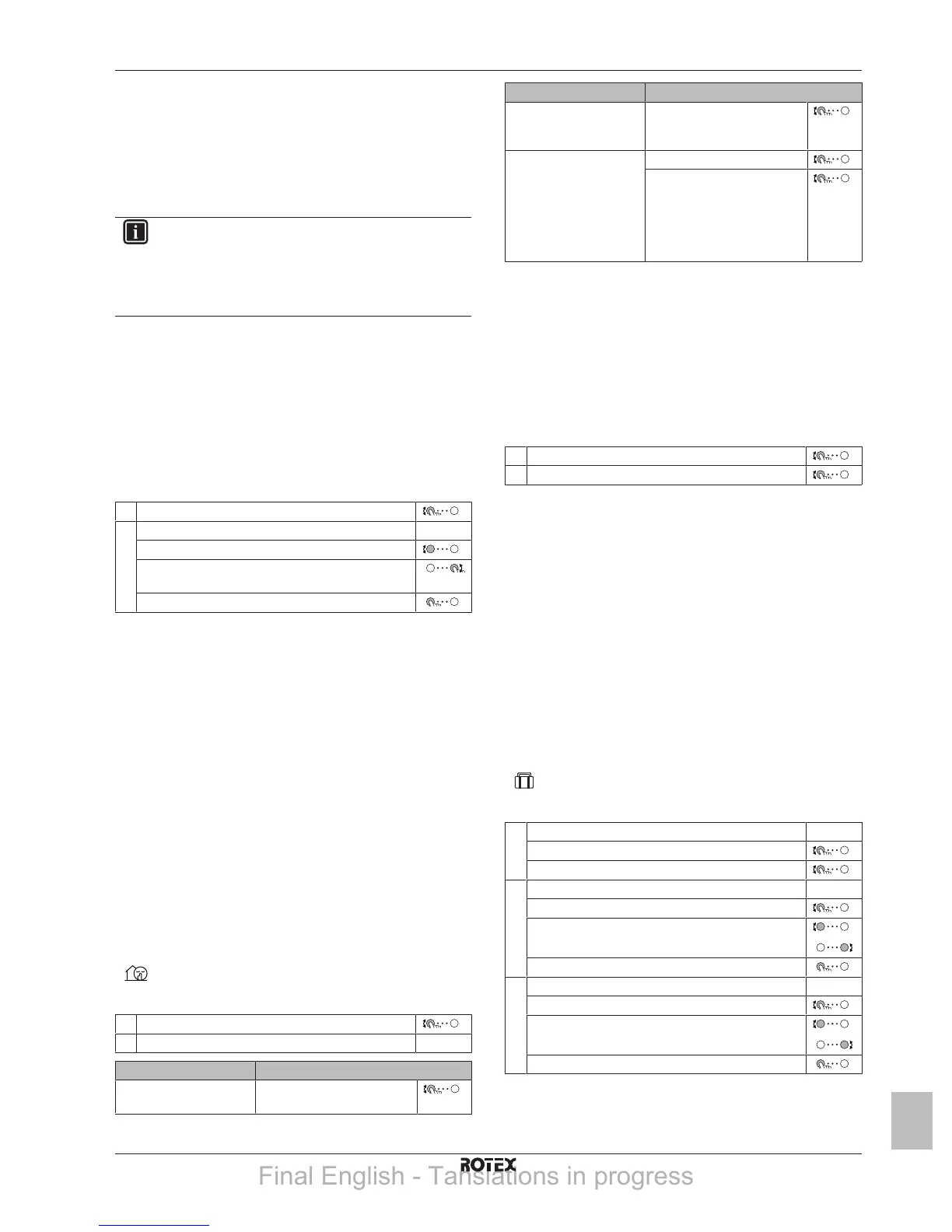
1 Go to [B]: User profile.
2 Enter the applicable code for the user permission. —
▪ Move the cursor from left to right.
▪ Browse through the list of digits and change the
selected digit.
▪ Confirm the pincode and proceed.
Advanced user pin code
The Advanced user pin code is 1234. Additional menu items for the
user are now visible.
User pin code
The User pin code is 0000.
4.6.2 Using quiet mode
About quiet mode
You can use quiet mode to decrease the sound of the outdoor unit.
However, this also decreases the heating capacity of the system.
There are multiple quiet mode levels.
You can:
▪ Completely deactivate quiet mode
▪ Manually activate a quiet mode level until the next scheduled
action
▪ Use and program a quiet mode schedule
To check if quiet mode is active
If
is displayed on the home screen, quiet mode is active.
To use quiet mode
1 Go to [7.4.1]: User settings > Quiet > Activation.
2 Do one of the following: —
If you want to… Then…
Completely deactivate
quiet mode
Select Off.
If you want to… Then…
Manually activate a quiet
mode level
Select the applicable quiet
mode level. Example: Most
quiet.
Use and program a quiet
mode schedule
Select Automatic.
Go to [7.4.2] Schedule and
program the schedule. For
more information about
scheduling, see
"4.7.4Schedule screen:
Example"on page11.
Usage example: Baby is sleeping in the afternoon
If you are in the following situation:
▪ You have programmed a quiet mode schedule:
▪ During the night: Most quiet.
▪ During the day: Off to ensure the heating capacity of the
system.
▪ However, during the afternoon the baby is sleeping and you want
it to be quiet.
Then you can do the following:
1 Go to [7.4.1]: User settings > Quiet > Activation.
2 Select Most quiet.
Advantage:
The outdoor unit runs in its most quiet level.
4.6.3 Using holiday mode
About holiday mode
During your holiday, you can use the holiday mode to deviate from
your normal schedules without having to change them. While holiday
mode is active, space heating operation and domestic hot water
operation will be turned off. Room frost protection and anti-legionella
operation will remain active.
Typical workflow
Using holiday mode typically consists of the following stages:
1 Setting the starting date and ending date of your holiday.
2 Activating the holiday mode.
To check if holiday mode is activated and/or running
If
is activated on the home screen, holiday mode is active.
To configure the holiday
1 Activate the holiday mode. —
▪ Go to [7.3.1]: User settings > Holiday > Activation.
▪ Select On.
2 Set the first day of your holiday. —
▪ Go to [7.3.2]: From.
▪ Select a date.
▪ Confirm the changes.
3 Set the last day of your holiday. —
▪ Go to [7.3.3]: Till.
▪ Select a date.
▪ Confirm the changes.
Final English - Tanslations in progress



 To Next Page