6. On-Screen Icons / Settings and Navigation
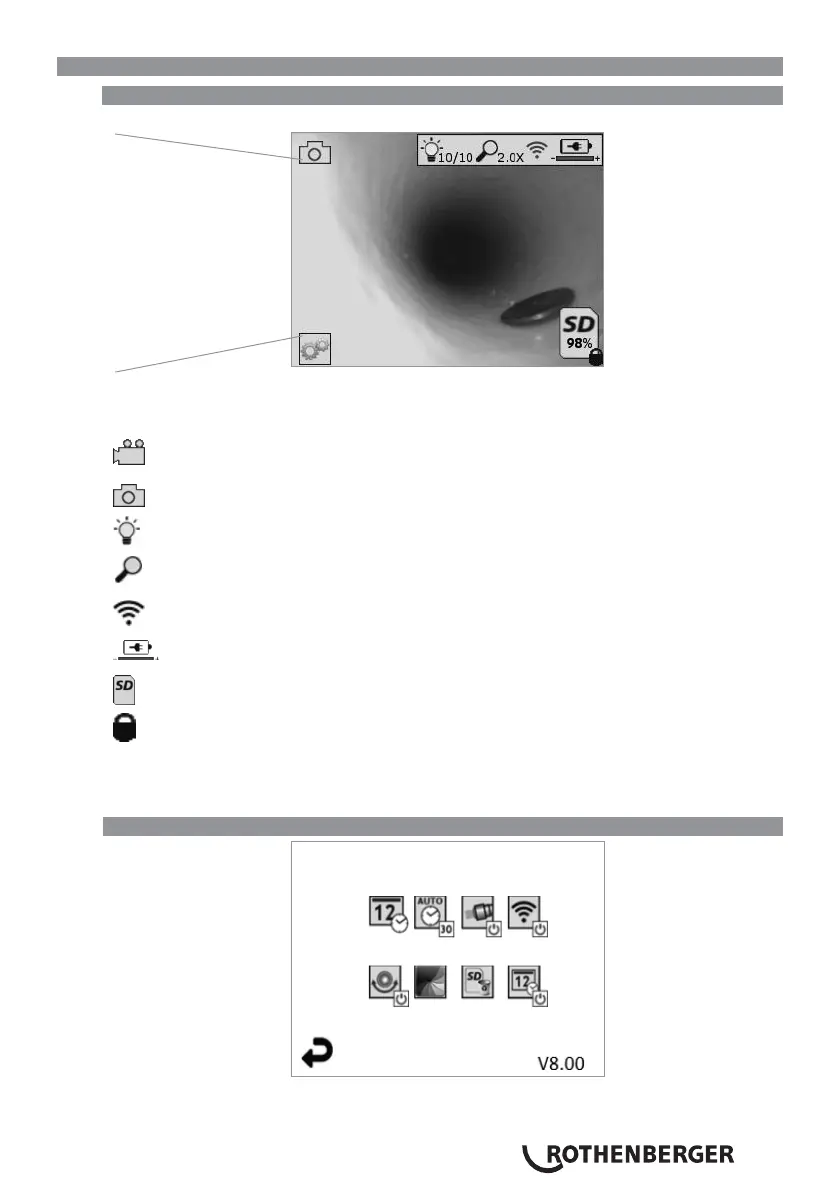
6.1 Live Screen Display
Capture Mode Indicator and Button (Touch screen to select camera or video)
Tools/Menu Button (Touch screen to access Tools Menu)
NOTE - All icons will appear when the user touches the screen or presses a hardware button and
will disappear after 3 seconds.
Video Capture Mode Selected
Image Capture Mode Selected (Default Setting)
Image LED intensity
Zoom level
Wi-Fi Connection established
Battery level
Indicates the amount of memory remaining on the installed SD card
Indicator that the SD card is write-protected
No icon will appear when there is no SD card installed (SD card required for memory storage).
(Touch screen to access saved files)
NOTE - Actuating the power button while video is recording, may corrupt the SD card.
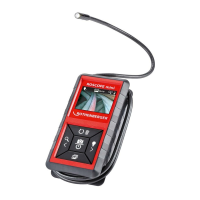
6.2 Tools / Menu
NOTE - All icons will appear when the user touches the screen or presses a hardware button and
will disappear after 3 seconds.


 To Next Page