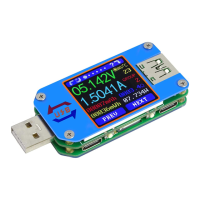
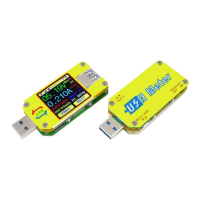
This document provides comprehensive instructions for the UM25/UM25C Full Colour USB Tester, a versatile device designed for monitoring and analyzing USB power and data. The manual details its core functions, operational procedures, and software installation for both mobile and PC platforms, ensuring users can effectively utilize its capabilities.
Function Description
The UM25/UM25C USB Tester is equipped with a range of functions to provide detailed insights into USB power delivery and data transfer. Its primary role is to measure voltage, current, and power, offering real-time data on the performance of USB devices and power sources.
Key functions include:
- PC Bluetooth Communication and Android Phone APP Control: The device supports wireless communication with both Android smartphones and PC control software via Bluetooth. This allows for remote monitoring, data logging, and advanced analysis of USB parameters, enhancing user convenience and flexibility.
- Quick Charge Recognition: The tester can automatically identify various quick charge protocols, including QC2.0, QC3.0, APPLE 2.4A/2.1A/1A/0.5A, Android DCP, and SAMSUNG. This feature is crucial for verifying if a charger or device is utilizing a fast-charging standard, though it's noted that recognition may not always be absolutely accurate due to rapid phone updates.
- Data Record and Store: The device can accumulate and store capacity (mAh) and energy (mWh) data across multiple groups. This is particularly useful for long-term monitoring of charging cycles or for comparing the performance of different power banks and devices over time.
- Capacity/Energy Detection: Users can accurately measure the accumulated capacity and energy transferred during charging or discharging cycles, providing a clear picture of a device's power consumption or a power bank's output.
- Differential Voltage Method Measurement for Data Connection Cable Impedance: A unique feature that allows the tester to measure the impedance of data connection cables. This helps in assessing cable quality, as high impedance can lead to slower charging and data transfer speeds.
- Voltage/Current/Power Detection: Real-time display of voltage, current, and power, enabling immediate feedback on the electrical characteristics of the USB connection.
- Load Connecting Detection Function: The device includes smart features like automatic screen off when no load is detected and automatic screen lighting when a load is connected, optimizing power consumption and user experience.
Usage Features
The UM25/UM25C is designed for ease of use, with intuitive interfaces and clear operational instructions.
Interface Navigation and Data Management:
- Main Measurement Interface: Displays real-time voltage, current, accumulated capacity, accumulated energy, temperature, load equivalent impedance, and power. Users can switch between 10 data groups (0-9) to save and view different measurement sessions. Data groups 1-9 retain their accumulated mAh and mWh values after power off, while group 0 temporarily saves data that flashes upon recall.
- Quick Charge Recognition Interface: Shows D+ (DP) and D- (DM) data signal levels and the detected quick charge mode. This helps users confirm if their devices are fast charging.
- Charging Recording Interface: Monitors accumulated capacity, energy, and total recording time. A "REC" indicator changes from red (stopped) to green (in progress) when the current flowing exceeds a user-defined trigger value (0.01A to 0.30A), automatically initiating data recording.
- Data Connection Cable Impedance Measurement Interface: Guides users through a two-step process to measure cable resistance. First, the tester is connected directly to a power supply with a load, and data is recorded. Then, the data cable is introduced between the tester and the power supply, and data is recorded again to calculate impedance.
- Measurement Graphing Interface: Visualizes voltage, current, and D+/D- voltage measurements over time in a graphical format. The display range automatically adjusts to accommodate fluctuations, providing a dynamic view of performance.
- System Parameter Setting Interface: Allows users to customize various settings, including auto screen off time (0-9 minutes), screen brightness (levels 0-5), temperature display units (°C/°F), and theme background/foreground colors.
Mobile APP and PC Software Integration:
- Android APP (UM25C): Supports Android 5.0 and above. Installation involves downloading the "UM Meter" APP from Google Play or a provided link. The APP offers a voltage-current graph, detailed measurement data, and the ability to export data to Excel or share files. It also includes multi-language support and Bluetooth connection features.
- IOS APP (UM25C): Supports IOS 8.0 and above. Users can search for "UM Meter" in the Apple Store. The IOS APP provides similar functionalities to the Android version, including graphing, data export, and multi-language options.
- PC Control Software (UM25C): Compatible with Windows 7 and above. The software allows for Bluetooth connection to the tester, offering a comprehensive interface for real-time monitoring, data logging, and advanced analysis. It includes features for viewing voltage and current graphs, managing data groups, and exporting data to clipboard, Excel, or simplified images.
Maintenance Features
The manual provides guidance on maintaining the device's functionality and ensuring accurate measurements.
Software Updates:
- Mobile APP Updates: Both Android and IOS APPs are designed to automatically prompt for updates when new versions are available, or users can manually check for updates in their respective app stores. This ensures users have access to the latest features and bug fixes.
- PC Software Updates: While not explicitly detailed as automatic, the availability of new software versions would typically be communicated through the download link or official channels, allowing users to keep their PC control software up-to-date.
Operational Best Practices:
- Data Group Management: The ability to save and clear data in different groups helps organize measurements and prevents data clutter. Clearing accumulated mAh and mWh values by holding the 'PREV' button ensures fresh measurement cycles when needed.
- Cable Impedance Measurement: The detailed procedure for measuring cable impedance, including the recommendation to reduce load current if the screen turns black, helps users perform accurate tests and troubleshoot potential issues with their cables.
- Bluetooth Connection: Instructions for opening the Bluetooth switch on the UM25C and searching for devices on a computer or mobile phone ensure a smooth connection process. The Bluetooth indicator changing from blinking to static confirms a successful connection.
- General Advice: The manual advises users to keep the instructions in a safe place for future reference, highlighting the importance of understanding the device's operation for correct use and longevity. It also includes notes on specific scenarios, such as the importance of using Windows system Bluetooth drivers for desktop connections and avoiding pressing buttons on the tester during PC communication to prevent data errors.
By following these instructions, users can effectively operate and maintain their UM25/UM25C USB Tester, leveraging its full range of features for accurate and reliable USB power and data analysis.

 Need help?
 General

 To Next Page