Need help?
Do you have a question about the RuiDeng UM34C and is the answer not in the manual?
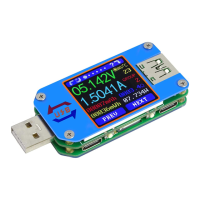
Displays voltage, current, capacity, energy, temperature, and impedance.
Identifies fast charging protocols like QC2.0, QC3.0, APPLE 2.4A.
Records accumulated capacity, energy, and elapsed time with a REC indicator.
Measures cable resistance by comparing direct connection vs. connected via cable.
Displays voltage and current fluctuations over time, and D+/D- voltage graphing.
Configures auto screen off, brightness, temperature units, and theme colors.
Guides on downloading and installing the UM Meter Android application.
Provides methods for downloading the Android app via link or Google Play.
Illustrates the process of installing the downloaded APK file on an Android device.
Connects the app to the USB tester and describes initial operational steps.
Details the main interface and features of the UM Meter Android application.
Guides on connecting the app to the USB tester and using its features.
Explains how to update the iOS application to the latest version.
Provides methods to measure power bank capacity using the USB tester.
Details two methods for assessing the quality of data cables.
This document provides comprehensive instructions for the UM34/UM34C Full Colour USB Tester, a device designed to monitor and analyze various electrical parameters of USB connections. The manual guides users through the device's functions, operational features, and maintenance considerations, ensuring proper and effective use.
The UM34/UM34C USB Tester serves as a versatile diagnostic tool for USB power delivery. Its core functions include Voltage/Current/Power Detection, allowing users to measure the real-time voltage, current, and power flowing through a USB connection. This is crucial for understanding the power consumption of devices and the output capabilities of chargers. The device also incorporates Capacity/Energy Detection, which accumulates mAh (milliampere-hour) and mWh (milliwatt-hour) values over time. This feature is particularly useful for assessing the actual capacity of power banks or the total energy consumed by a device during a charging cycle.
A significant capability of the tester is Quick Charge Recognition. It can identify various fast charging protocols such as QC2.0, QC3.0, APPLE 2.4A/2.1A/1A/0.5A, Android DCP, and SAMSUNG. This helps users verify if their charger and device are communicating effectively for fast charging. The manual notes that this recognition model is for reference only due to rapid updates in cell phone technology. The device also supports OPPO phone VOOC and OnePlus DASH charging protocols.
Another key function is Data Record and Store. The tester can save up to 10 groups of accumulated data (mAh and mWh), allowing users to track charging performance over multiple sessions or for different devices. Data group 0 provides temporary storage that is recalled upon power-on, while groups 1-9 offer persistent storage.
The tester can also perform Differential Voltage Method Measurement Cable Impedance. This function helps assess the quality of USB data cables by measuring their resistance, which directly impacts charging speed and efficiency. The device also features a Load Connecting Detection function, which automatically turns off the screen when no load is connected and lights it up when a load is detected.
For enhanced control and data visualization, the UM34C model offers Android and iOS APP Control. This allows users to monitor measurements, view graphing interfaces, and manage settings remotely via their smartphones. The APP also enables data export to phone folders, generation of graphs in Excel, and sharing of files with other applications.
The UM34/UM34C USB Tester is designed for intuitive operation with a 1.44-inch full-color LCD display that can be rotated in four directions for optimal viewing. The device features multifunction buttons for navigation and control.
Upon powering on, the device displays a welcome screen followed by the main measurement interface. A "hidden interface" can be accessed by pressing any button during power-on, offering options to select Chinese or English language, reset system settings to factory defaults, or zero the current reading (ensuring no load is connected).
The main measurement interface displays real-time voltage, current, accumulated capacity, accumulated energy, temperature, data group in use, load equivalent impedance, and power measurement. Users can switch between data groups by holding the 'NEXT' button and clear accumulated mAh and mWh values by holding the 'PREV' button.
The Quick Charge Recognition interface shows the D+ (DP) and D- (DM) data positive and negative signal levels, along with the recognized charging mode. The Charging Recording interface displays accumulated capacity, energy, and recording time. Users can set a low current trigger value (from 0.01A to 0.30A) to automatically start and stop recording, indicated by a green or red 'REC' status.
The Data Connection Cable Impedance Measurement interface guides users through a two-step process to measure cable resistance. First, the tester is connected directly to a power supply with a load, and data is recorded. Second, the cable to be tested is introduced between the tester and the power supply, and data is recorded again to calculate the cable's resistance. The manual provides detailed instructions for this measurement, including recommended load currents.
The Measurement Graphing interface provides a visual representation of voltage and current over time, automatically adjusting the display range to accommodate fluctuations. It can also display D+/D- voltage measurements over time.
The System Parameter Setting interface allows users to customize various device settings, including auto screen off time (0-9 minutes), screen brightness (levels 0-5), temperature display units (°C/°F), theme background color, and theme foreground color. Settings are adjusted by stepping through options with the 'NEXT' button and changing values with the 'PREV' button.
For the UM34C model, the Android and iOS APPs offer additional usage features. After installation, the APP automatically detects updates and provides a graphical interface for monitoring voltage-current curves, viewing detailed data tables, and accessing various settings. The APP supports multiple languages and allows for Bluetooth connection to the device, enabling remote control and data management.
The manual emphasizes the importance of familiarizing oneself with the instructions to ensure correct operation and advises keeping the instructions in a safe place for future reference. While specific "maintenance features" in the traditional sense (like cleaning or calibration) are not detailed, the operational guidelines contribute to the longevity and accurate performance of the device.
The ability to reset system settings to factory defaults via the hidden interface can be considered a maintenance feature, as it helps resolve potential configuration issues. The zeroing of the current reading also ensures accuracy for subsequent measurements.
For the APP, the automatic update detection and multi-language support enhance usability and ensure the software remains current and accessible to a broad user base. The APP's ability to export data and generate graphs facilitates detailed analysis, which can indirectly aid in identifying potential issues with charging setups or cables, thus contributing to the maintenance of connected devices.
The manual also includes an "Explanation of terms" and "Basic Operational Knowledge" appendix, which serves as a valuable resource for users to understand the underlying concepts and best practices for using the USB tester, thereby promoting proper usage and minimizing potential damage or misinterpretation of results. For instance, it provides methods for measuring power bank capacity and data cable quality, which are practical applications of the device that contribute to the maintenance and optimal performance of other electronic devices.
 General
| Model | UM34C |
|---|---|
| Category | USB Tester |
| Current Measurement Resolution | 0.001A |
| Temperature Measurement Range | 0°C - 80°C |
| D+ Voltage Range | 0-3.3V |
| D- Voltage Range | 0-3.3V |
| Refresh Rate | 2Hz |
| Data Logging | Yes |
| USB Ports | 1 |
| Resistance Measurement Range | 0 - 9999Ω |
| Capacity Measurement Range | 0 - 99999mAh |
| Load Impedance Range | 0 - 9999Ω |
| Display Screen | 1.44 inch color LCD |
| USB Interface | USB Type-A |
| Operating Temperature | 0°C - 45°C |

 To Next Page