Copyright ©2022 Ruko All Rights Reserved.
8
F11GIM User Manual
7. Problems You May Encounter
1. To Prevent Flying Lost
1) It is better for beginners to fly the Aircraft within a real-time image
transmission range on your phone's App for safety.
2) During the flight, DO NOT turn off GPS signal (Do not long-press
button, otherwise GPS will turn off), the Aircraft would fly unsteadily,
or lose the direction, or will be lost completely.
3) During the flight, if the picture freezes, the reason is WiFi
disconnection, please RETURN the aircraft first, change to another
new environment or check if there is interference around, then
connect again.
4) button on the transmitter is only for emergency stop. You
can short press and then long press this button to operate it within
49.21 feet (15 meters height). DO NOT use it casually while flying,
otherwise, it will crash.
2. Camera Guidelines
1) Please take off the gimbal camera cover before flight.
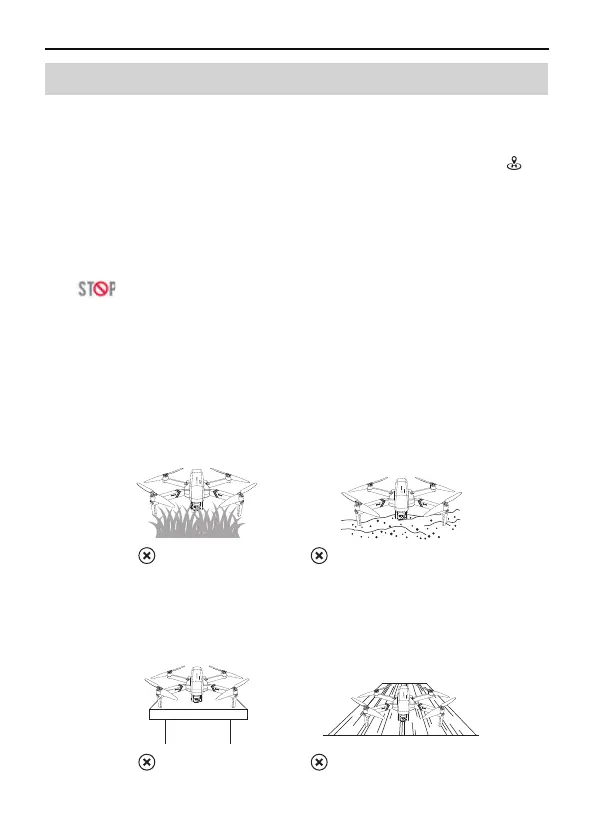
2) When taking off from grass or sand, please place the aircraft on
the landing pad or cardboard to keep it level.
3) Do not turn on the aircraft when it is on desk or hollow wooden
floor. They will amplify the small vibrations into high-frequency
vibrations, which will cause the gimbal cannot work.
On the sand
On the grass
On the hollow wooden floor
On the desk



 To Next Page