EasyManua.ls Logo

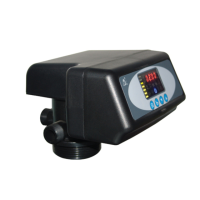
Runxin F79A-LCD - User Manual

Default Icon
54 pages
Print Icon
To Next Page IconTo Next Page
Loading...
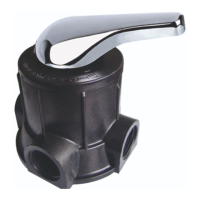
Multi-functional Flow Control Valve for
Water Treatment Systems
82602Old ModelF79A-LCD
82602BOld ModelF79B-LCD
82604Old ModelF82A-LCD
82604BOld ModelF82B-LCD)
82504AB (Old ModelF82AG-LCD)
82504BB(Old ModelF82BG-LCD)
Instruction Manual
Please read this manual in details before using the valve
and keep it properly in order to consult in the future.
OWRX.466.515
China Patent No.: ZL02220153.X
ZL200820169873.5

Questions and Answers

  • G
    garciatylerSep 10, 2025
    Why does the circle capacity decrease in my Runxin Control Unit?
    • J
      James GallowaySep 10, 2025
      If the circle capacity of your Runxin Control Unit decreases, it could be due to improper regeneration; regenerate correctly. A fouled resin bed could also be the cause; increase the backwash flow rate and time, and clean or change the resin. Improper salt setting may be another factor; readjust the brine drawing time. If the softener setting is not proper, recount and reset according to the test of outlet water. Raw water quality deterioration can also cause this; regenerate the unit manually temporarily, then reset the regeneration cycle. Finally, a stuck turbine could be the issue; disassemble the flow meter and clean it or replace the turbine.
  • J
    Jonathan RodriguezAug 23, 2025
    How to fix a Runxin F79A-LCD Control Unit when the softener fails to regenerate?
    • A
      Ashley MeyerAug 23, 2025
      If your Runxin Control Unit softener fails to regenerate, it could be due to a few reasons. First, ensure that the unit has permanent electrical service by checking the fuse, plug, pull chain, or switch. If the power supply is okay, verify that the regeneration cycles are set correctly and reset them if necessary. If the issue persists, the controller or motor may be defective and need replacement.
  • P
    phammatthewAug 25, 2025
    Why does my Runxin F79A-LCD use too much salt?
    • A
      Andrew WoodwardAug 25, 2025
      If your Runxin Control Unit is using too much salt, check the salt usage and salt setting. Also, excessive water in the brine tank can cause this issue.
  • K
    Kenneth ThompsonAug 26, 2025
    What to do if there is excessive water in the brine tank of my Runxin F79A-LCD Control Unit?
    • J
      Joshua PattersonAug 27, 2025
      If you notice excessive water in the brine tank of your Runxin Control Unit, try the following: reset the refilling time to the correct duration. Check the injector and ensure there are no obstructions in the brine pipe. Clean the brine valve and brine line to remove any foreign material. If you haven't installed a safety brine valve and there's a power failure during salting, stop the water supply and restart, or install a safety brine valve in the salt tank. Finally, if you have a safety brine valve, check if it is broken and repair or replace it if needed.
  • M
    Megan WilliamsAug 28, 2025
    What to do if Runxin Control Unit softener fails to draw brine?
    • O
      osbornerebeccaAug 28, 2025
      If your Runxin Control Unit softener fails to draw brine, the following could be the reasons: the line pressure might be too low, so try to increase it. The brine line might be plugged, so clean it. There could be a leak in the brine line, so replace it. The injector might be plugged, so clean or replace it. There could be an internal control leak, so replace the valve body. The drain line might be plugged, so clean the drain line flow control. The sizes of the injector and DLFC might not match the tank, so select the correct injector size and DLFC according to the P26 requirements.
  • D
    Daisy OlsonAug 29, 2025
    Why is the regeneration time not correct on my Runxin Control Unit?
    • J
      jacksonmariaAug 29, 2025
      If the regeneration time on your Runxin Control Unit is not correct, check the program and reset the time of day. Also, a power failure lasting more than 3 days may cause this issue.
  • R
    rodriguezmichaelSep 18, 2025
    What does E3 or E4 flash mean on my Runxin F79A-LCD?
    • J
      Julie LewisSep 18, 2025
      If E3 or E4 is flashing on your Runxin Control Unit, it indicates a faulty control board, which needs to be replaced.
  • J
    Jennifer HowellSep 12, 2025
    Why do all indicators display on the front panel of my Runxin F79A-LCD?
    • S
      sgloverSep 12, 2025
      If all indicators are displayed on the front panel of your Runxin Control Unit, it could be due to faulty wiring between the front panel and the controller; check and replace the wiring. It could also indicate a faulty control board, which would need replacement. A damaged transformer could also be the cause; check and replace the transformer. Unstable electrical service might also be the issue; check and adjust the electrical service.
  • W
    Willie ColeSep 8, 2025
    Why is there salt water in the softened water from my Runxin F79A-LCD?
    • S
      Sharon McdonaldSep 8, 2025
      If you notice salt water in the softened water from your Runxin Control Unit, it could be due to foreign material in the injector or a malfunctioning injector; clean and repair the injector. Alternatively, the brine valve may not be shutting off; repair and clean the brine valve. Lastly, the fast rinse time may be too short; extend the fast rinse time.
  • V
    Valerie CamposSep 5, 2025
    Why is there interrupted or irregular brine in my Runxin F79A-LCD Control Unit?
    • N
      nbaileySep 5, 2025
      If you experience interrupted or irregular brine in your Runxin Control Unit, possible causes include water pressure that is too low or unstable (increase water pressure), a plugged or faulty injector (clean or replace injector), air in the resin tank (check and find the reason), or floccules in the resin tank during backwash (clean the floccules in the resin tank).

Summary

Notices and Precautions

1. Product Overview

1.1. Main Application & Applicability

Details on systems where the valve is used and its suitability.

1.2. Product Characteristics

Key features and functionalities of the control valve.

1.3. Service Condition

1.4. Product Structure and Technical Parameters

1.5. Product Install

A. Install notice

Precautions and requirements before installing the control valve.

B. Device location

Recommended placement guidelines for the softener unit.

2. Basic Setting & Usage

2.1. The Function of PC Board

Explains the functions of the control valve's PC board and buttons.

2.2. Basic Setting & Usage

A. Parameter specification

Lists and defines the available control modes and parameters.

C. Usage

3. Applications

3.1. Softener Flow Chart

Visual representation of the softener's working process and regeneration cycle.

3.2. The Function and Connection of PC Board

3.3. System Configuration and Flow Rate Curve

3.4. Parameter settlement

Service Time Calculation

Formula and method for calculating service time based on water capacity.

Backwash Time Calculation

Guidance on setting backwash time based on water turbidity.

Brine & Slow Rinse Time Calculation

Formulas for calculating brine and slow rinse times.

3.5. Parameter Enquiry and Setting

Parameter Enquiry

Steps to view current parameter settings on the control valve.

Parameter Setting

Instructions for modifying various operational parameters.

3.6. Trial Running

3.7. Trouble-Shooting

Control Valve Fault

Common problems with the control valve and their solutions.

Controller Fault

Issues related to the control board and display, with troubleshooting steps.

3.8. Assembly & Parts

Valve Body Components for F79 A;F79 B

List of parts for F79A/F79B valve body assembly.

Valve Body Assembly for F82 A;F82 B Models

Parts list for F82A and F82B valve body assemblies.

Valve Body Components for F82 AG;F82 BG Models

Components list for F82AG and F82BG valve body assemblies.

4. Warranty Card

Runxin F79A-LCD Specifications

General IconGeneral
ModelF79A-LCD
CategoryControl Unit
Display TypeLCD
Water Quality MonitoringYes
Max. Water Production Capacity4m³/h
Power SupplyAC 100-240V, 50/60Hz
Water Temperature5-50°C
Drain1/2"
Water Pressure0.15-0.6 MPa
Transformer InputAC 100-240V, 50/60Hz
Brine Line Connector3/8"
Riser Pipe1.05 inch OD

Related product manuals