User Interfaces
26
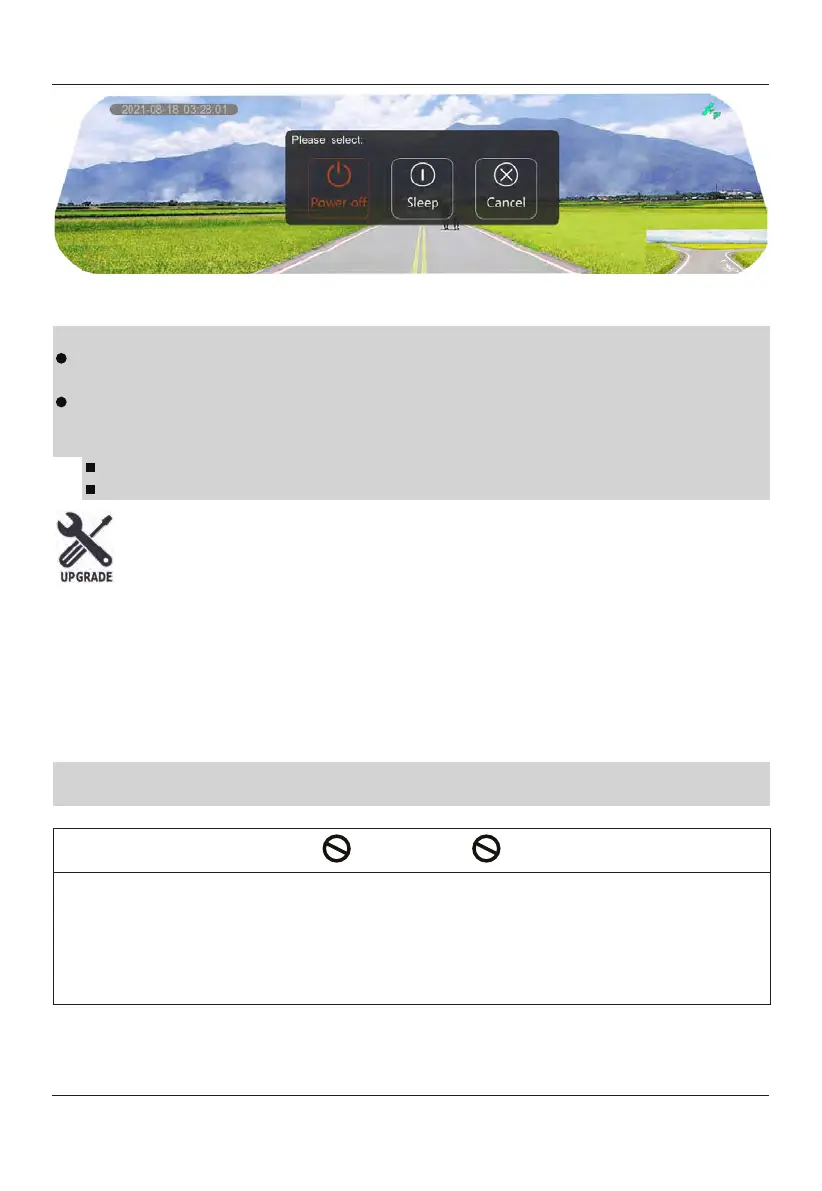
Power Off
Note:
When selecting this option, the TOMBO 360 will completely turn off and features
like parking monitoring mode will be disabled. Please choose carefully.
For vehicles in which the cigarette lighter retains power when the key is Off.
Please Power down TOMBO 360 manually by following one of the two options
below.
Press and hold
the power button to Power On/Off.
Disconnect the cigarette lighter adaptor.
Sleep
Select "Sleep" to enter parking monitoring mode. In parking monitoring mode,
the Proximity and G-sensor will enable approximately one-minute after ACC is turned
off. The G-sensor measures the movement of your vehicle through 3 axes –
up and
down, side to side, and front and back. When the G-sensor detects significant or
sudden movement (such as an impact or collision) it will record an SOS video file
recording. The external proximity sensor can detect motion within the field of view
and record an SOS video file. You can view the recorded SOS video files through the
playback function on the mirror or on the PC backup, by using the dedicated video
player.
Note:
If the G-sensor is selected "Off" in the menu, the G-sensor will remain enabled
during parking monitoring mode
for vehicle safety.
CAUTION
Please do not remove or insert the microSD card while
the product is running.
Doing so, may damage
the microSD card
and the video may not be viewable. If
you need to remove or insert the microSD
card, please be sure that the TOMBO
360 is not recording. In the event
of an accident, please remove
the microSD card
and store it
in a
proper place
to prevent the video files
from being overwritten.
You can also use the "To SSD" function to back up to an external storage device.
Cancel
When selecting
this option, the mirror will remain in normal working condition.


 To Next Page