User Interfaces
25
Note: Dash camera defaults back to original view setting (DIY installation).
Dash camera will memorize last view setting (ProKit 1 installation).
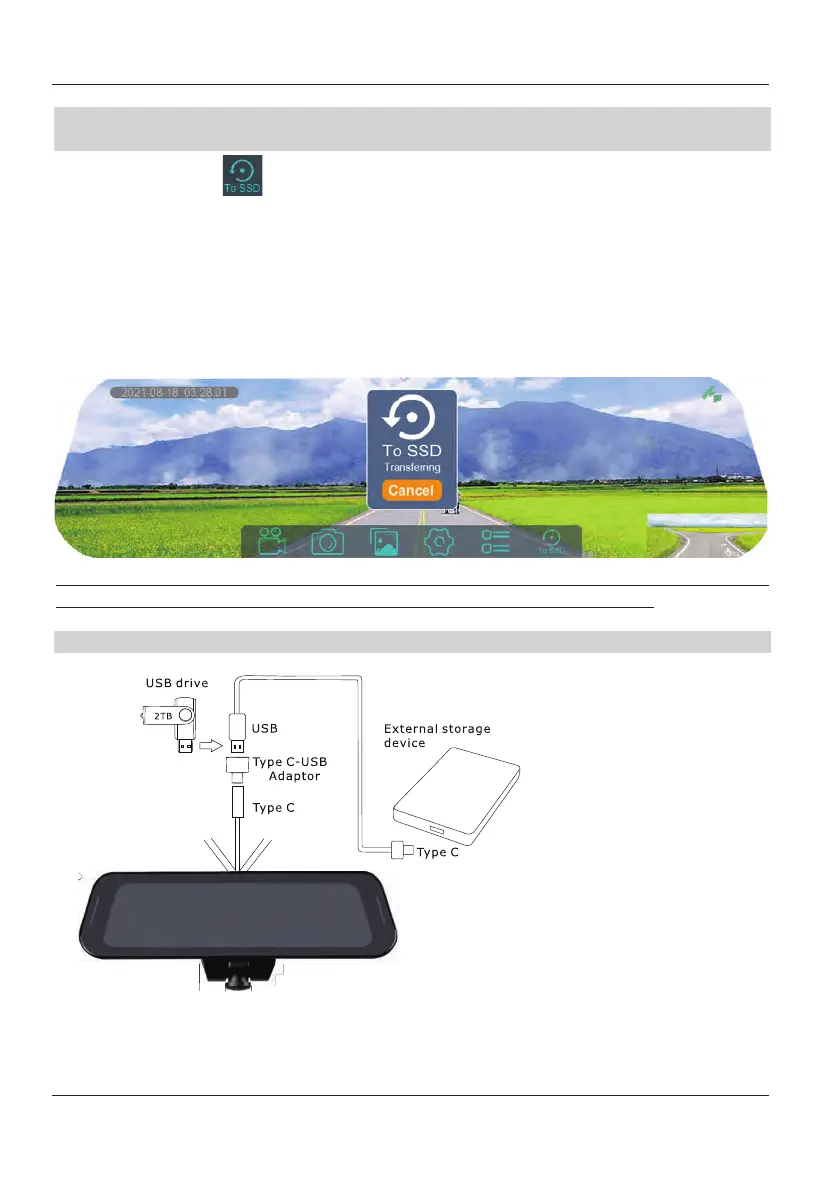
To SSD
Icon
TOMBO 360 uses loop recording for file management. When the microSD card is full,
the newly recorded video will overwrite the previously recorded videos. To prevent
files from being overwritten by loop recording. Please select the "To SSD" icon to
back up the files to an external storage device (maximum support 2T). Back up video
files to the storage device
when the ACC on. For your safety, please do not operate
this feature until your vehicle has come to a complete stop. During the backup
process, the system will prompt "Exporting files", and after the backup is completed,
it will prompt "Export completed".
When using an external storage device to store the transferred files, you must first
format the storage device using your PC in "exFAT"
file system format.
Note: While backup is in process, DVR recording is disabled.
Power Down
When turning off your ignition switch, you will be prompted to make one of the
following selections.
Please follow the diagram
on the left to connect the
Type C-USB adaptor to the
external removable hard
disk for backup. When
connecting the Type C-USB
adaptor, please allow 20
seconds for connection
initialization to the TOMBO
360 system.


 To Next Page