User Interfaces
24
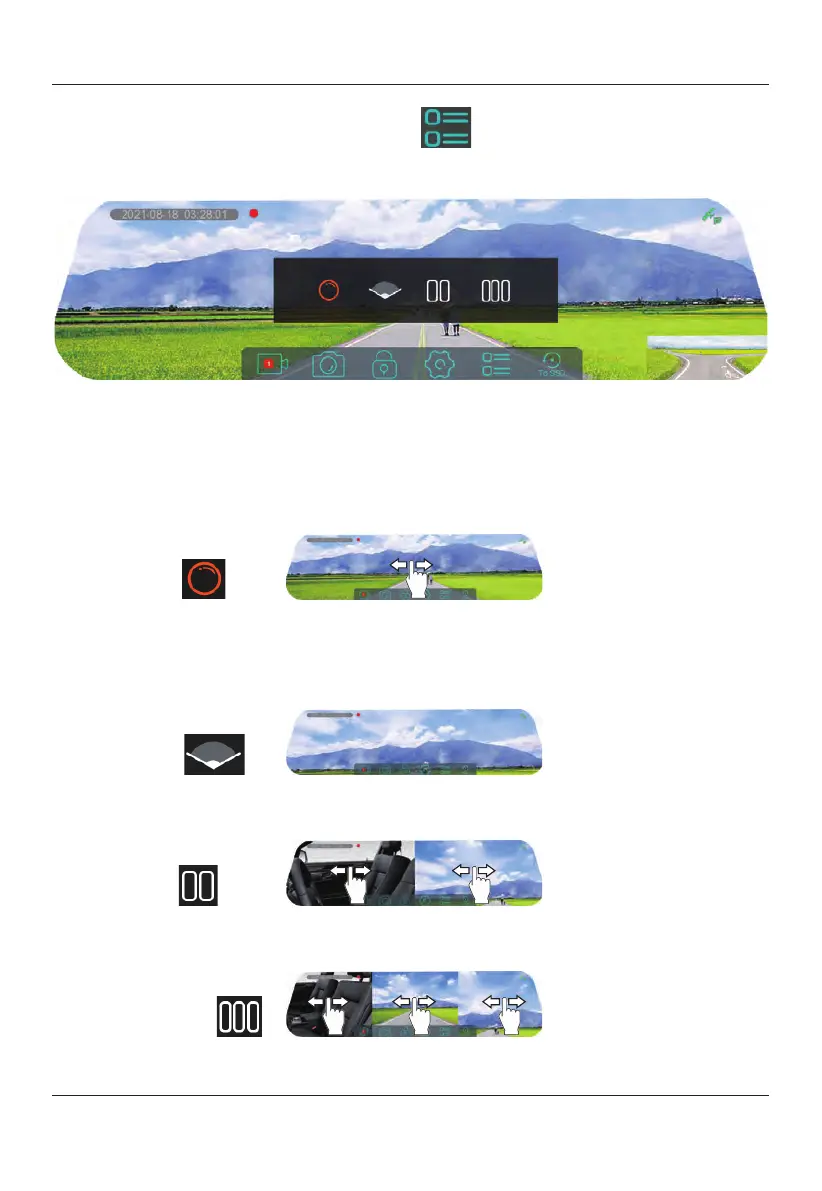
Display Mode Selection Icon
Select this
icon to view the different
display modes.
Screen Display Mode Introduction
TOMBO 360 has four
screen display modes.
With the exception of
"Wide Mode", the
camera should be
positioned downward
for the best viewing angle.
360°
Mode
360° mode is the factory default display mode, which can be changed through the
screen display mode selection icon. In this mode,
you can swipe the screen left and
right to view a 360-degree panoramic view of the inside and outside of the vehicle
and
view a particular perspective.
Wide Mode
In wide mode, the front camera should be facing forward
to give you a super wide
viewing angle.
Viewing angle adjustment is not available within this mode.
Split Mode
In split mode, you can orientate each individual screen to view a specific perspective
of the front of the vehicle and inside view of the vehicle.
Tri-split Mode
In this mode, the middle screen displays a 360-degree panoramic screen, the user
can swipe left and right on the touch screen to view a specific perspective.


 To Next Page