User Interfaces
23
Frequency----
Select display refresh rate.
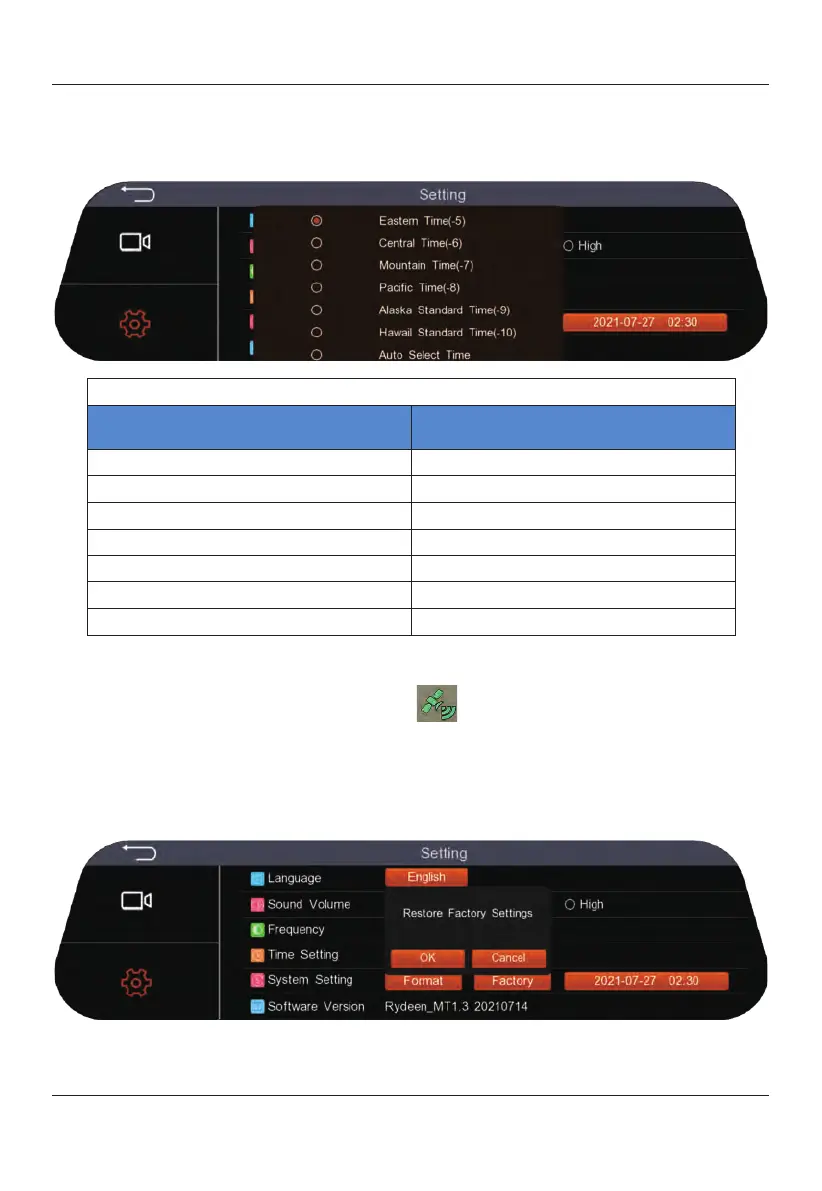
Time Setting----Time is determined by GPS positioning, including six manually
selected time zones and one automatic time zone.
When the GPS is successfully positioned, the GPS signal icon will appear in the upper
right corner of the mirror and a green icon will indicate connectivity. Otherwise,
the GPS icon will
display in red.
Press on the GPS icon to enter the GPS interface. Specific information such as latitude
and longitude will be displayed.
System Setting ----Select "Format" to delete all files in the microSD card. Select
"Factory" to
reset
all settings back to default.
Software Version----Shows current software version installed in your device.
GPS Time Zones for TOMBO 360
Time zone
abbreviations
English
ET
Eastern Time
CT
Central Time
MT
Mountain Time
PT
Pacific Time
AKST
Alaska Standard Time
HST
Hawaii Standard Time
AST
Auto Select Time


 To Next Page