User Interfaces
22
G-sensor----Select the sensitivity of the G-sensor. The higher the selection, the
higher the sensitivity of the G-sensor. Selecting "Off" will disable the G-sensor during
normal operation. In sleep mode, G-sensor will be enabled.
LED Indicator ----Turn on or off the LED indicator. In standby LED flashes. While
recording LED is off.
Rear Cam Image----Control mirrored image displayed on the backup camera.
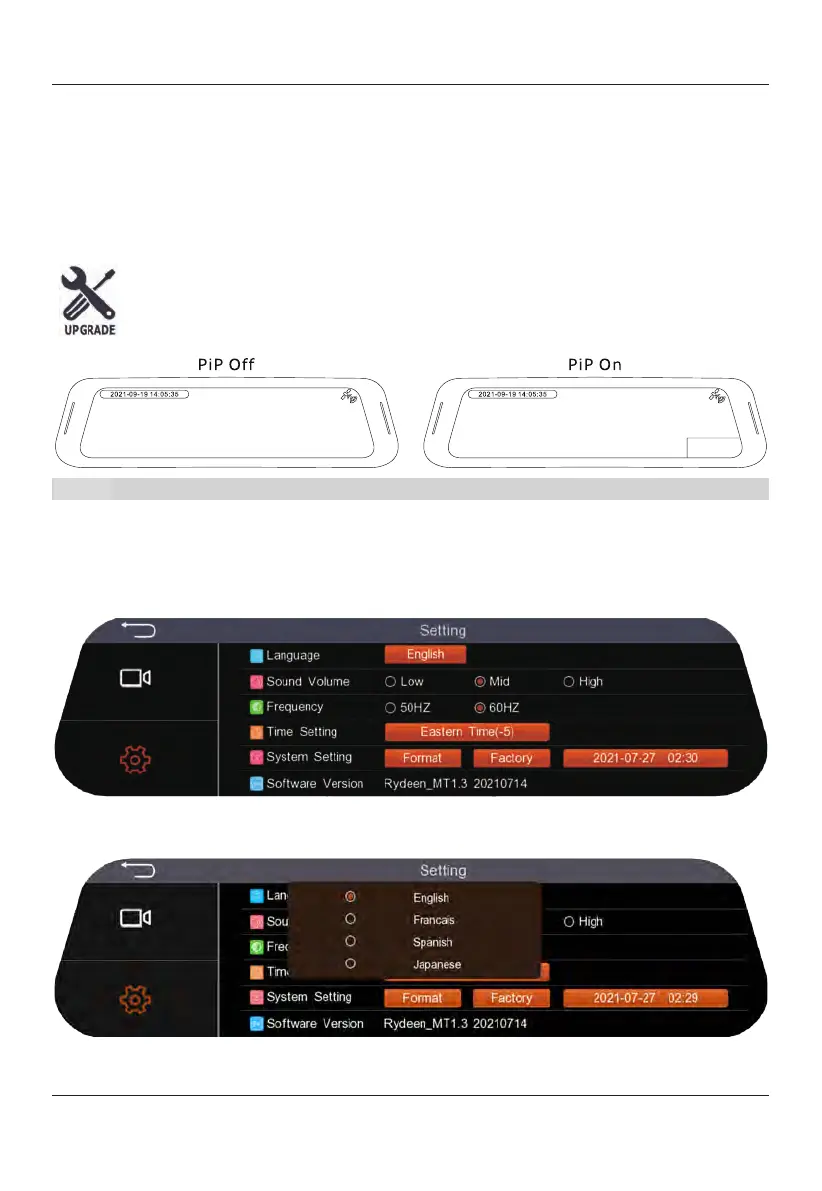
PiP On----Backup camera will display at the bottom right corner of the
display.
PiP Off----
Backup camera
view
will not be displayed in the bottom right
corner of the display.
Note: When selecting "PiP Off" option, Reverse mode is disabled.
Screen Saver----Mirror will go into sleep mode after selected time has been reached
with no usage. Selecting "Off"
will keep display on during vehicle operation.
Page 2
Language----Select the system language, there are four languages (English, French,
Spanish, and Japanese).
Sound Volume----Adjust System Volume.


 To Next Page