Dedicated player
27
6. Video Player Installation (PC Only)
TOMBO 360 uses Pre-allocating file management to provide you with a safer
experience. If you need to play the video on your PC, please check the provided
microSD card in the mirror.
There is a file named "Tombo360Setup" inside
of folder "exe", please install and run
the software on your PC.
Note:
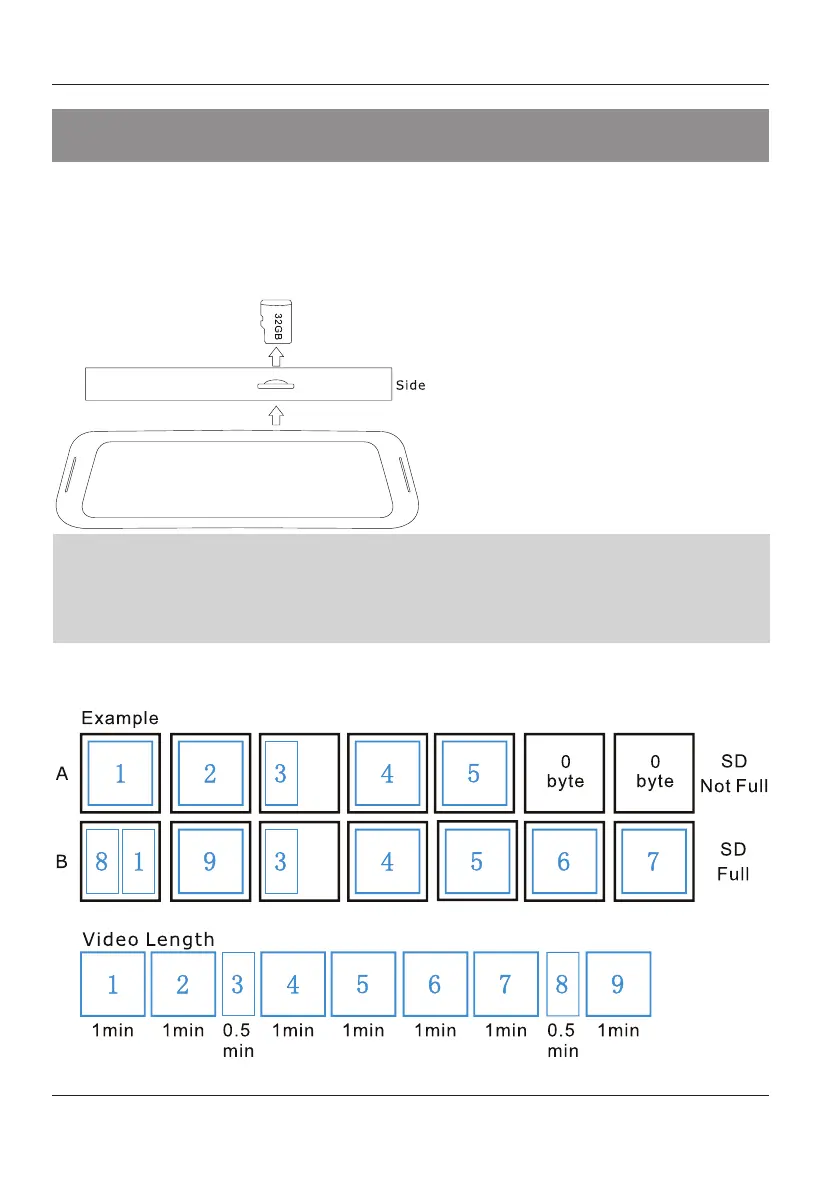
TOMBO 360 uses Pre-allocating memory for file management. The system will
generate 0-byte
files in the folder during initialization. When recording videos are
generated, the recording videos will occupy the 0-byte files one by one. Please use
the provided video player in the microSD card to playback the recorded videos, if you
want to view
the videos
on a
PC.
Pre-allocating
File Management
Instructions
Follow the diagram on the left
and use
provided screw driver to remove the
microSD card.
MicroSD Slot


 To Next Page