Dedicated player
28
As shown in the example above, the blue squares represent
the recorded video files
and the black
squares represent the pre-allocated storage space. Assuming that the
microSD
card has only 7 pre-allocated storage spaces
and the duration of video "3"
and video "8" is half a minute and the other videos are 1 minute.
Case A,
when the microSD card is not full, video "1", video "2", video "3", video "4",
video "5" will be stored in the pre-allocated storage spaces in sequence. The
remaining pre-allocated storage space will show 0-byte files.
Case B, when the microSD card is full. Since
the storage device only has 7
the pre-
allocated storage spaces, video "8" will occupy a portion of video "1" and video "9"
will completely overwrite video "2".
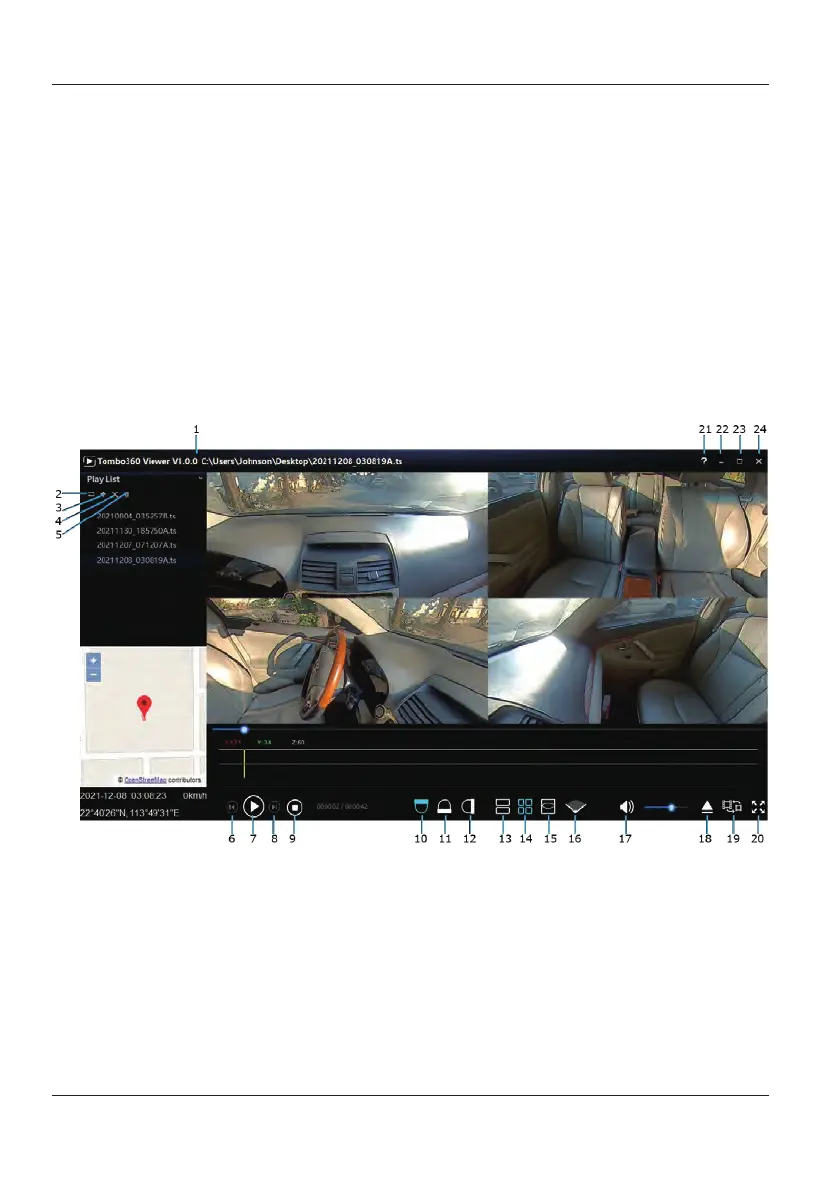
Tombo360 Video Player Instructions
Tombo360
Viewer
Menu
1) Version Check: Click on the software version number to update to the latest
version available. Over the Air (OTA) update support only available when a
2)
Play Mode: Play mode switch. In selection gives three choices (Sequence,
Random,
Repeat).
3)
Add: Add videos to list.
4)
Del: Delete a single video.
5)
Clear: Clear video file list.
6)
Prev:
Play previous video.
7)
Pause/Play: Pause/play video.
8)
Nex:
Play next video.
computer is connected with online access.



 To Next Page