I Speed set I indication panel!
c
X100
R.P.H.
e[ill]
I Unit selection panel I
UNIT
Chapter 2 Names
and
Functions
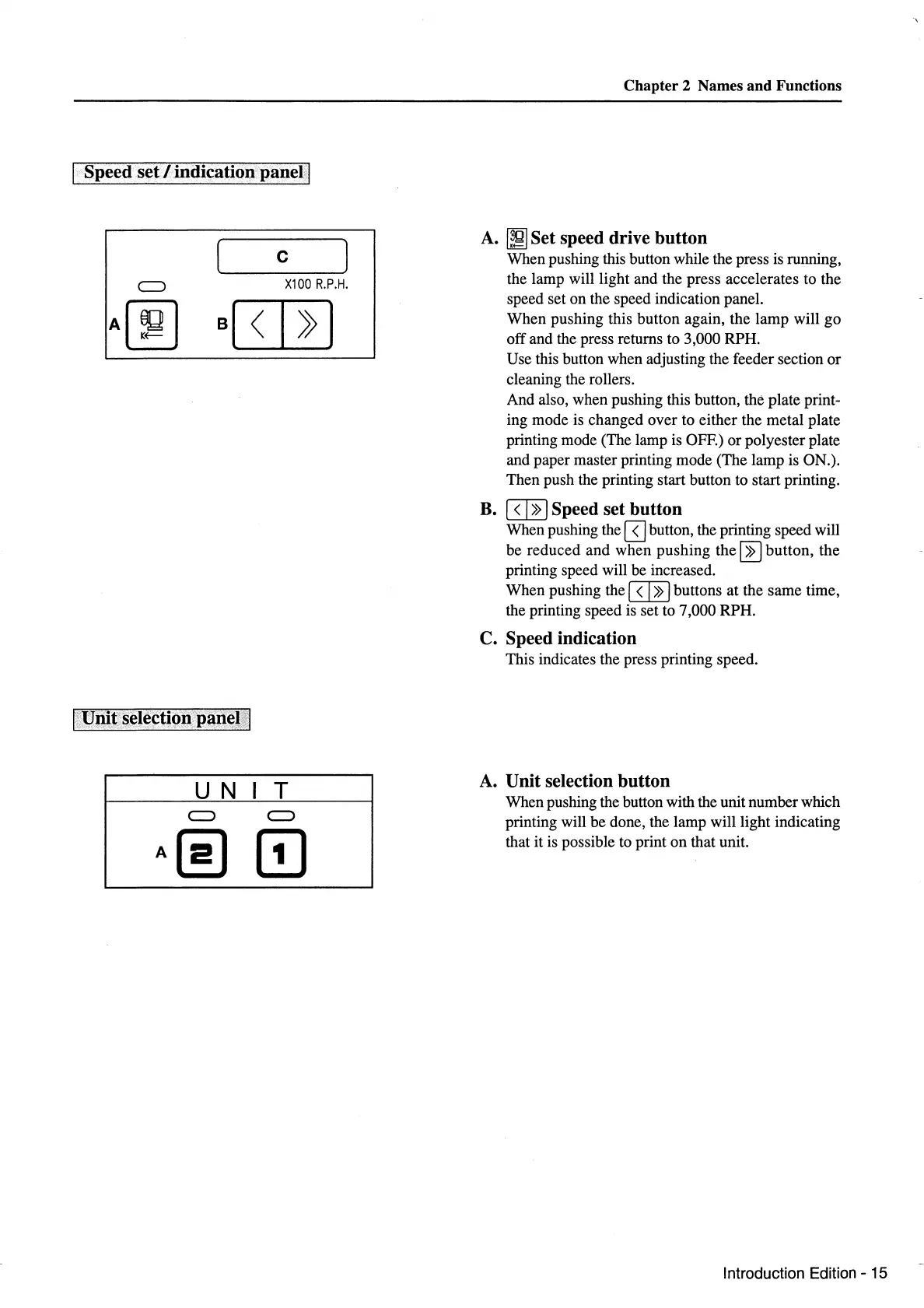
A.
~Set
speed drive button
When pushing this button while the press is running,
the lamp will light and the press accelerates to the
speed set on the speed indication panel.
When pushing this button again, the lamp will go
off and the press returns to 3,000 RPH.
Use this button when adjusting the feeder section
or
cleaning the rollers.
And also, when pushing this button, the plate print-
ing mode is changed over to either the metal plate
printing mode (The lamp is OFF.) or polyester plate
and paper master printing mode (The lamp is ON.).
Then push the printing start button to start printing.
B.
8JE Speed set button
When pushing the
8J
button, the printing speed will
be reduced and when pushing
the~
button, the
printing speed will be increased.
When pushing the 8JE buttons at the same time,
the printing speed is set to 7,000 RPH.
C. Speed indication
This indicates the press printing speed.
A.
Unit selection button
When pushing the button with the unit number which
printing will
be
done, the lamp will light indicating
that it is possible to print
on
that unit.
Introduction Edition-
15



 To Next Page