Remote Control
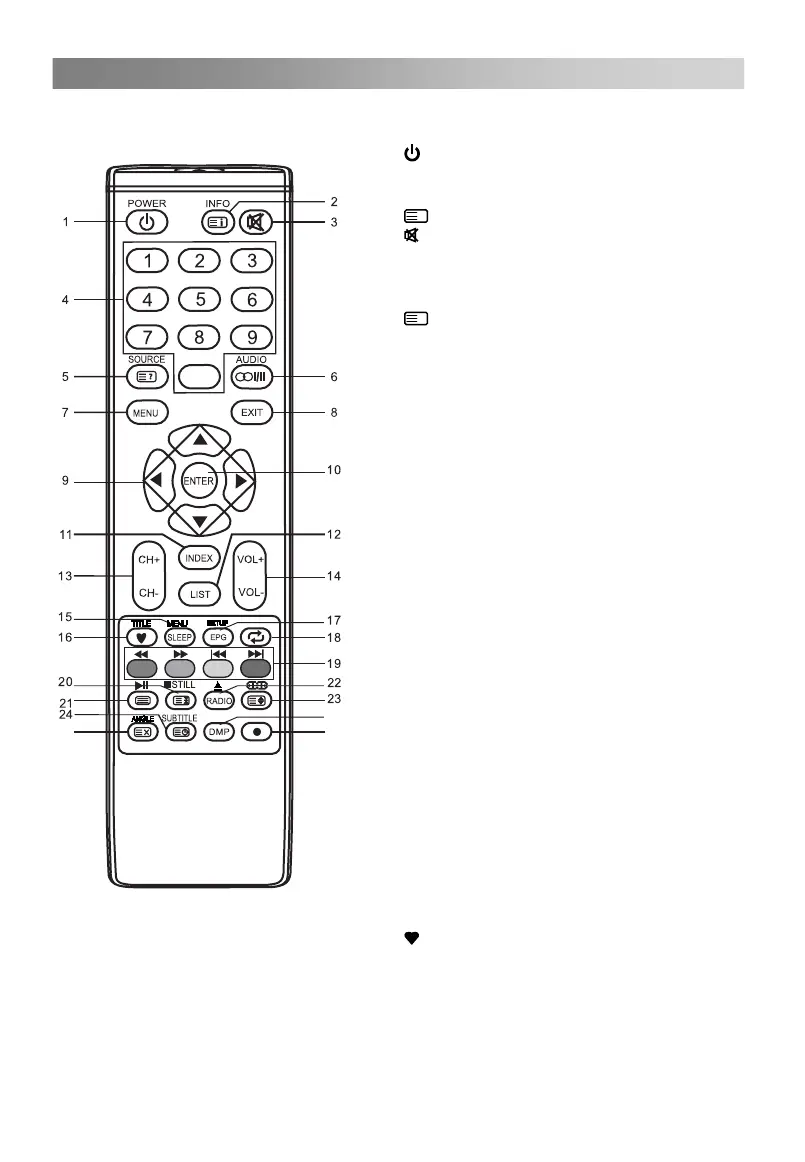
The buttons of the original remote control are as following:
1.
: Power, switch on or off TV set.
2. INFO: Press to display the current
program information on the screen.
i
: Go to the index page.
3.
: Press to mute or restore sound.
4. NUMBER BUTTONS: Choose channels
or password importation.
5. SOURCE: Press to select signal source.
?
: Reveal the hidden information of
some teletext pages.
6. AUDIO (
∞
I/II): The button can be used
DTV mode.
7. MENU: Press to enter the menu screen
for various optional adjustable settings.
8. EXIT:Exit OSD Menu.
9. ▲/▼/◄/►: To select the direction.
10. ENTER: Press to execute the selected
item in the menu screen or enter the
desired value in any input mode.
11. INDEX: Press to enter the Recorded list.
(In DTV mode)
12. LIST: Press to call up the channel list.
Press again to exit it.
13. CH+/CH-: Press to select channels in
ascending or descending order.
14. VOL+/VOL-: Press to adjust the volume
level up or down.
15. SLEEP: Press to set the sleep timer.
When the preset length of time has
passed, the TV set enters standby
mode.
16.
: Switch on/off the favorite programs
list.
17. EPG: Electronic Program Guide, use in
the DTV mode.
Ⅰ
NICAM DUAL , NICAM DUAL ,
Ⅱ
Ⅰ+Ⅱ
MONO and switch Audio
language in
to switch between NICAM DUAL ,
0
25
26
27
REPEAT: Repeat display the selected title/
chapter (in DVD mode).
MENU: Press to display the disc menu
(in DVD mode).
TITLE: Press to display the title content
(in DVD mode).
SETUP: Press to display the DVD menu
(in DVD mode).
REPEAT



 To Next Page