Menu Operation
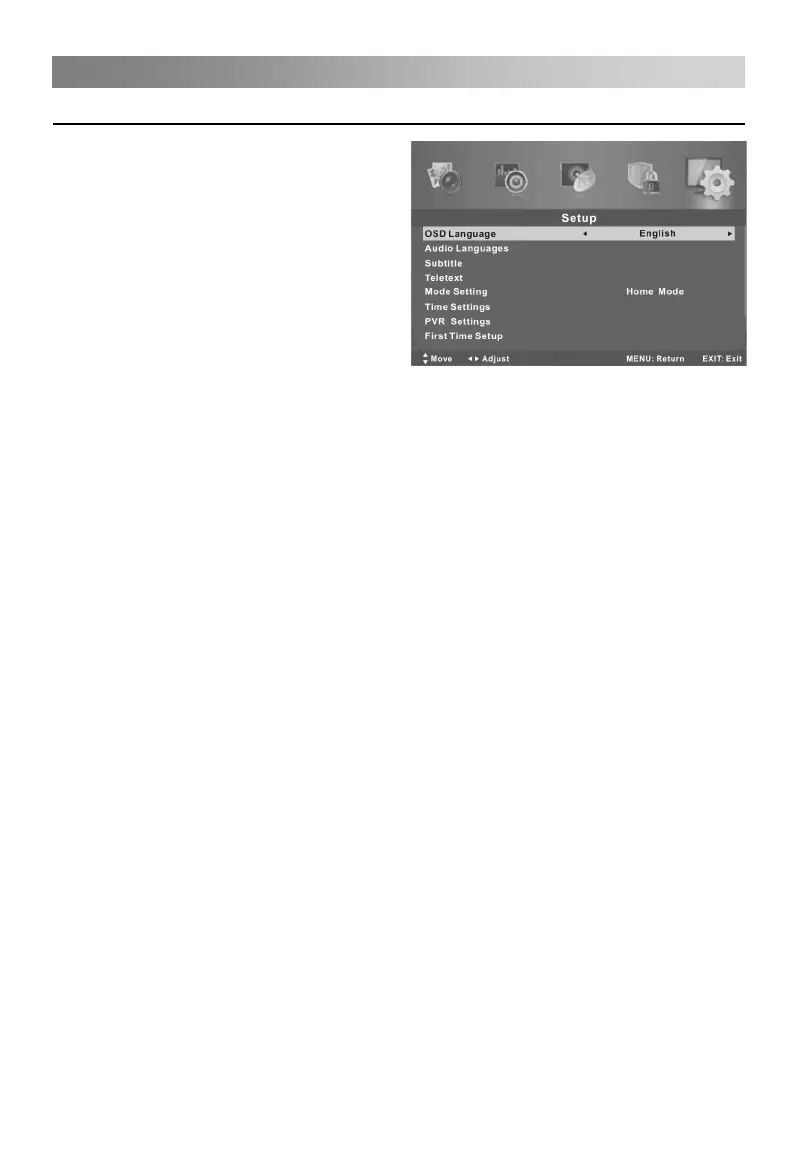
Configuring the Setup Menu
• OSD Language
Select your preferred On Screen
Display language.
• Audio Languages (In DTV mode)
Select your preferred audio language.
(Available for digital channels if multiple
audio languages are broadcasted.)
Press the▲/▼button to select Audio
Languages, then press ENTER button
to enter sub-menu.
Press the arrow button to select the
Audio Primary Language and Audio
Secondary Language.
• Subtitle (In DTV mode)
Press the▲/▼button to select Subtitle, then press ENTER button to enter sub-menu.
Press the▲/▼button to select Mode, then press◄/►button to select On or Off.
Press the arrow button to select the Subtitle Primary Language and Subtitle
Secondary Language.
Press the▲/▼button to select Hearing Impaired, then press◄/►button to select On
or Off.
• Teletext
Adjust Teletext settings. Only available under DTV and ATV source.
Press the▲/▼button to select Teletext, then press ENTER button to enter sub-menu.
Under DTV source, press◄/►button to select Digital Teletext Language.
Under ATV source, press◄/►button to select Decoding Page Language.
• Mode Setting
Press◄/►button to select Store mode or Home Mode.
• Time Settings
Press the▲/▼button to select Time Settings, then press ENTER button to enter
sub-menu.
OSD Time: Select On-Screen Menu displaying time.
Sleep Timer: Select the time to turn the TV to standby mode automatically.
Auto Sleep: Select the Auto Sleep time you want.
Time Zone: Select your time zone.
Time: Press the▲/▼button to select Time, then press ENTER button to enter
sub-menu. Set Auto Sync to Off, then you can set the time manually.
Note: In the case of loss of power, the clock setting will be lost.



 To Next Page