English
42
8
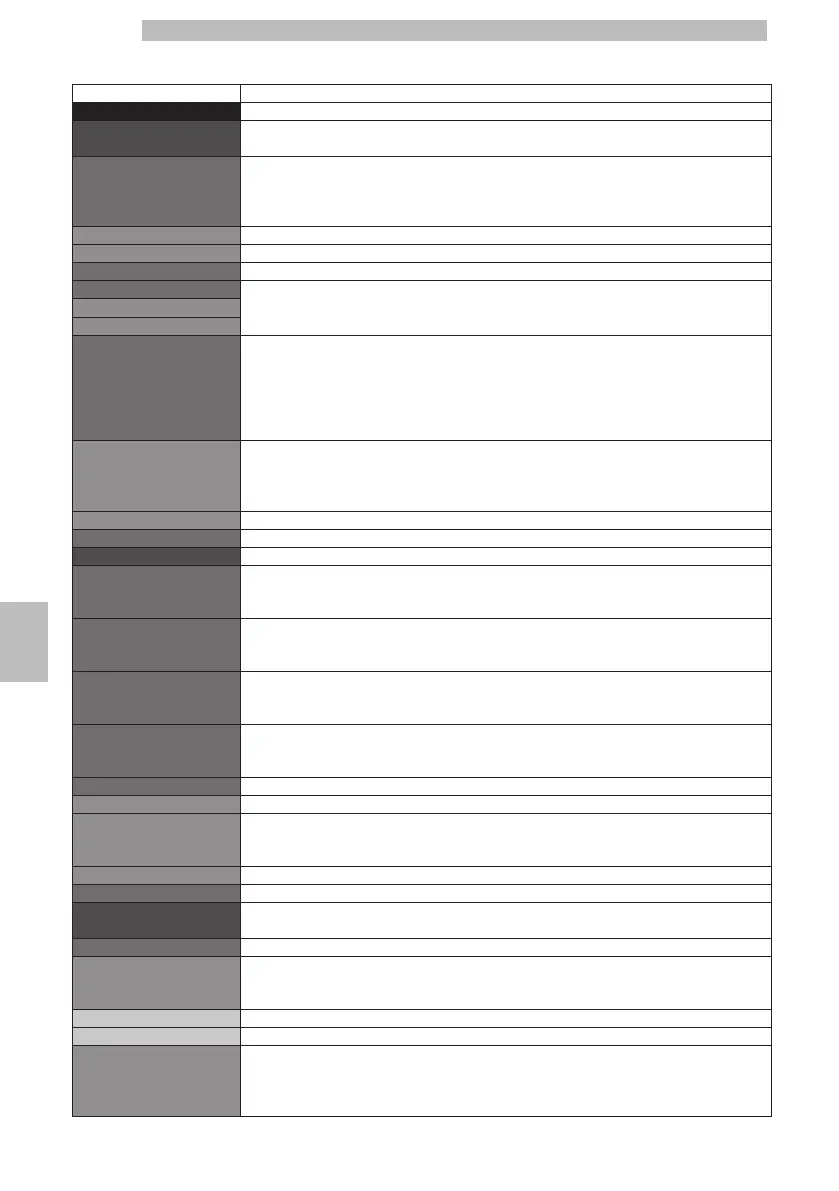
8.3.3Description of Messages in the Technical Menu
8
MENU ITEMDescription
SettingsThis menu allows you to access all machine configuration parameters
Credits MenuThis menu allows you to activate the use of virtual credits, load them onto the machine,
reset them and enable the display of the "Ready for use" screen
ENABLE CREDITSThis function, if enabled, allows coffee brewing only if virtual credits have been loaded onto
the machine.
Instead, the "Hot Water" and "Manual Milk" beverages can always be dispensed.
The setting that is currently active is highlighted by a pink background.
OffThis setting disables the virtual credits checking system
OnThis setting enables the virtual credits checking system
Add CreditsThis function allows you to load virtual credits onto the machine
Reset CreditsThis function allows you to reset all virtual credits on the machine
yes
no
SHOW CREDITSThis function, if enabled, displays the number of available credits in the left bottom corner
of the "Ready for use" main screen.
The setting that is currently active is highlighted by a pink background.
NOTE:
If the "ENABLE CREDITS" setting is on "OFF", the menu will not display the "SHOW
CREDITS" option and will automatically set it to "OFF"
OffTo disable credit display.
NOTE:
If the virtual credits are less than 30, the machine will in any case show the residual value
on the "Ready for use" screen
OnTo enable credit display
ExitThis option allows the user to go back to the menu top level
BEVERAGE SETTINGSThis menu allows you to access the products' dose adjustment function.
EspressoAn Espresso will be brewed once the length of the beverage has been saved
CoffeeA Coffee will be brewed once the length of the beverage has been saved
RISTRETTORistretto will be brewed once the length of the beverage has been saved
HOT WATERHot water will be dispensed once the length of the beverage has been saved
AMERICAN COFFEEYou access the American coffee configuration submenu
BEVERAGE LENGTHIt allows you to set the total beverage length (values from 325 to 735)
WATER QUANTITYIt allows you to set the water percentage to be dispensed according to the total dose.
The currently active setting is inside a dotted rectangular box (LOW 30% / MED 50% /
HIGH 70%)
ExitThis option allows the user to go back to the menu top level
ExitThis option allows the user to go back to the menu top level
Machine MenuThis menu manages general machine operation and maintenance parameters.
General MenuTo change the machine operating settings.
ToneThis function allows you to activate/deactivate the sound when you press a button on the
keypad.
The setting that is currently active is highlighted by a pink background.
OffTo deactivate the acoustic alarms.
OnTo activate the acoustic alarms.
EcomodeThis function controls the temperature management in the coffee boiler when the machine
is in the "ready for use" mode.
The function is set by default to «OFF».
The setting that is currently active is highlighted by a pink background.







 To Next Page