English
43
8
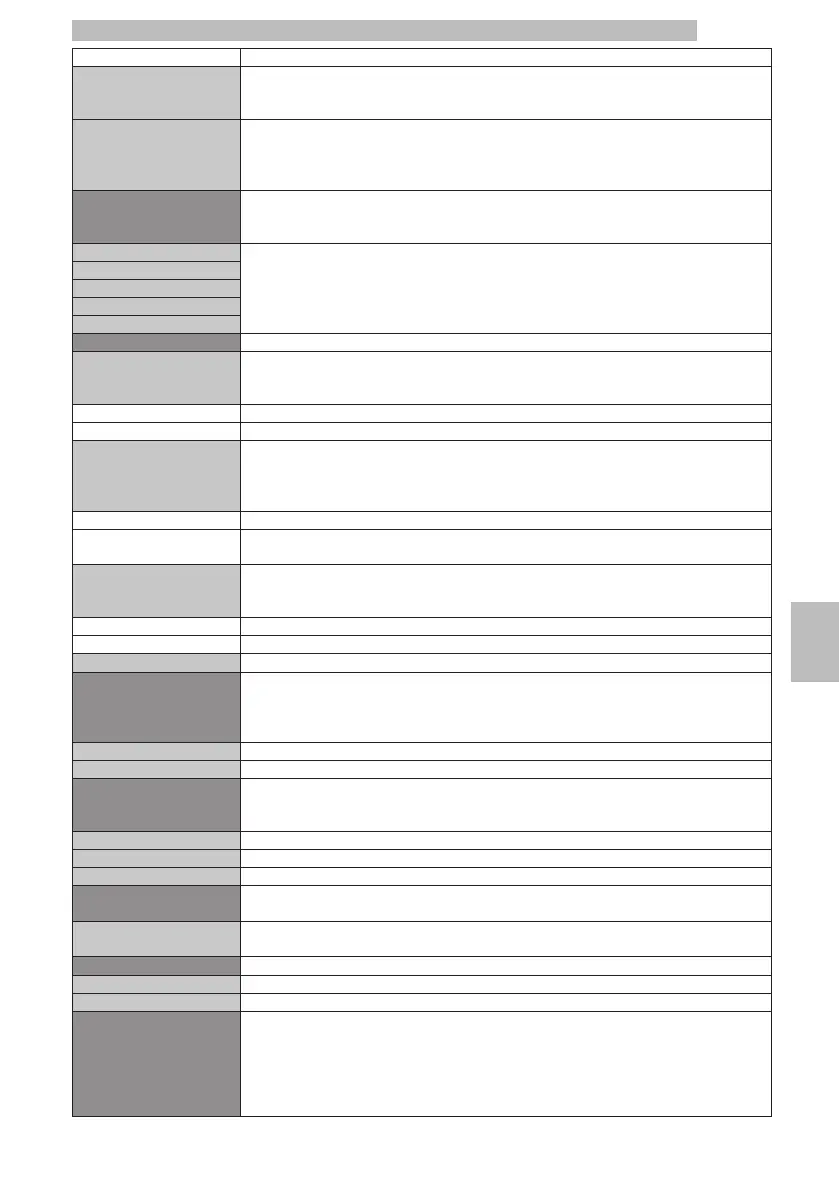
MENU ITEMDescription
OffThis way, the coffee boiler is always kept at the brewing temperature. This results in higher
energy consumption because the machine is always ready for use.
OnThis way, the coffee boiler, when in off position, is kept at a lower temperature than the
one needed to brew a beverage. The machine saves energy but takes longer to start
brewing a beverage. By default, this settings is disabled by the appliance factory settings.
Stand-by SettingsTo set the time interval for the machine to go into stand-by mode after the last brewing.
The default time value is «after 30 minutes».
The setting that is currently active is highlighted by a pink background.
15 minutesThe machine moves to stand-by mode after the set time. To reactivate the machine, press
any button. After performing the function diagnostics and the warm-up phase, the machine
is again ready for use. When the parameter is set to "OFF", the machine is always active.
30 minutes
60 minutes
180 minutes
Off
ALARMSIt allows you to activate and deactivate some alarms.
Coffee grounds drawer full
alarm
This function allows you to enable/disable the dregs alarms, i.e. the warning on the drawer
with the already brewed coffee pods being full and its need to be emptied.
The setting that is currently active is highlighted by a pink background.
Offalarm disabled
Onalarm enabled
DescalingThis function enables/disables the warning (no blocking) on the need to descale the
machine hydraulic circuit. This alert is displayed by a special icon on the "Ready for use"
screen (see page 57).
The setting that is currently active is highlighted by a pink background.
OffWith this setting, the warning message is disabled.
OnBy doing so, the warning message is enabled; the message will be displayed whenever the
machine requires a descaling cycle.
CAPP. QUICKThis function allows you to enable/disable the "Cappuccinatore Washing" alarm, which is
the warning for the Cappuccinatore quick clean.
OffWith this setting, the warning message is disabled.
OnBy doing so, the warning message is enabled.
ExitThis option allows the user to go back to the menu top level
PRE-GRINDINGThis function enables/disables the pre-grinding prior the next coffee dose. This way, upon
selecting the beverage, the user will already have the coffee powder ready for brewing and
will save the grinding time.
The setting that is currently active is highlighted by a pink background.
OffWith this setting, the pre-grinding function is disabled.
OnWith this setting, the pre-grinding function is enabled;
Pre-brewingThis function adjusts the break time between pod pre-brewing and its actual dispensing.
The setting that is currently active is highlighted by a pink background.
OffIt disables pre-brewing
LowIt activates a short break between pre-brewing and dispensing (2 sec)
HighIt activates a long break between pre-brewing and dispensing (4 sec)
TemperatureThis function allows you to adjust any increase/decrease in the coffee temperature inside
the cups
Range from -5 to +5It allows to lower or increase the temperature of the product on a range between -5 and
+5.
Product buttonIt sets up the Ristretto button
RISTRETTOIt sets up the Ristretto button for the Ristretto product brewing
Espresso x2It sets up the Ristretto button for the Doppio Espresso product brewing
USER PWThis function allows you to set or disable the password to access the User menu.
NOTE:
Enter the value '0000' as password to disable the password.
If you forget the PASSWORD, you must start a reset procedure. Please contact Saeco
(Evoca group) customer service.







 To Next Page