English
75
11
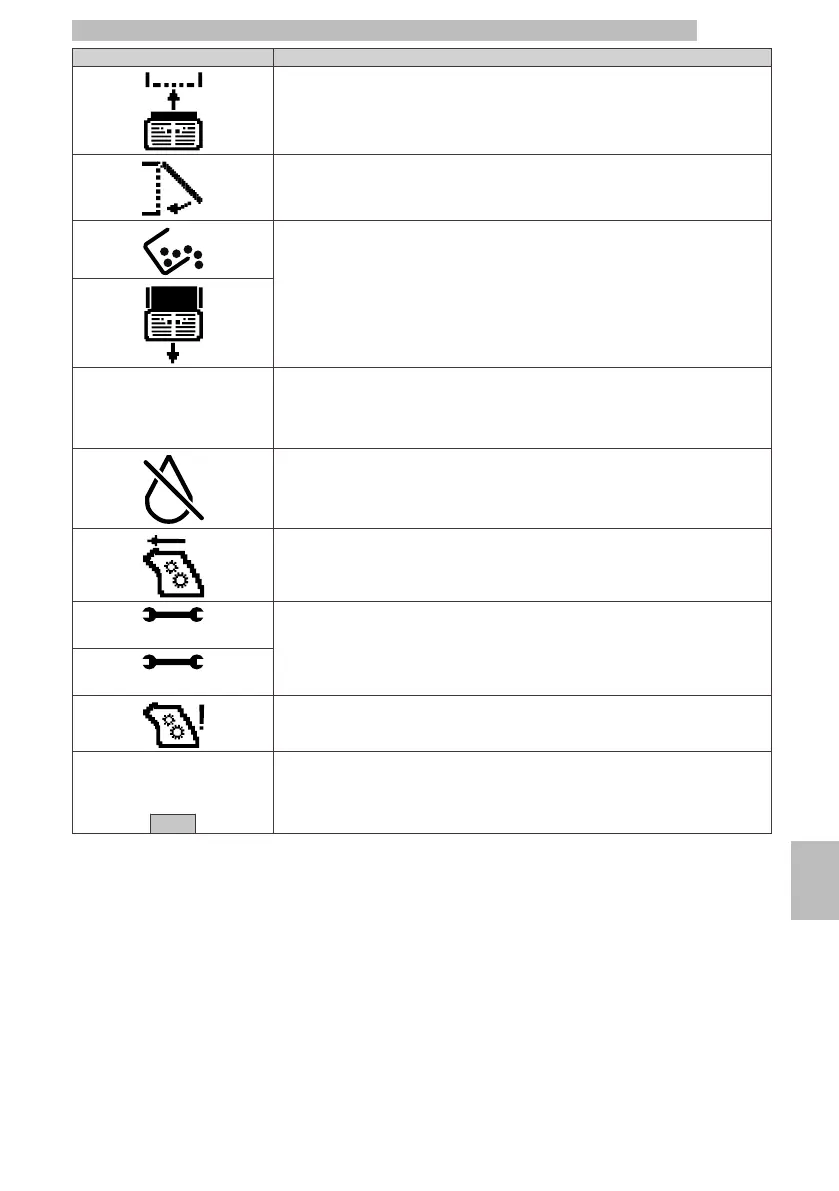
Warning SignalsHow to reset the message
Insert the drip tray and the coffee grounds drawer in the machine.
To make the machine ready, slightly pull the drip tray and the coffee grounds drawer
out, close the service door and place the drip tray and the coffee grounds drawer
back in.
Empty the coffee grounds drawer.
Fill the coffee bean hopper with coffee beans and select one product.
ADD BEANS
AND SELECT A BEVERAGE
Fill the water tank.
Insert the brew group into its seat.
Turn off the machine.
Turn it back on after 30 seconds.
Try this 2 or 3 times.
If this signal appears again, contact the service provider and provide the code shown
in the display.
RESTART MACHINE
Exx
It is an alarm managed by the machine.
The machine will perform a cycle of attempts to enter its ready-to-use status.
If this is not possible, the machine will signal the error type.
The Bluetooth module is no longer working correctly.
Press the "OK" key to exit the error and be able to use the machine with the
product keys.
BLUETOOTH ERROR
Exit
11







 To Next Page