14 VG5 Installation & Quick-Start Manual
Removing and Replacing the Front Cover
B Claws
A Claws
Front Cover
Digital Operator
2
1
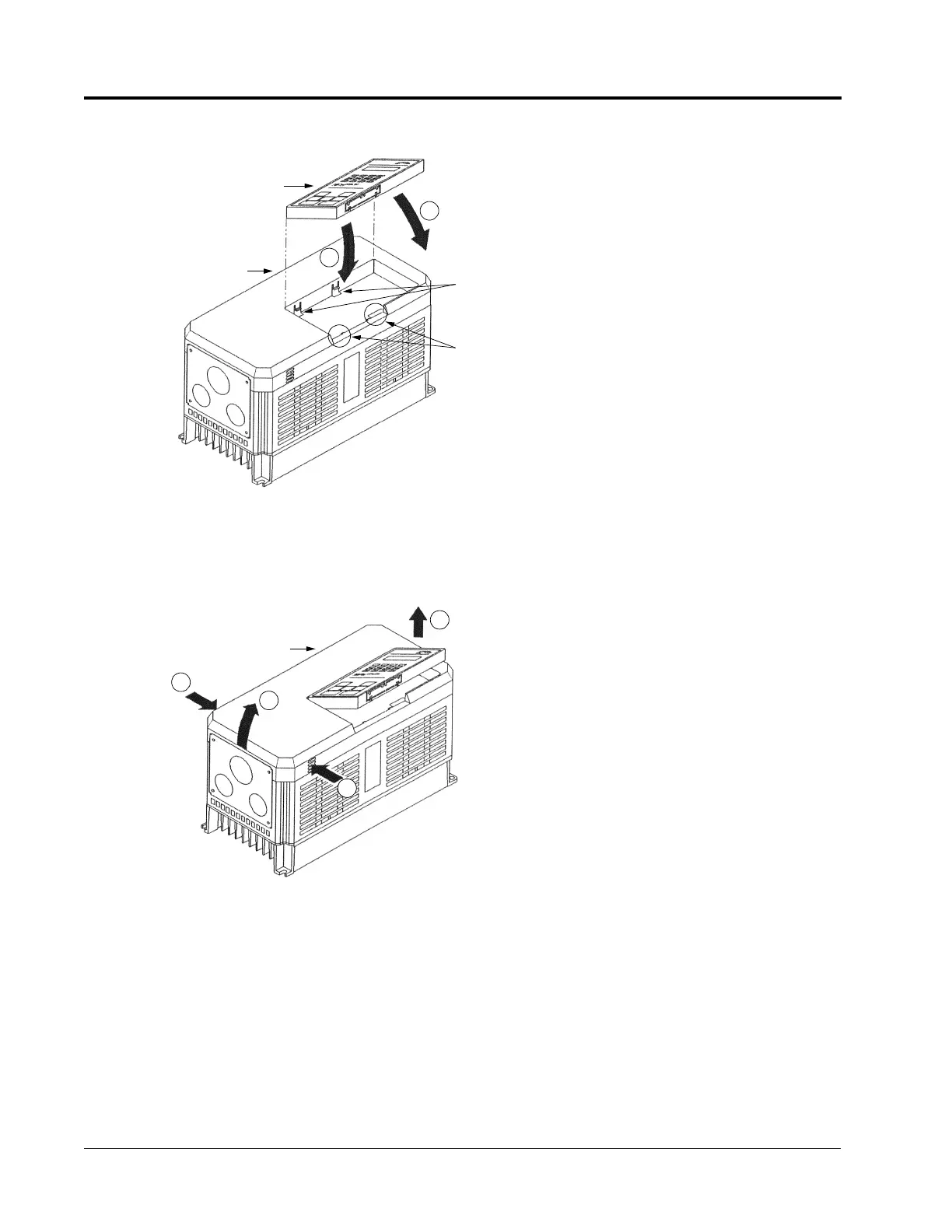
Figure 5 Replacing the Digital Operator
To replace the digital operator,
engage the operator onto the A
tabs in the direction shown by
arrow 1 and then press the
operator onto the B tabs in the
direction shown by arrow 2,
locking the digital operator into
place.
Figure 6 Removing and Replacing the Front Cover
1
2
3
Front Cover
2
To remove the front cover, first
remove the digital operator (see
previous section). Then
squeeze the cover on both sides
in the direction shown by
arrows 2 and lift the cover in
the direction shown by arrow 3.
Chapter 1 - Receiving & Installation
Mounting
Artisan Technology Group - Quality Instrumentation ... Guaranteed | (888) 88-SOURCE | www.artisantg.com



 To Next Page