TUTORIAL: Setting the Alarm
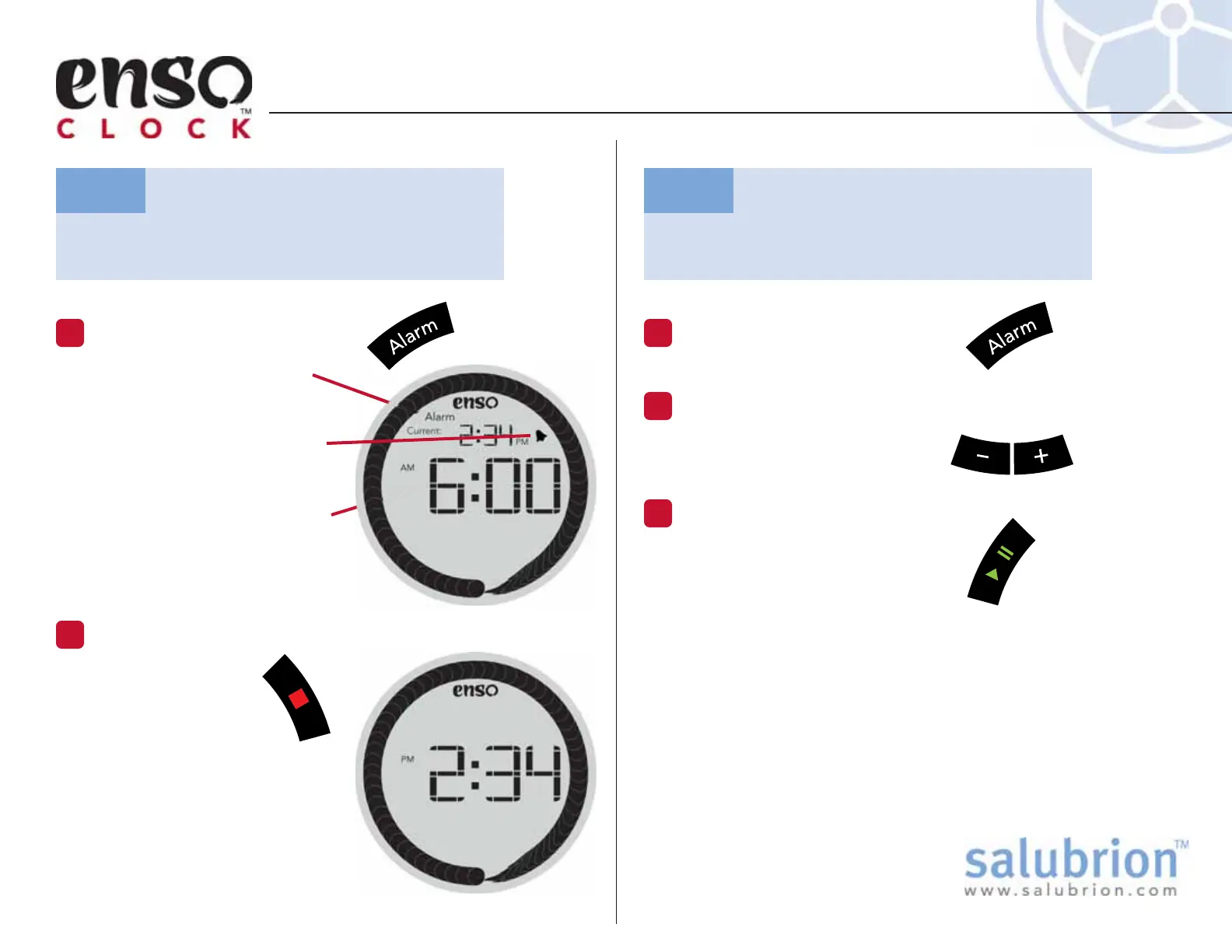
Press the Alarm Button
1
The Alarm screen icon is
visible when the clock is in
Alarm Set mode.
Since the Alarm is currently
set to trigger at 6:00 am, the
small bell icon is visible.
The Alarm time is displayed
in the large digits in the
center of the display.
Cancel the Alarm
2
Press the red Stop
button to cancel
the set alarm.
Note that the small
bell icon is not longer visible,
indicating that the alarm is no
longer set.
After a few minutes of inactivity, the clock will automatically
exit the Alarm setting mode and return to the clock display.
TG-EC-100-1.1
Cancel the alarm, which has already been
set to trigger at 6:00 am.
Task:
Update the time of a previously set
alarm.
Task:
Press the Alarm Button
1
Adjust the Alarm Time
2
Use the + and – buttons to
adjust the alarm time.
Set the Alarm
3
Press the green Play/Pause
button to set the Alarm.
When the alarm is set, both the
alarm time and small bell icon
are visible at the top of the
screen when the clock is visible.


 To Next Page