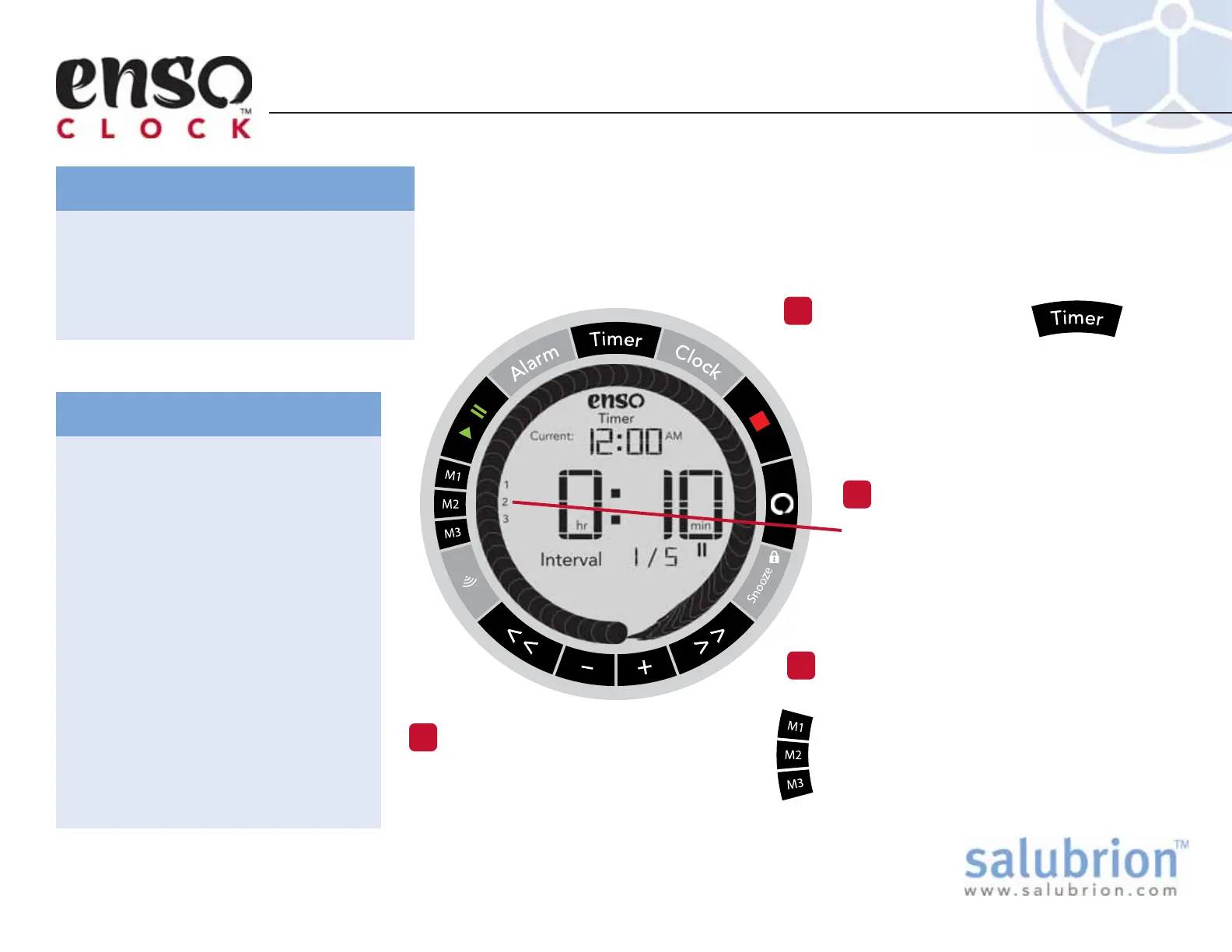
When a Snapshot is stored in a
particular memory location (M1,
M2, or M3) a small numerical icon
for the memory location (1, 2, or 3)
is visible on the screen.
Hold down the button of a memory
location to store a Snapshot of the
Master Timer in that location. A single
beep will confirm that the Snapshot has
been saved. The small numerical icon for
the memory location will become visible.
Press the Timer button.
Set the timer. (See section “Setting the
Timer” for more information)
The timer is displayed in the center of
the display. This is the Master Timer.
Setting the Timer Memories
Set the Timer
1
EX-EC-100-1.1
There is only one active timer in the
Enso Clock and it is called the Master
Timer. The Master Timer is visible in
the center of the display when the
Timer button is pressed.
What is the Master Timer?
The memory locations work by
taking Snapshots of the Master
Timer.
A Snapshot that is stored in a
memory location cannot be
changed or modified in any way.
Snapshots in memory can only be
recalled or deleted.
Recalling a Snapshot from a
memory location copies the
Snapshot over the Master Timer,
which is displayed on the screen.
After a Snapshot has been deleted
from a memory location a new
Snapshot can be saved in the
memory location.
What is a Snapshot?
The Enso Clock is capable of storing three different timing sequences,
or Timers, into memory for quick recall. The three memory locations
are M1, M2, and M3. Each memory location can store a Snapshot of
the Master Timer, including all of its Intervals (sub-timers).
Check Memory Status
2
Save Snapshot to Memory
3
Hold down the button of a memory
location to erase the Snapshot that
is stored at that location. A double
beep will confirm deletion.
Clear a Memory Location
4


 To Next Page