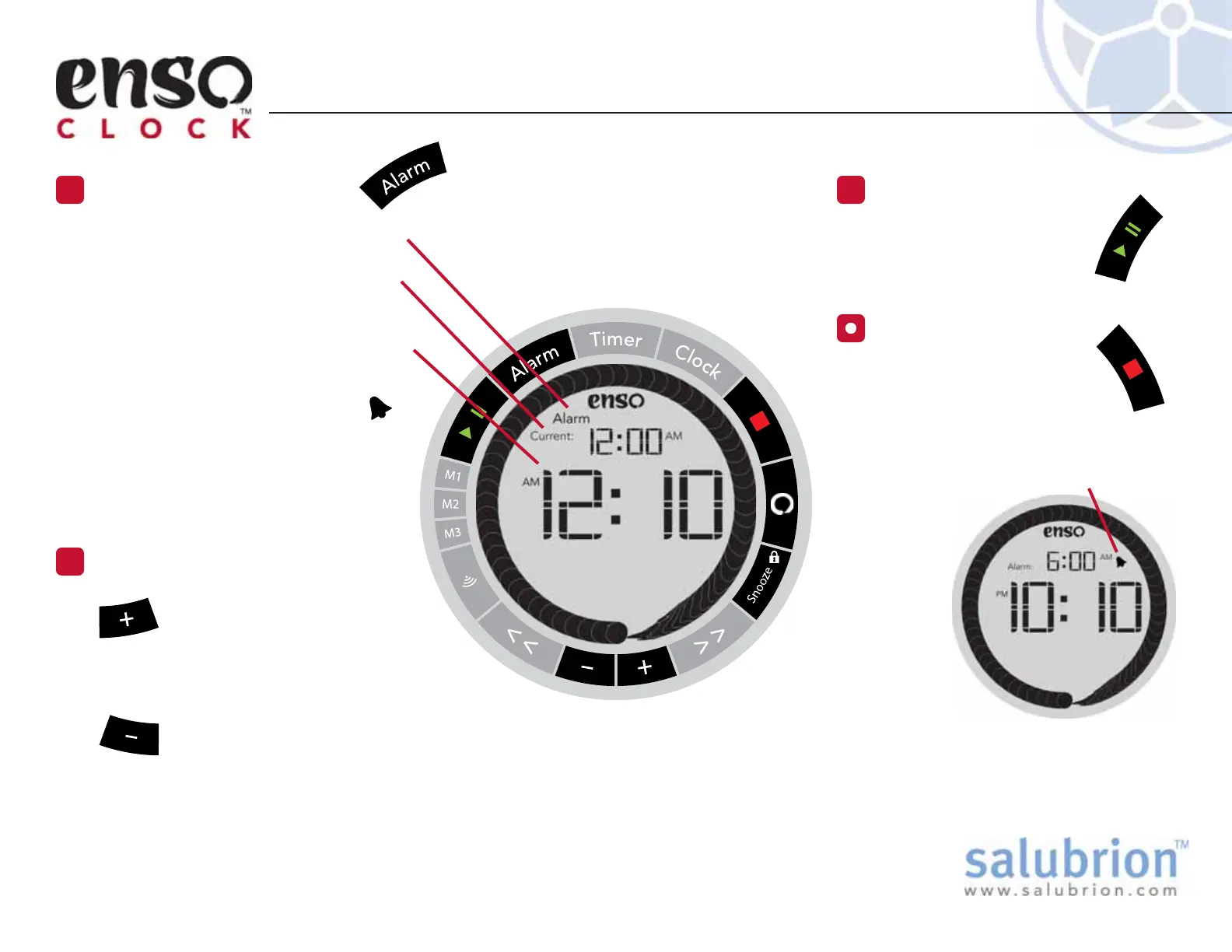
When the alarm is set, a small bell
icon will be displayed to the right of
the small time
display at the
top of the
screen.
Use the + button to
increment the alarm time.
Holding down the + button
will accelerate the rate at which time is
incremented.
Use the – button to decrement the
alarm time. Holding down the – button will
accelerate the rate at which time is decremented.
The Alarm screen icon is visible when
the clock is in Alarm Set mode.
The current time is displayed in the
small digits at the top of the display.
The Alarm time is displayed in the large
digits in the center of the display.
When the alarm is set a small bell icon
will be displayed to the right of
the small time display.
In newer versions of the clock, the
large digits in the center of the
screen will flash.
Setting the Alarm
Press the Alarm Button
1
Adjust the Alarm
2
Note: There is no separate mode for the setting of hours or minutes,
specifically. You use the + and – buttons to adjust the alarm time as a
whole. For example, once the minute count reaches 59, pressing the +
button will cause the hour to increment and return the minute count to 00.
Set the Alarm
3
Press the green Play/Pause
button to set or update
the alarm.
Cancel the Alarm
Press the red Stop button
to cancel a set alarm.
After a few minutes of inactivity, the clock
will automatically exit the Alarm setting
mode and return to the clock display.
EX-EC-100-1.1
e
e


 To Next Page