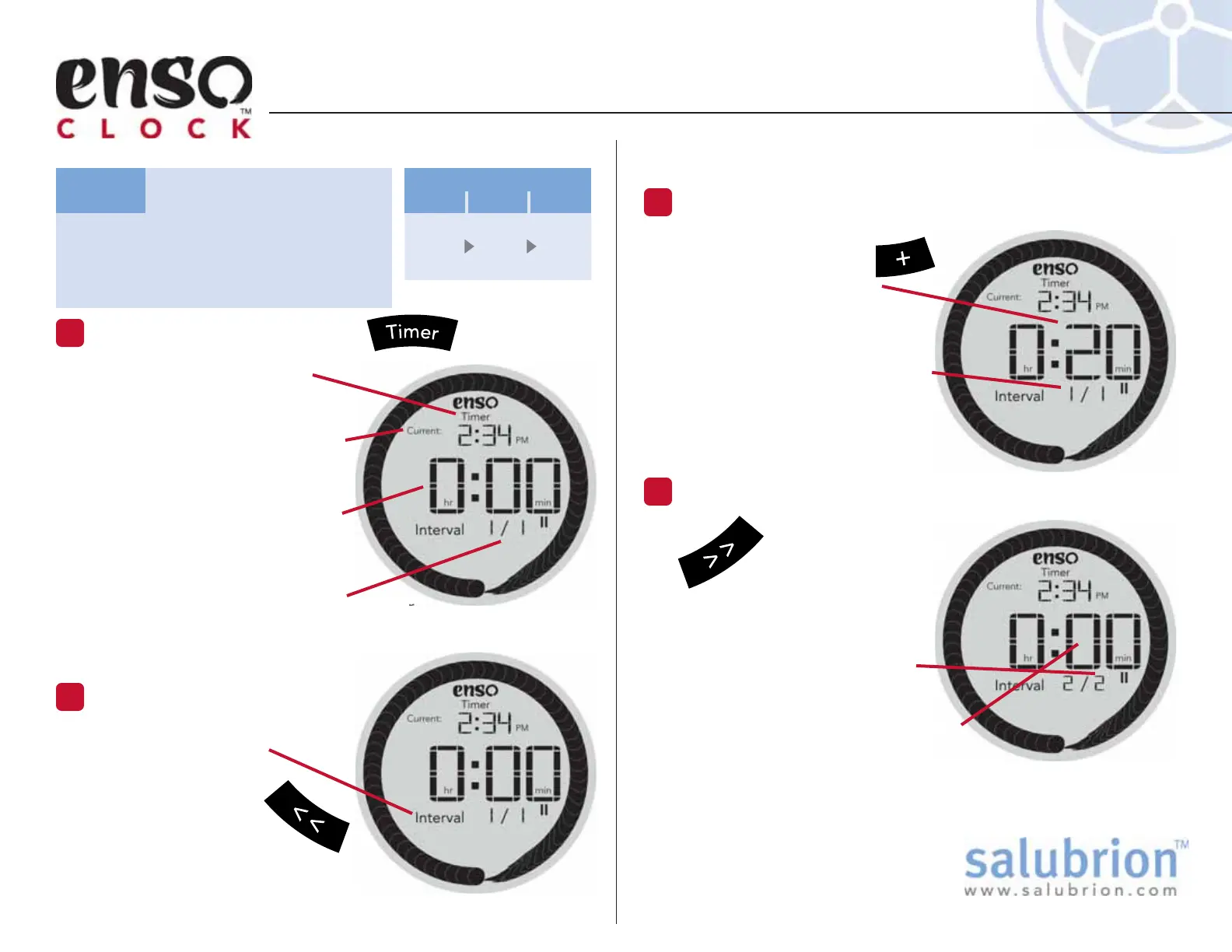
Hold down the >>
button for more than
a second to insert
Interval 2.
A beep will confirm that a
new Interval has been added.
Note that there are now 2
total Intervals.
The duration of Interval 2 is now
displayed in the large digits
(0 minutes since no time has been
added yet to this new Interval)
Use the + button to
increment the Interval
1 to 20 min. Holding
down the + button will
accelerate the rate at which
time is added.
As shown by the display time
is being added to Interval 1/1
(Interval 1 of 1 total Intervals).
The Timer screen icon is visible
when the clock is in Timer Set
mode.
The current time is displayed
in the small digits at the top
of the display.
The large digits in the center
of the display show the
number of hours and minutes
for the current interval.
The Interval display shows the number
of the current Interval as well as the total
number of Intervals in the timer.
TUTORIAL: Setting the Timer
Press the Timer Button
1
Check the Intervals
2
Make sure the display
reads “Interval 1/1”.
If not, repeatedly
hold down the <<
button to delete
extra intervals.
TG-EC-100-1.1
Set the following timing
sequence: 20 min, 15 min, 10
min. (3 total Intervals)
Task:
Adjust the Duration of Interval 1.
3
Add a New Interval
4
n
w
20
min
15
min
10
min
Interval
123


 To Next Page