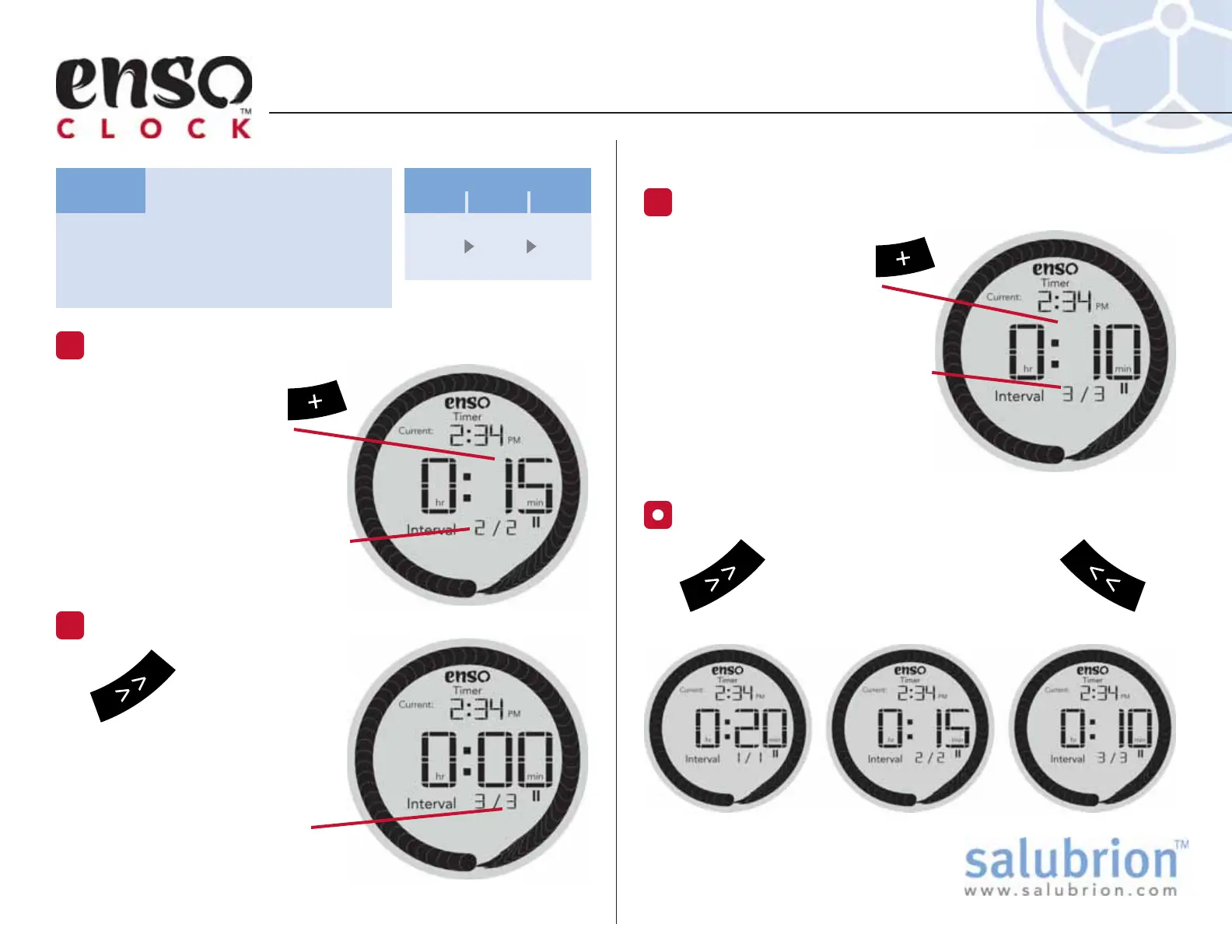
Use the + button to
increment the Interval
1 to 10 min. Holding
down the + button will
accelerate the rate at which
time is added.
As shown by the display time
is being added to Interval 3/3
(Interval 3 of 3 total Intervals).
TUTORIAL: Setting the Timer
TG-EC-100-1.1
Set the following timing
sequence: 20 min, 15 min, 10
min. (3 total Intervals)
Task:
Adjust the Duration of Interval 3.
7
20
min
15
min
10
min
Interval
123
(continued)
Use the + button to
increment the Interval
2 to 15 min. Holding
down the + button will
accelerate the rate at which
time is added.
As shown by the display time
is being added to Interval 2/2
(Interval 2 of 2 total Intervals).
Adjust the Duration of Interval 2.
5
Hold down the >>
button for more than
a second to insert
Interval 3.
A beep will confirm that a
new Interval has been added.
Note that there are now 3
total Intervals.
Add a New Interval
6
n
Momentarily press the << or >>
button to cycle through all of the
Intervals in the timer. The Interval
number and duration will update on-screen.
Review the Intervals in Timer


 To Next Page