MODE
MODE
+Hr
+Hr
SELECT SET
<
<
MODE
MODE
+Hr
+Hr
SELECT SET
<
<
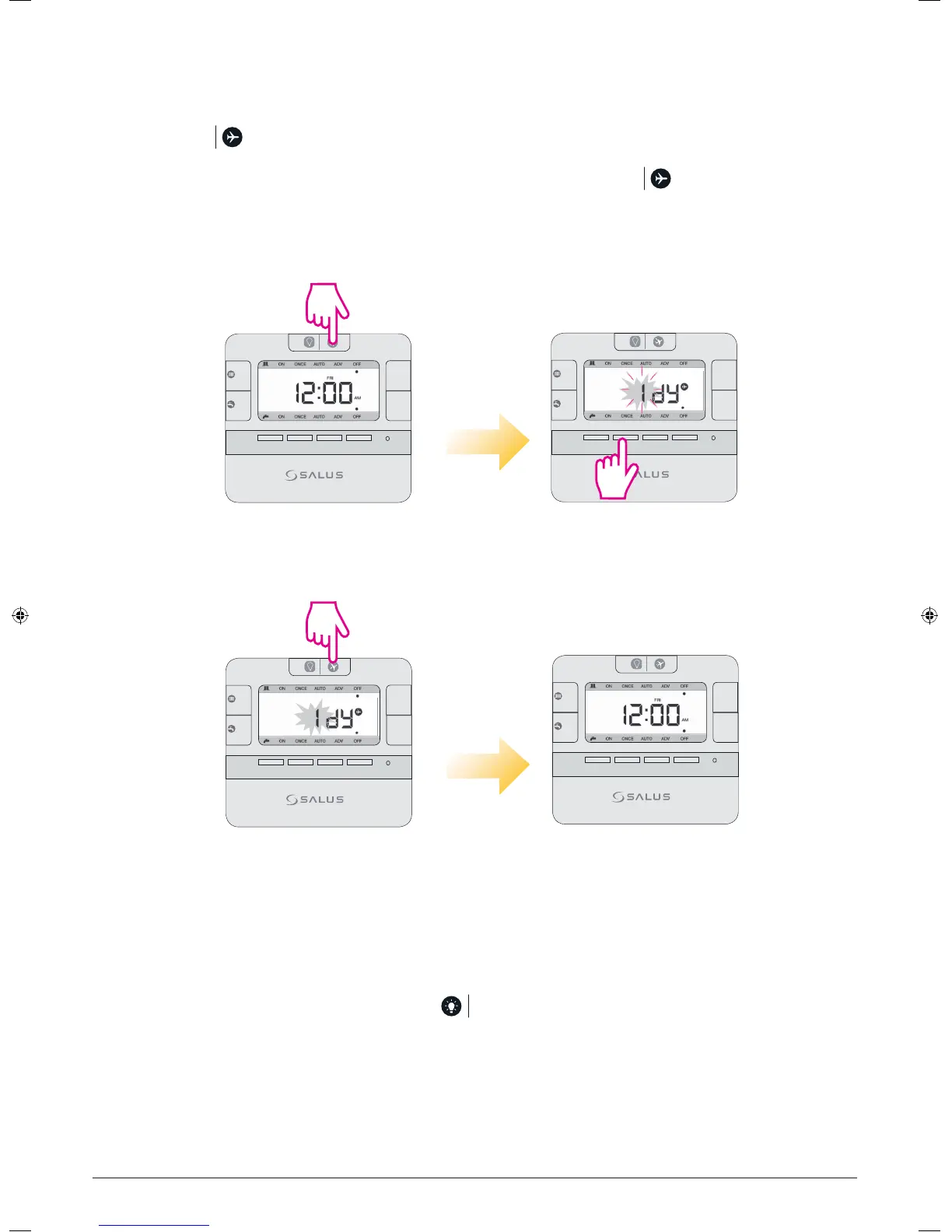
Holiday Override
During the period of holiday override, relay should be always Off.
Press and hold at current mode for 3 seconds to activate the Holiday Override setting mode.
The plane icon will be displayed on the LCD and the user’s only option will be to set the number of holiday
days (up to 31). To exit Holiday Override and turn On the relay, long press the key.
Press Up/Down keys
to select days.
Enter Holiday Mode
Exit Holiday Mode
Press for 3 seconds.
Press for 3 seconds. Controller in current mode.
LCD Backlight
If AC is powered, LCD backlight is activated when or any key is pressed. The backlight will be turned off in
15 seconds after all keys are released.
3 sec
MODE
MODE
+Hr
+Hr
SELECT SET
<
<
MODE
MODE
+Hr
+Hr
SELECT SET
<
<
3 sec
20 EP210 Installation Manual



 To Next Page