5. OPERATION
The controller has
TOUCH&PLAY system that
facilitates its operation by the
knob with a button.
To switch the controller on
press and keep the knob
depressed for three seconds.
When on the controller
automatically starts controlling the collector
pump. Pump operation is described in section 7
about working algorithm.
When the controller is starting it runs a
test. Detailed test description is in section 9.1.
The collector pump operation is indicated
by illumination of the indicator icon under the
pump icon. When the indicator is lit – the collector
pump is working, when the indicator is not lit, it
means that the pump is not working.
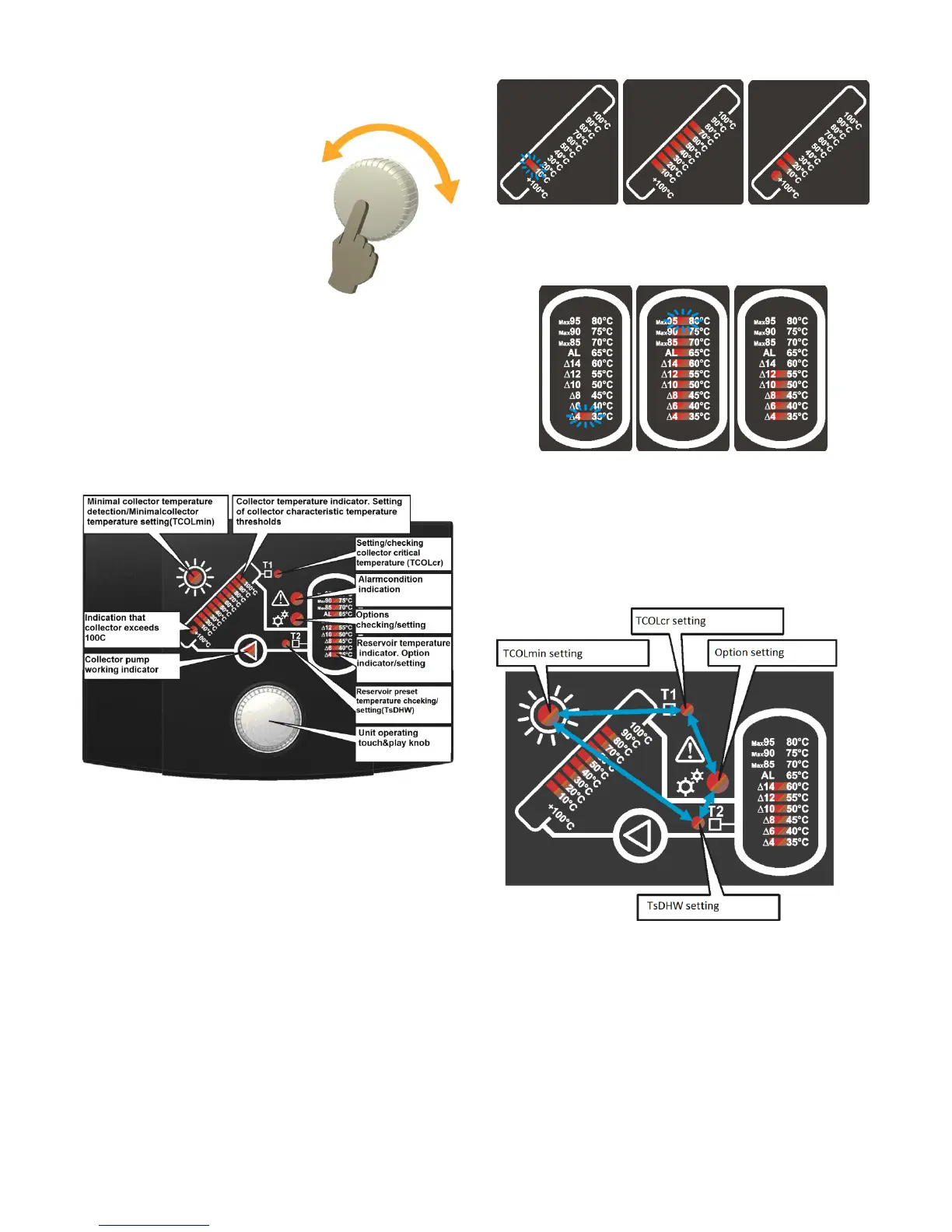
Fig. 5.1 Controller screen
5.1. Temperature display
Measured temperatures from both connected
sensors are presented on PCSol 150 linear display
indicators.
Number of lit segments increases along with the
temperature rise. Measured temperature is shown
with the step of 10°C for T1 sensor (collector’s
temperature) and 5°C for T2 sensor (DHW
reservoir temperature). Subsequent segments of
the indicator indicate respective temperatures
reached in the sensor. Examples of the
temperature display is presented in Fig. 5.3, Fig.
5.4
a) b) c)
Fig. 5.2 Collector temperature display.
a) collector temperature below 10°C
b) collector temperature 70°C
c) collector temperature 120°C
a) b) c) .
Fig. 5.3 Reservoir temperature display.
a) reservoir temperature below 35°C
b) reservoir temperature above 85°C
c) reservoir temperature 55°C
5.2. Screen navigation
Screen position selection for edit is done
by knob turning. Cursor position in selection mode
is indicated by slow blinking of the indicator.
Fig. 5.4 Screen navigation.
Press the knob to start editing selected value. The
indicator will blink fast.
To remove blinking cursor from the screen (in
selection mode), keep the knob depressed for at
least 3 seconds or leave the controller untouched
for 10 seconds.



 To Next Page