16
SINGLE FINGER MODE
SINGLE FINGER Mode fingering makes it simple to produce beautifully orchestrated
accompaniment using major , seventh , minor and minor-seventh chords by pressing a minimum
number of keys in the Auto Accompaniment section of the keyboard.
There are two different Single Finger mode available in the instrument:
- Chord System 1 – This is the default system
- Chord System 2.
These two types refer to the most common Single Finger systems used in the portable keyboards. To
select the desired Single Finger Type see the [FUNCTION] button paragraph.
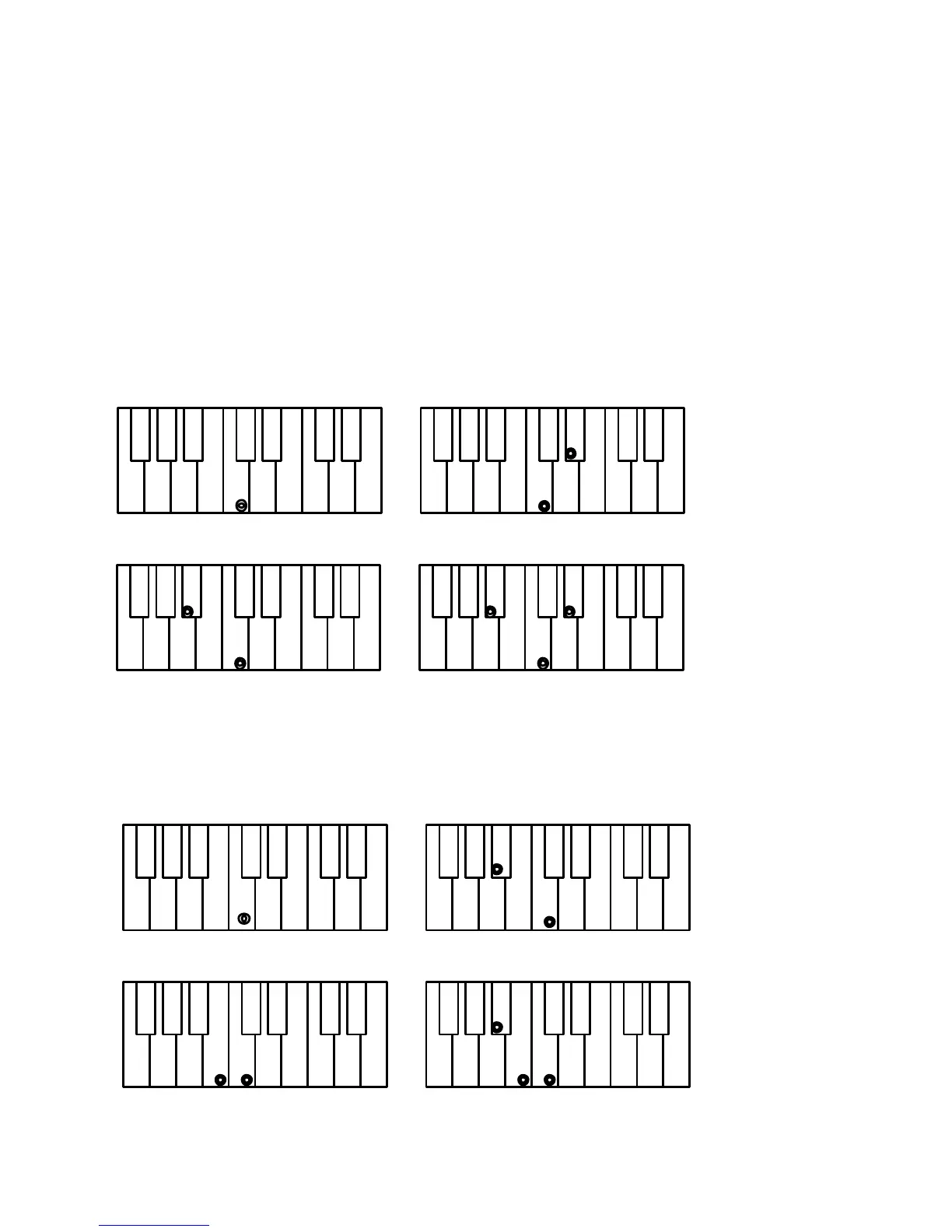
ChordSys 1 C Major Press the key C.
C minor Press the key C + the 3rd key to the right
C Seventh Press the key C + the 2nd key to the left
C minor 7th Press the key C + the 3rd key to the right + 2nd key to the left
?
C chord - press C key C minor - press C + 3rd key to right
C 7th - press C + 2nd key to left C m 7th - press C + 2nd key to left and 3rd to right
ChordSys 2 C Major Press the key C.
C minor Press the key C + any black key to the left
C Seventh Press the key C + any white key to the left
C minor 7th Press the key C + any black + any white key to the left
C chord - press C key C minor - press C + any black key to left
C 7th - press C + any white key to left C minor 7th - press C + any black and any white to left



 To Next Page