7
PANEL DISPLAY INDICATIONS
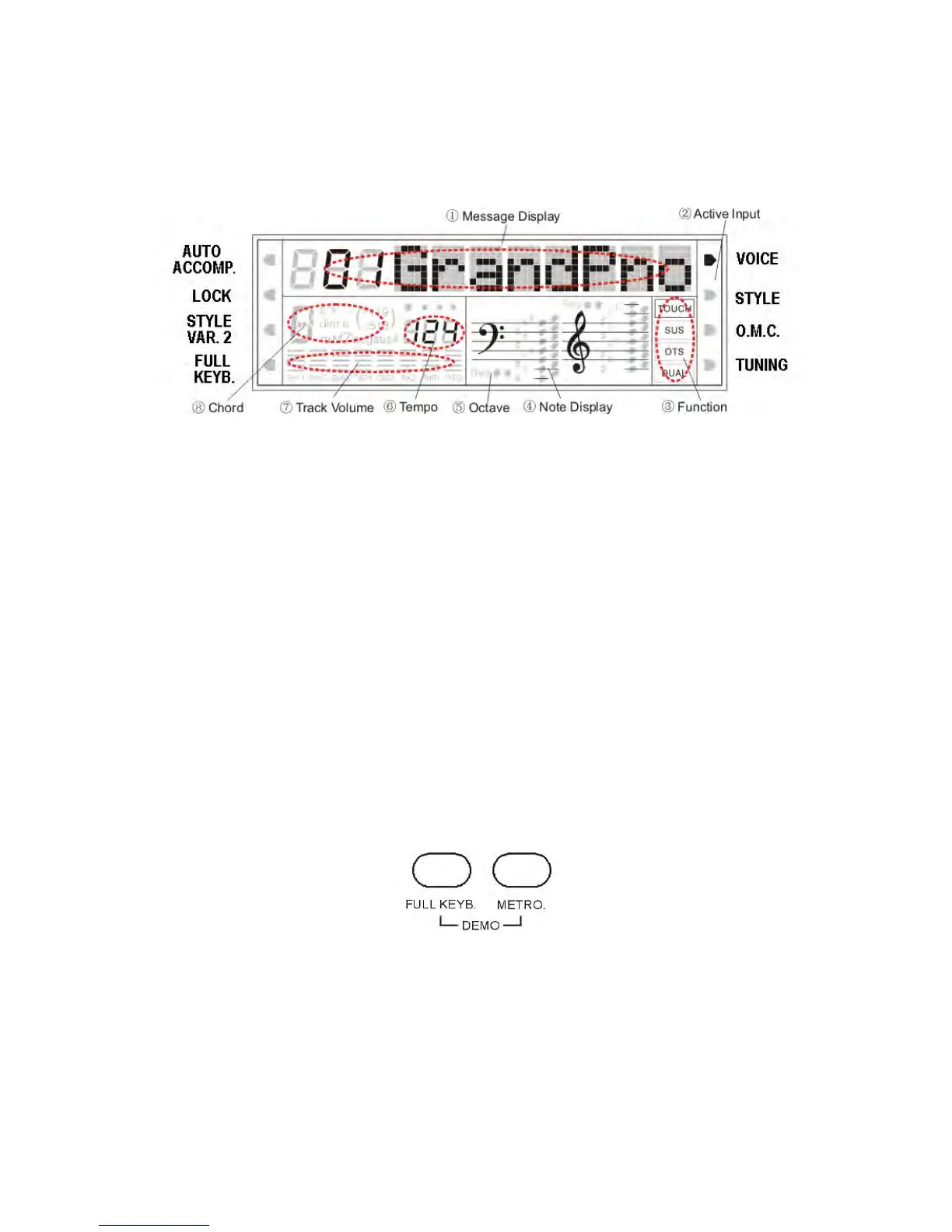
Your instrument features a large multi-function display (INFORMATION DISPLAY) that shows
all the important settings for the instrument. The section below briefly explains most of the various
icons and indications that may appear in the display.
(1) Message Display - This section displays the demo song, voice or style name and number you have
selected. Other important functions and parameters are also displayed in this section.
(2) Active Input – Enables the user to make selection changes. The arrow indicates the active feature.
(3) Function – Indicates the status of the listed parameters: Touch Sensitivity , Sustain, OTS, Dual mode.
(4) Note Display - When you play a key on the keyboard, the note will be displayed.
(5) Octave - The icon indicate the Octave of the played notes.
(6) Tempo – Indicates the tempo in BPM (Beats Per Minute).
(7) Track Volume - Displays the volume of each track dynamically, when a song or a style is played.
(8) Chord – Indicates the chord played on the instrument.
DEMO SONGS
There are 26 demo songs in the internal memory. Listen to the pre-programmed demonstration
songs and they will give you a good idea of what the instrument can do.
- With the Power ON and Set the Master Volume at half way.
- Press the [FULL KEYBOARD] button and the [METRONOME] button at the same time to
activate the DEMO function. The name of the selected DEMO will appear on the
INFORMATION DISPLAY. You can select the demo songs by using the [+/-] buttons.
- Press [FULL KEYBOARD] button and the [METRONOME] button again to stop the
DEMO song.



 To Next Page