33
CONNECTIONS
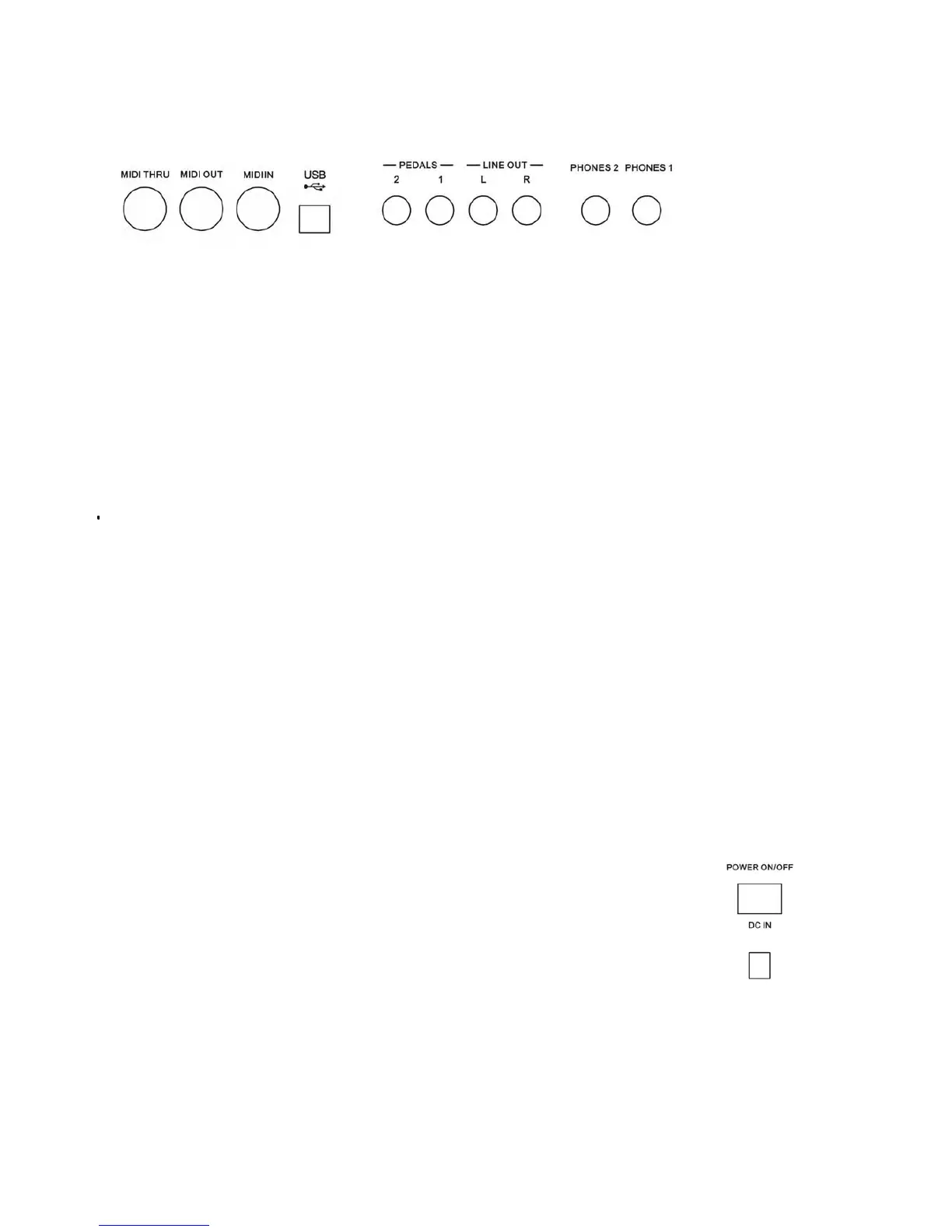
MIDI IN/TRHU/OUT
The Midi THRU connector retransmits any data from the Midi IN directly to other Midi devices.
The Midi OUT connector transmits Midi data generated by the instrument to other Midi
instruments.
The Midi IN connector receives the Midi data from an external Midi device.
USB TO COMPUTER
It is possible to connect the instrument to a computer using the USB port located in the back panel
of the instrument and control the Midi parameters.
PEDALS SOCKETS
This is the connection for the pedal sets that can be used with the instrument.
If using the supplied Sustain Pedal connect it to Pedal Connection 1.
If the optional 3 Pedals pedal board is used connect the mono jack to pedal connection 1 and the
stereo jack to pedal connection 2.
LINE OUT SOCKETS
There are two outputs (Left and Right) and they are used to send the audio signal out an external
amplifier, mixer console or recording equipment. To connect the instrument in Stereo to an external
amplification system connect both Left and Right outputs.
HEADPHONES
Two sets of Headphones can be plugged in for private practice. The sockets are located at the back
of the instrument in left part of the keyboard and allows you to play without disturbing anyone else
or being disturbed by outside noise.
POWER ON/OFF (SDP45)
It is to turn On the instrument.
DC IN SOCKET
This is the connection to power. Connect the adapter to this socket to power the instrument.



 To Next Page