45
SAMIX GmbH
Fault causes/troubleshooting
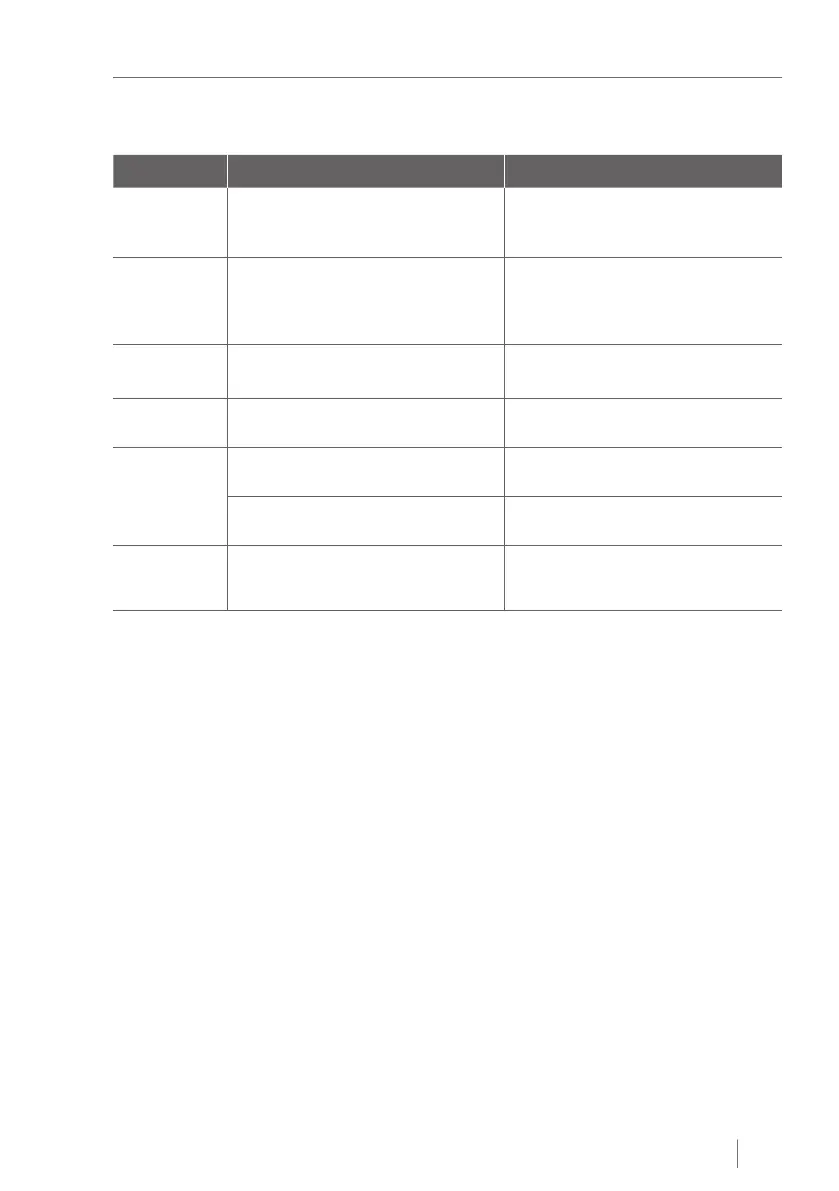
8.2 Fault messages
Fault display Possible cause of fault Troubleshooting
FE 0 The device was switched off and on again
during an operation or a temporary power
failure.
Press the "Start/Stop" button.
The oscillation arm moves to the next end
position.
FE 1 The device was switched on while a mi-
xing unit is engaged or a changeover of
operating modes was effected while a
mixing unit was engaged.
Remove the mixing unit and press the
"Start/Stop" button.
The oscillation arm moves to the previ-
ously desired position.
FE 2 The oscillation arm does not move or only
moves very slowly.
Press the "Start/Stop" button.
Fault message FE 0 is displayed.
FE 8 No mixing unit is engaged in MANUAL
operating mode.
Press the "Start/Stop" button, engage mi-
xing unit. Restart.
FE 9 In AUTO operating mode no mixing unit is
secured at the oscillation arm.
The oscillation arm automatically moves
back to the start position.
In AUTO operating mode no mixing unit is
engaged or disengaged.
Remove the mixing unit and press the
"Start/Stop" button.
FE A The engine is temporarily overloaded. Press the "Start/Stop" button. If neces-
sary, switch off the device and allow the
device to cool down for 30 minutes.
Tab. 6: Fault messages


 To Next Page