5. Attaching and Detaching ROM Cartridges
%
Note @ Be
sure
that you switch off the power
before
mounting
or
demounting the
ROM cartridge.
)
6
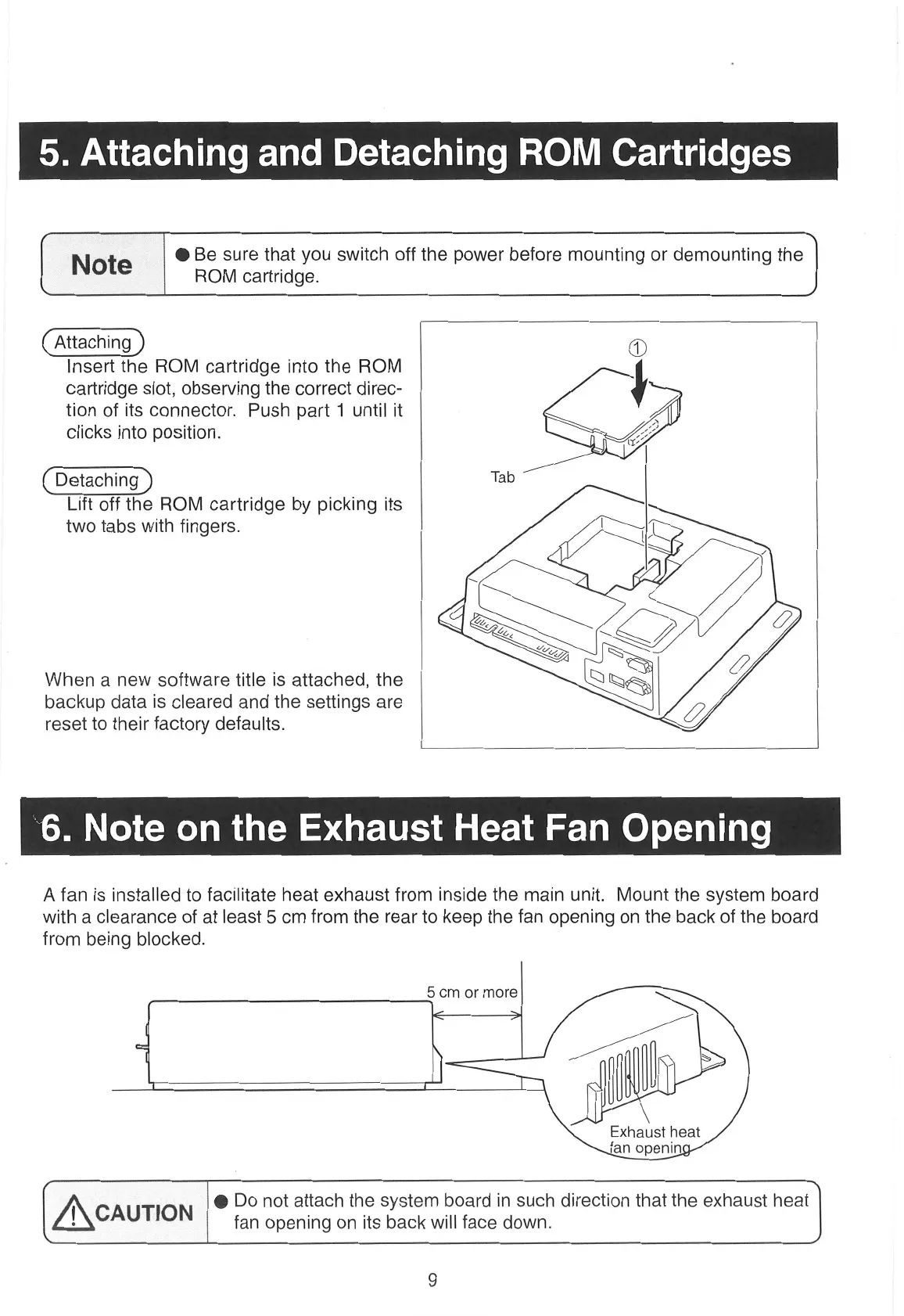
Insert the ROM cartridge into the ROM
cartridge slot, observing the correct direc-
tion of its connector. Push part 1
until
it
clicks into
position.
~
Detaching
Tab
Lift off the ROM cartridge by picking its
two tabs with fingers.
When
a
new
software title is attached, the
backup data is cleared and the settings
are
reset to their factory defaults.
A fan is installed to facilitate heat exhaust from inside the main unit. Mount the system board
with
a
clearance of at least 5
cm
from the
rear
to keep the fan opening
on
the back of the board
from being blocked.
5
cm
or
more
Exhaust heat
fan openin
@ Do not attach the system board in such direction that the exhaust heat
' CAUTION fan opening
on
its back will face down.


 To Next Page