7. System Menu Configuration
1. System Menu Configuration
Press the test switch,
or
switch
on
the power with DIP SW-2 set ON, to open
a
screen
in
which you have integrated control
over
a
variety of operational tests, configuration changes,
operating status and
so
forth.
This
screen
is called
the "system menu."
In
case
of
a
cabinet
without
a
test switch, you may also switch
on
the power with
DIP SW-2
set ON to open the system
menu.
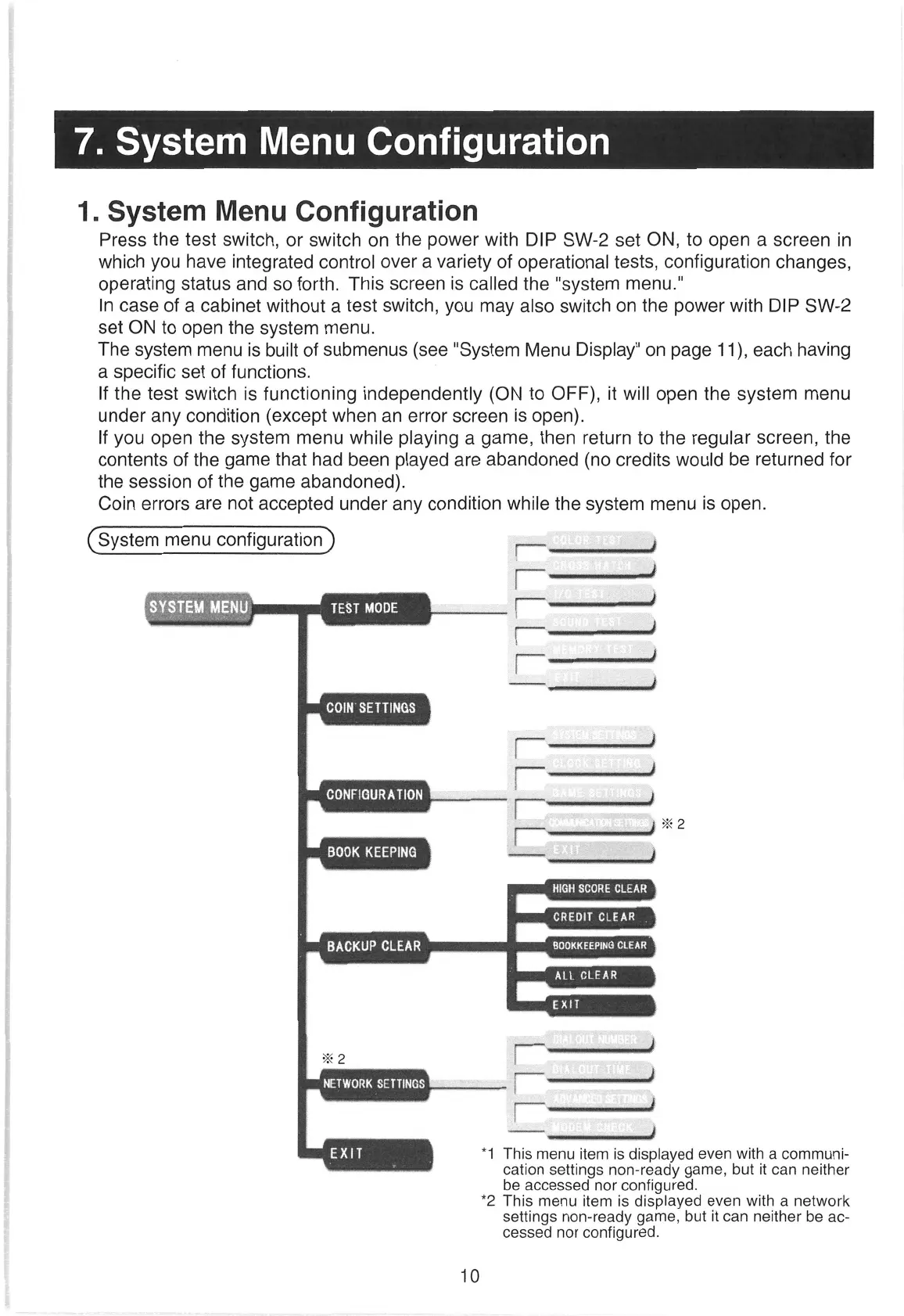
The system
menu
is built of submenus (See "System Menu Display"
on
page 11), each having
a
specific set of functions.
If the test switch is functioning independently (ON to OFF), it will open the system
menu
under any condition (except when
an
error
screen
is open).
If you open the system
menu
while playing
a
game, then return to the regular screen, the
contents of the game that had been played
are
abandoned (no credits would be returned for
the session of the game abandoned).
Coin
errors
are
not accepted under any condition while the system
menu
is open.
(System
menu configuration
) coe }
RA
ade
3
ered
LO)
Same thy
CONFIGURATION
[—
}
BOOK KEEPING
Lem).
toe
as
CREDIT
CLEAR
EyAH
Get
wo
BOOKKEEPING
CLEAR.
PV
ee
as
aR
caidas
*%2
[iia
NETWORK SETTINGS |
el
clidcickisiadiaecenamacy
ail “1 This
menu
item
is displayed
even
with
a
communi-
cation settings non-ready game, but it
can
neither
be
accessed
nor
configured.
*2 This
menu
item is displayed
even
with
a
network
settings
non-ready game, but it
can
neither
be
ac-
cessed
nor
configured.
10


 To Next Page