7. System Menu Configuration
17. Backup Clear Display
Clear the high score, credits and bookkeeping, and reset all settings to their factory defaults
(ALL CLEAR).
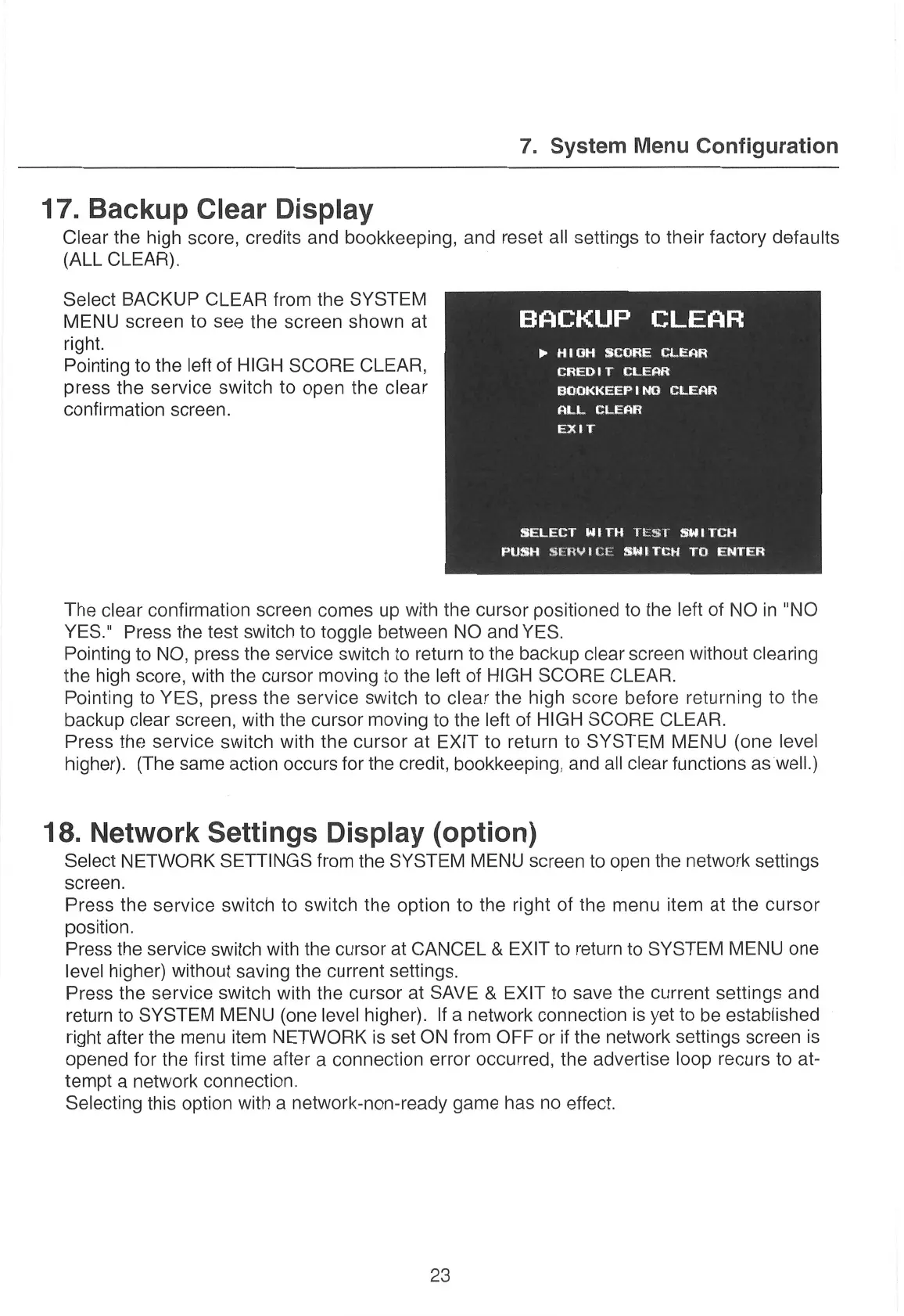
Select BACKUP CLEAR from the SYSTEM
MENU
screen
to
see
the
screen
shown
at
BACKUP
CLEAR
right. >»
HIGH
SCORE
CLEAR
Pointing to the left of
HIGH
SCORE CLEAR, ete
tan
ae
press the service switch to
open the clear
Staats
ata}
confirmation
screen.
ALL
CLEAR
EXIT
SELECT
WITH
TEST
SWITCH
PUSH
SERVICE
SWITCH
TO
ENTER
The clear confirmation
screen
comes
up with
the
cursor
positioned
to the left of
NO in "NO
YES." Press the test switch to toggle between NO and YES.
Pointing to NO, press the service switch to return to the backup clear
screen
without clearing
the high score, with
the
cursor
moving to the left of HIGH SCORE CLEAR.
Pointing to YES, press the
service
switch
to clear the
high
score
before returning
to the
backup clear screen, with the
cursor
moving to the left of HIGH SCORE
CLEAR.
Press
the service switch with
the
cursor
at EXIT to return to
SYSTEM MENU (one
level
higher). (The
same
action
occurs
for the credit, bookkeeping, and all clear functions
as
well.)
18. Network Settings Display (option)
Select NETWORK SETTINGS from the SYSTEM MENU
screen
to open the network settings
screen.
Press the service switch
to
switch
the option to the right of the
menu
item
at the
cursor
position.
Press
the
service
switch with
the
cursor
at CANCEL & EXIT to return to SYSTEM MENU
one
level higher) without saving the current settings.
Press the service switch with the
cursor
at SAVE & EXIT to
save
the current settings and
return to SYSTEM MENU (one level higher). If
a
network connection is yet to be established
right after the
menu
item NETWORK is set ON from OFF
or
if the network settings
screen
is
opened for the first time after
a
connection
error
occurred, the advertise loop
recurs
to at-
tempt
a
network connection.
Selecting
this option
with
a
network-non-ready
game has
no
effect.
23


 To Next Page