11
Samson AirLine
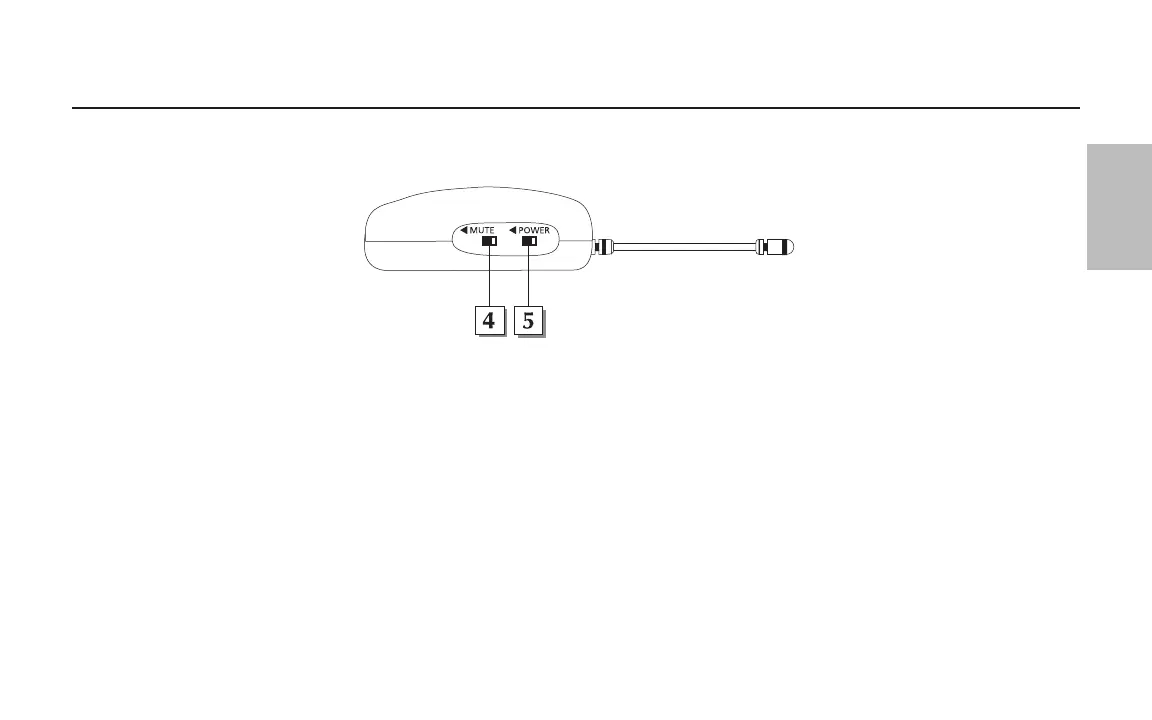
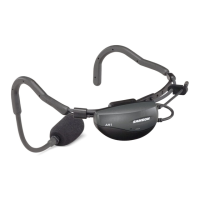
4: Mute switch - Move this switch in the direction of the arrow to mute the AH1; move it away from the arrow to unmute it and transmit
audio signal. Because the carrier signal remains during muting, no “pop” or “thud” will be heard. Note that turning this off does
not turn
off the transmitter power—it is simply a way to temporarily mute the transmission of audio signal. If you don’t plan on using the AH1 for
extended periods, turn it off power by using the power on-off switch (see #5 below).
5: Power switch - Move this switch in the direction of the arrow to turn power to the AH1 on; move it away from the arrow to turn power
off. (to conserve battery power, be sure to turn the AH1 off when not in use). Be sure to mute the audio signal at your external mixer or
amplifier before turning the AH1 power on or off, or an audible pop may result.
Guided Tour - AH1 Headset Transmitter
ENGLISH


 To Next Page