15
XP1000 • Portable PA System
ENGLISH
FRANÇAISDEUTSCHEESPAÑOLITALIANO
Quick Start
1. Be sure that the XP1000’s POWER switch is set to the OFF position.
2. If the speakers are not connected, connect the speaker wires as described in the
previous section.
3. Turn each of the channel LEVEL and MASTER volume controls fully counterclock-
wise, to the “0” position.
4. Next, connect one side of the included power cable to the XP1000 mixer’s power
inlet and the other to a grounded AC power outlet.
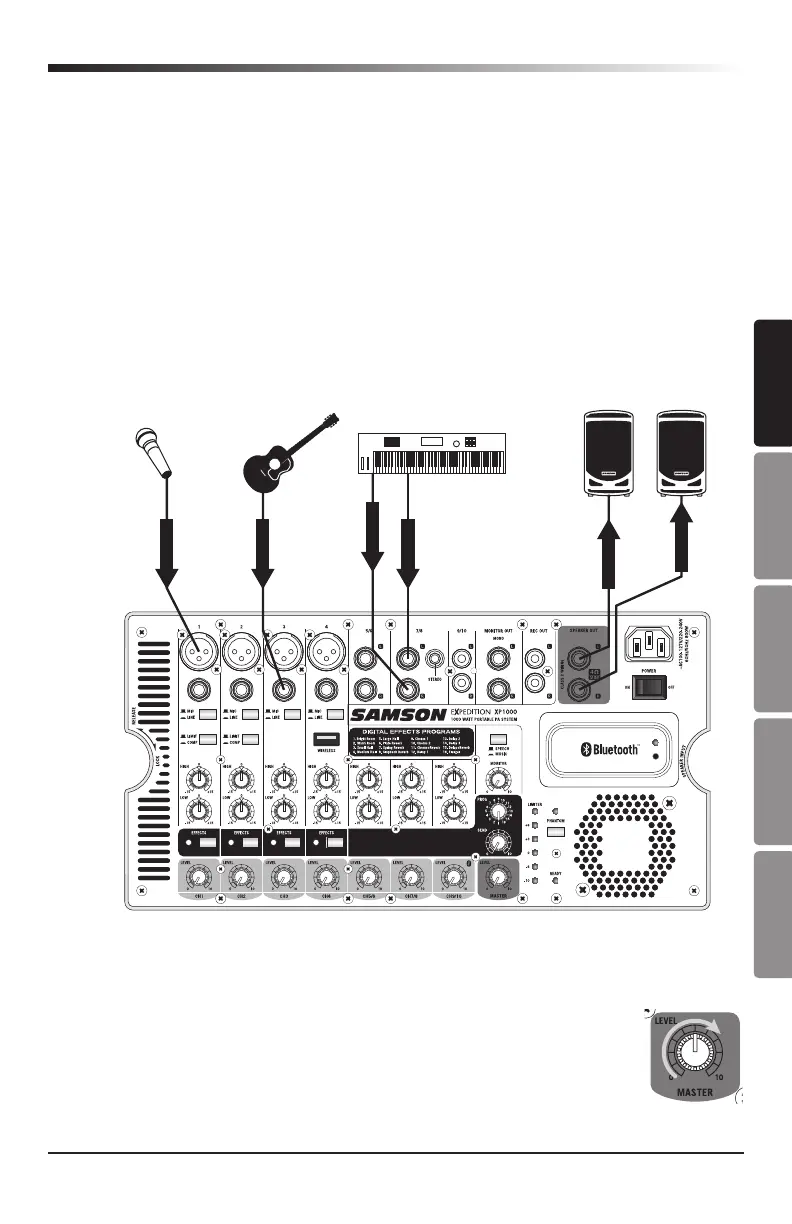
5. Connect your microphones using standard XLR cables, instruments using ¼” phone
cables, and MP3 player using
¹
/
8
” cable, into the appropriate jacks on the mixer.
SIGNAL
SIGNAL
SIGNAL
SIGNAL
SIGNAL
SIGNAL
Electric Acoustic
Guitar
KeyboardDynamic Microphone
6. Switch on all equipment connected to the XP1000, then switch the XP1000’s
POWER switch to the ON position.
7. Turn the MASTER level control up halfway, to the “5” position.
8. Start talking or playing into channel 1 while slowly adjusting the
LEVEL control until you have reached the desired level. Do the same
for each channel you are using.







 To Next Page