EB 5573 EN 10-7
Servicing
10.2.4 Automatic rmware update for several controllers over
RS-485 bus or Ethernet
Requirements
− Host computer
How to proceed:
1. Downloadthelatestversionofthetooltoinstallrmwareupdateles(bootmanager)
andthecurrentlyvalidrmwareleatuwww.samsongroup.com > DOWNLOADS >
Software & Drivers > Firmware.
2. Install the boot manager tool on the host computer.
3. Exit the active Modbus application running on the host computer.
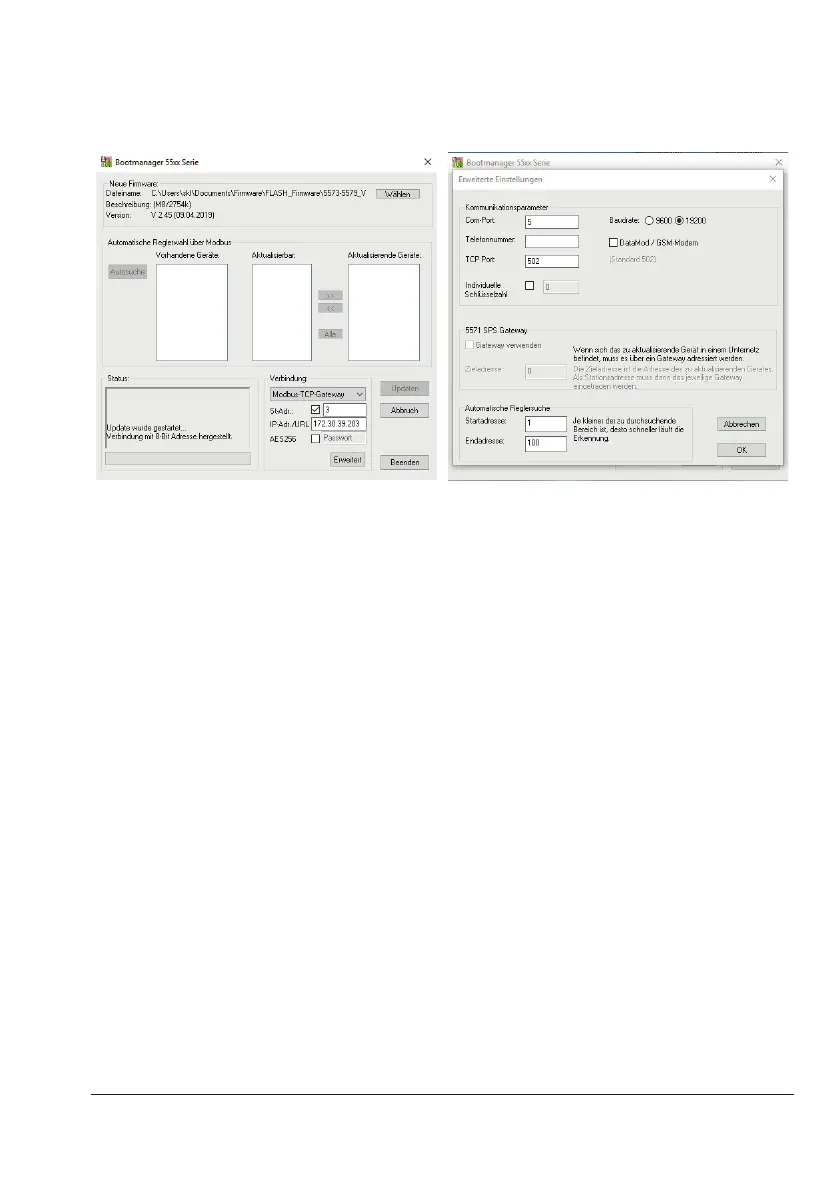
4. Startthebootmanagerandclick[Wählen](select)toselectandloadthermwarele.
5. Selectthefollowingfromthedrop-downlistinthe'Verbindung'(connection)eld:
− For RS-485 communication: 'COM-Port'
− For Ethernet communication: 'Modbus-TCP-Gateway'
6. When 'Modbus-TCP-Gateway' is selected: enter the IP address or URL of the Modbus TCP
gatewayorSAMHOMEgatewayinthe'IP-Adr./URL'eld.
7. Changes to settings in [Erweitert] (advanced):



 To Next Page