57
Connecting and Using a Source Device
2
2 Connecting and Using a Source Device
Edit Name
z You can rename a connected source device.
Sometimes the screen will not display properly unless the name of a source device is specified in Edit
Name. In addition, it is best to rename the source device in Edit Name to obtain optimal picture quality.
To rename a source device in Edit Name:
This product can only be controlled by using the remote control.
1 Press MENU on the remote control.
2 Press / to move to Input and press [ ].
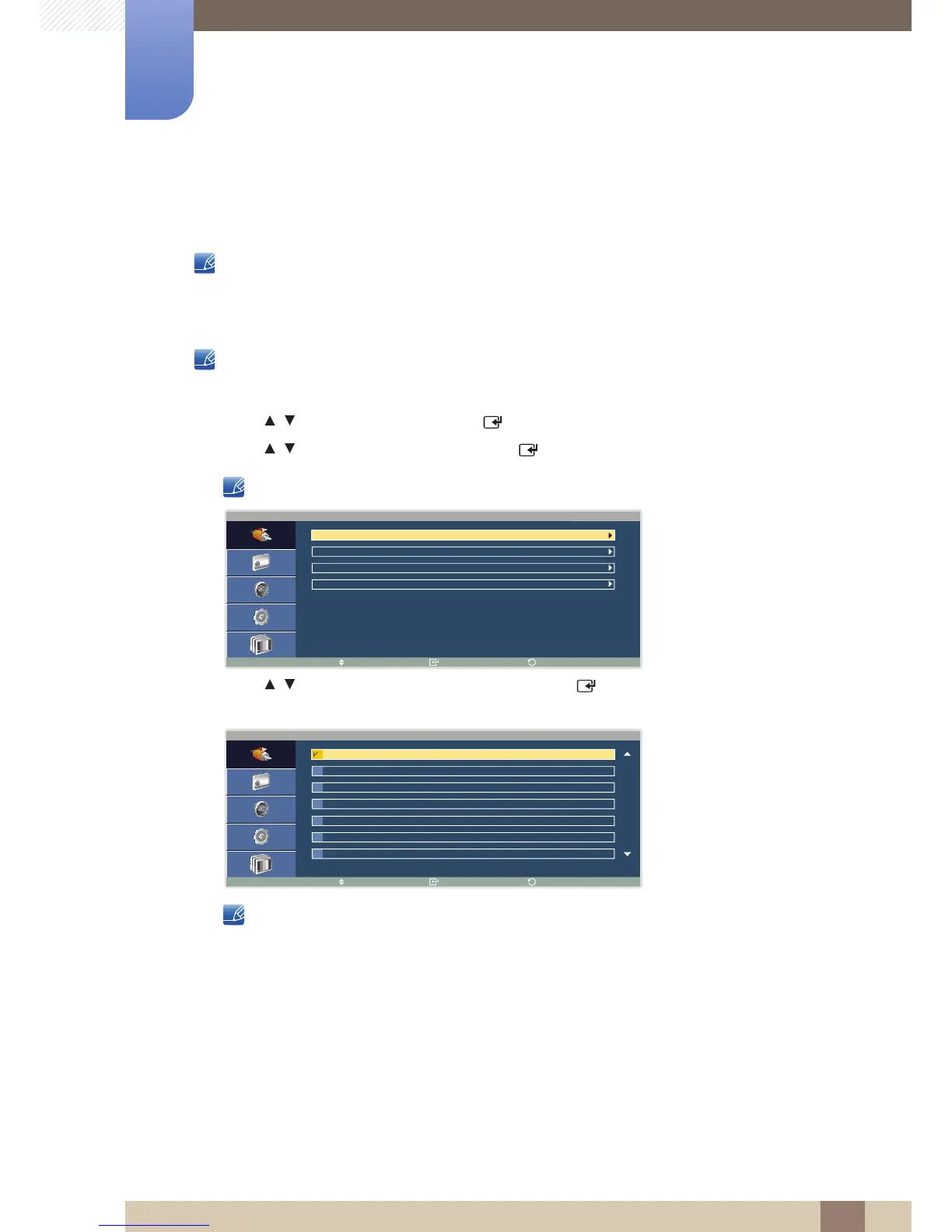
3 Press / to move to Edit Name and press [ ]. A list of sources (PC, DVI , etc.) will appear.
DVI will be displayed as TV if a TV tuner box is connected.
4 Press / to move to the source you want and press [ ]. A list of source devices will appear as
shown below.
The list can include the following source devices. Source devices on the list differ depending on the
selected source.
VCR / DVD / Cable STB / HD STB / Satellite STB / AV Receiver / DVD Receiver / Game /
Camcorder / DVD Combo / DHR / PC / DVI PC / DVI Devices





 To Next Page