Source List
Use to select TV or an external input sources
such as a DVD player / Blu-ray player / cable
box / STB satellite receiver.
[_ MENU rlTI --_Input --_ Source List --_
ENTERI_
SOURCE
TV / AV / Component1 / Component2 /
HDMI1/DVI / HDMI2
You can only choose external devices that are
connected to the TV. In Source, connected inputs
will be highlighted.
Edit Name
[_ MENUITTI _ input --_ Edit Name --_ ENTERI_
Inthe Source, press the TOOLS button, and then you can
set an external input sources name you want.
VCR / DVD / Cable STB / Satellite STB / PVR STB /
AV Receiver / Game / Camcorder / PC / DVl PC /
DVI / IV / IPTV / Blu-ray / HD DVD / DMA: Name the
device connected to the input jacks to make your input
source selection easier.
Ifyou have connected a PC to the HDMI _NI(DVl} port
with an HDMI cable, select PC under Edit Name to
enter a device name.
if you have connected a PC to the HDMI _NI(DW} port
with an HDMI to DVI cable, select DVI PC under Edit
Name to enter a device name.
Ifyou connected an AV device to the HDM_ _N I(DW}
port with an HDMI to DVI cable, select DVI Devices
mode under Edit Name to enter a device name.
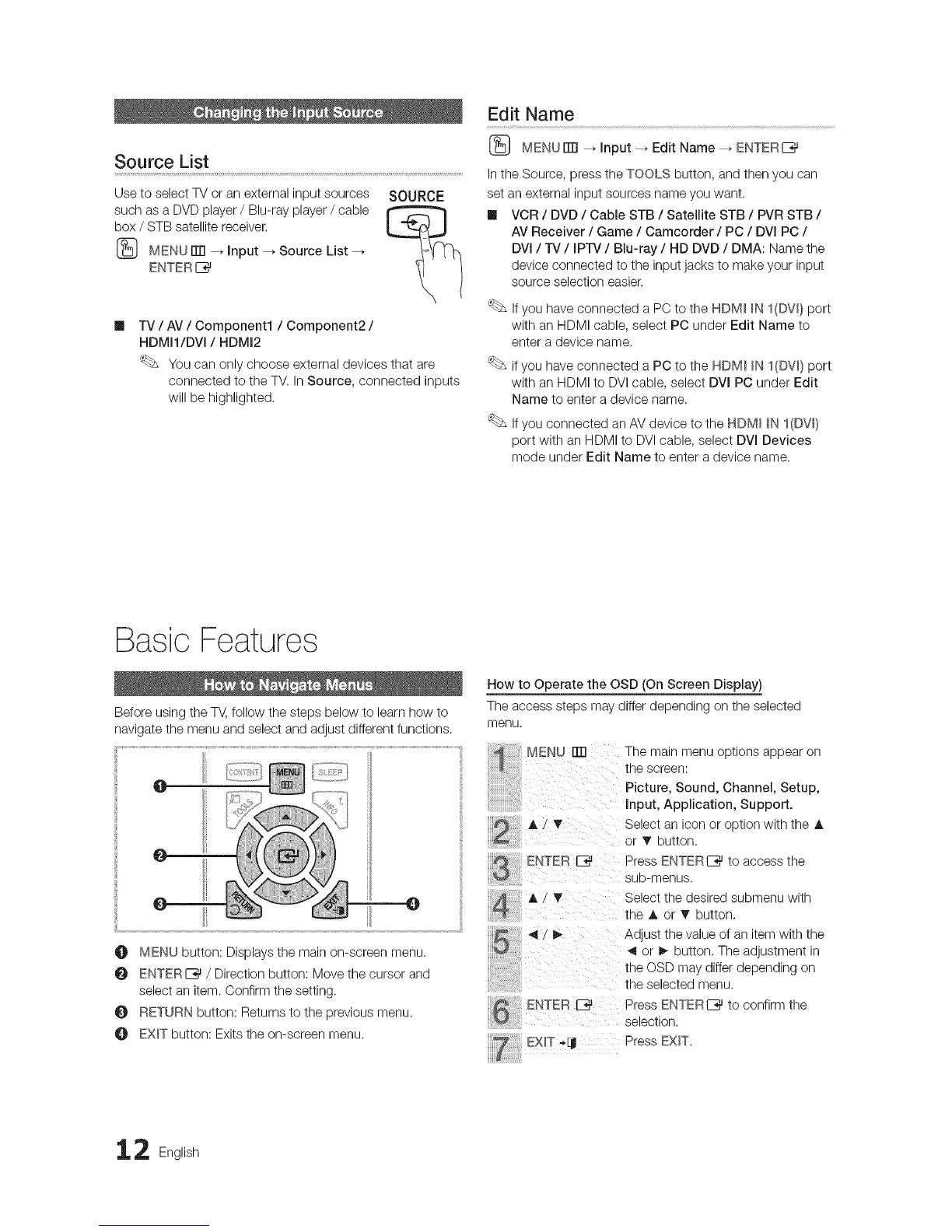
O MENU button: Displays the main on-screen menu.
ENTER_ / Direction button: Move the cursor and
select an item. Confirm the setting.
O RETURN button: Returns to the previous menu.
O EXIT button: Exits the on-screen menu.
How to Operate the OSD (On Screen Display)
The access steps may differ depending on the selected
menu.
MENU= Thema,nmenuopt,onsappearon
the screen:
Picture, Sound, Channel, Setup,
Input, Application, Support.
A 7 _' Select an icon or option with the A
......................... or • button.
E_ITER _ Press ENTER I_ to access the
eub-menus.
A/_' Select the desired submenu with
theA orT button,
_1/_ Ad ust the value of an item with the
4 or _- button. The adustment in
the OSD may differ depending on
the selected menu.
ENTER _ Press ENTER I_ to confirm the
selection.
.... E×IT PressEXIT.
2 English




 To Next Page