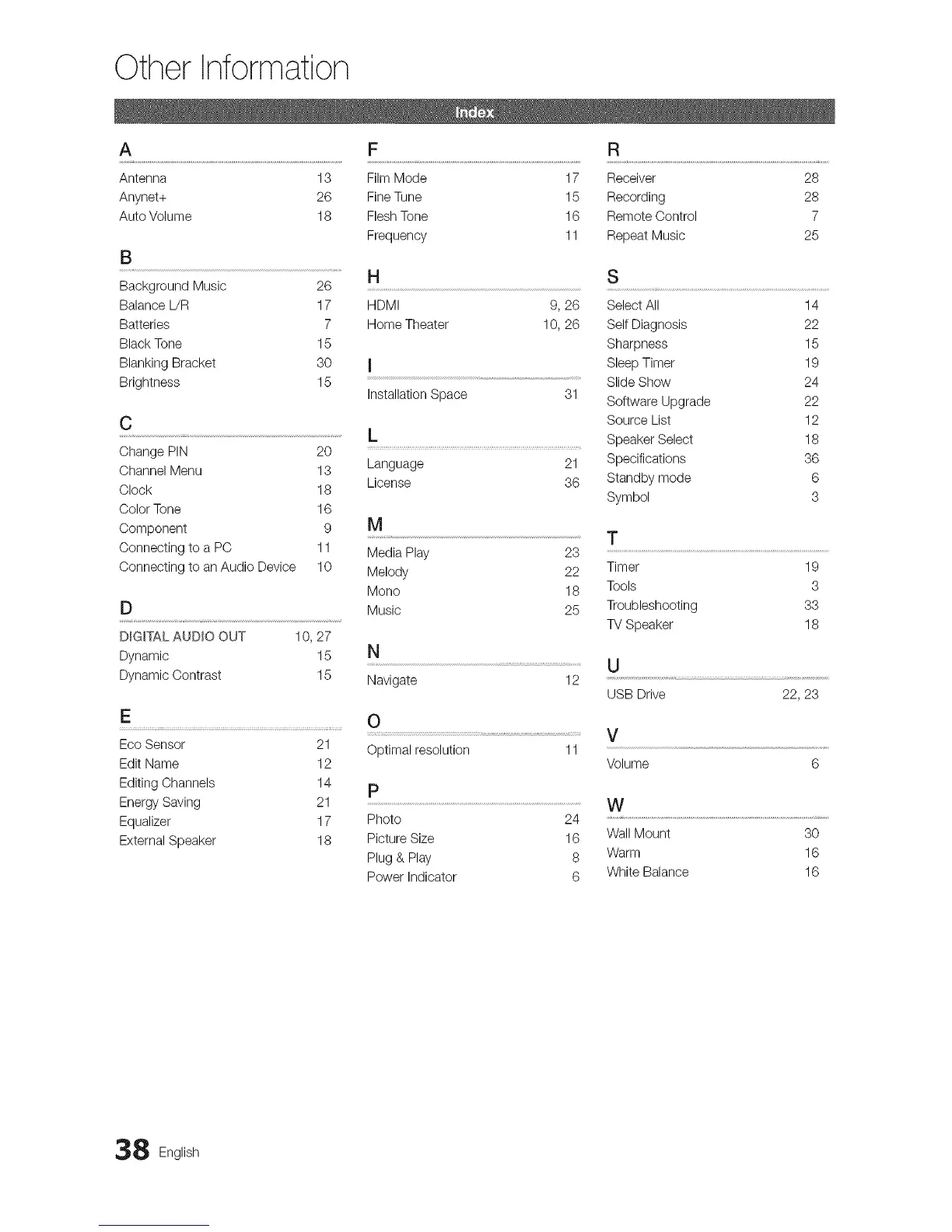
Other Information
A F R
Antenna 13 Film Mode 17 Receiver 28
Anynet+ 26 Fine Tune 15 Recording 28
Auto Volume 18 FleshTone 16 Remote Control 7
Frequency 11 Repeat Music 25
B
Background Music 26
Balance L/R 17
Batteries 7
Black Tone 15
Blanking Bracket 30
Brightness 15
C
Change PIN 20
Channel Menu 13
Clock 18
Color Tone 16
Component 9
Connecting to a PC 11
Connecting to an Audio Device 10
H S
HDMI 9, 26 Select All 14
Home Theater 10, 26 Self Diagnosis 22
Sharpness 15
I Sleep Timer 19
Slide Show 24
Installation Space 31
Software Upgrade 22
Source List 12
h Speaker Select 18
Language 21 Specifications 36
License 36 Standby mode 6
Symbol 3
D
D_G_TALAUDIO OUT 10, 27
Dynamic 15 N
Dynamic Contrast 15 Navigate
M
T
Media Play 23
Melody 22 Timer 19
Mono 18 Tools 3
Music 25 Troubleshooting 33
TV Speaker 18
12
E
Eco Sensor 21
Edit Name 12
Editing Channels 14
Energy Saving 21
Equalizer 17
External Speaker 18
U
USB Drive
22, 23
8 English




 To Previous Page