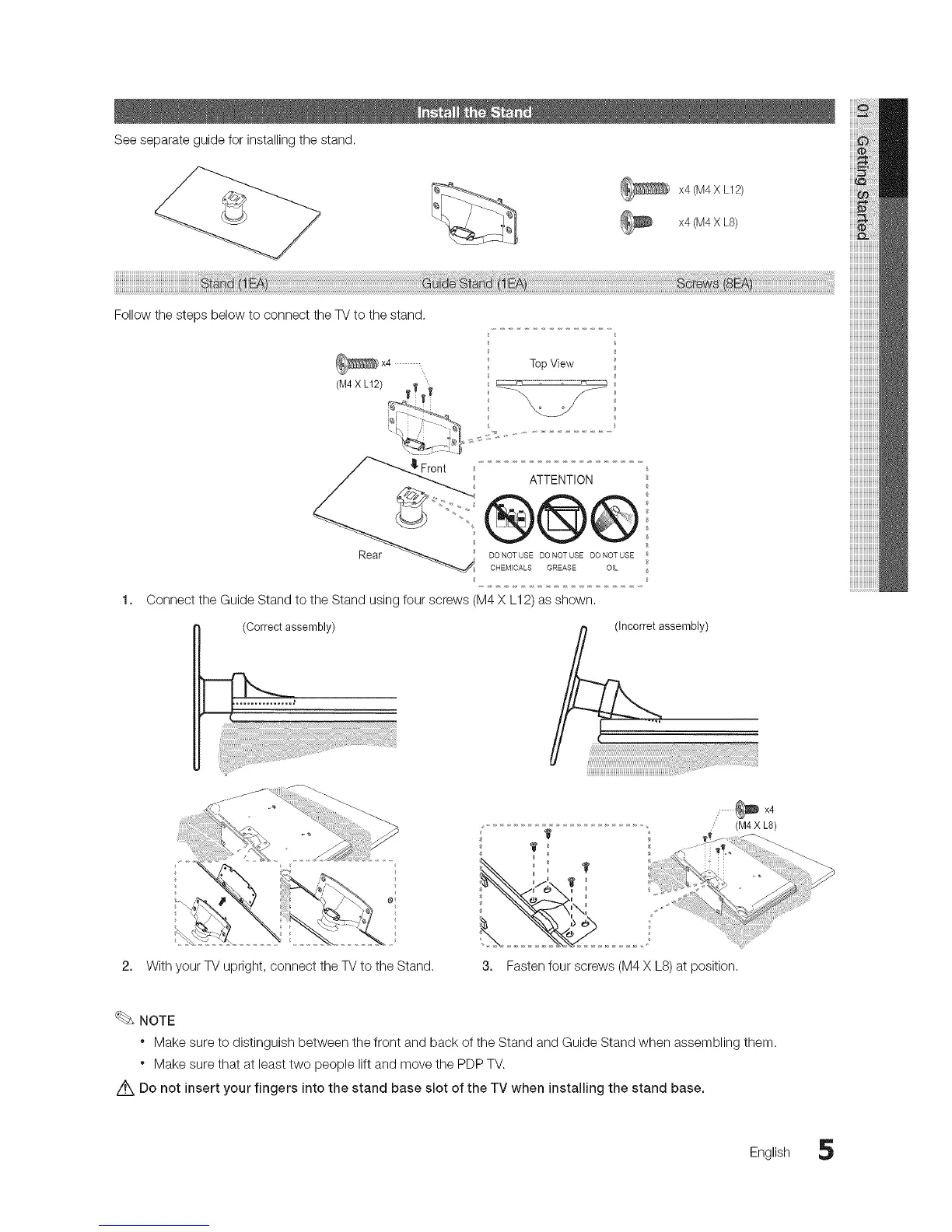
Seeseparateguideforinstallingthestand.
x4 (M4X L12)
x4 (M4X LS)
Follow the steps below to connect the TV to the stand.
_X4 -,,
(M4 X L12) "
TopView
1,
ATTENTION
®@@
Rear DONOTUSE DONOTUSE DONOTUSE
CHEMICALS GREASE OIL
Connect the Guide Stand to the Stand using four screws (M4 X L12) as shown.
(Correct assembly)
o;
2. With your TV upright, connect the TVto the Stand.
,- _ X4
(M4 X L8)
3. Fasten four screws (M4 X L8) at position.
NOTE
" Make sure to distinguish between the front and back of the Stand and Guide Stand when assembling them.
" Make sure that at least two people lift and move the PDP TV.
Z_ Do not insert your fingers into the stand base slot of the TV when installing the stand base.
English 5




 To Next Page