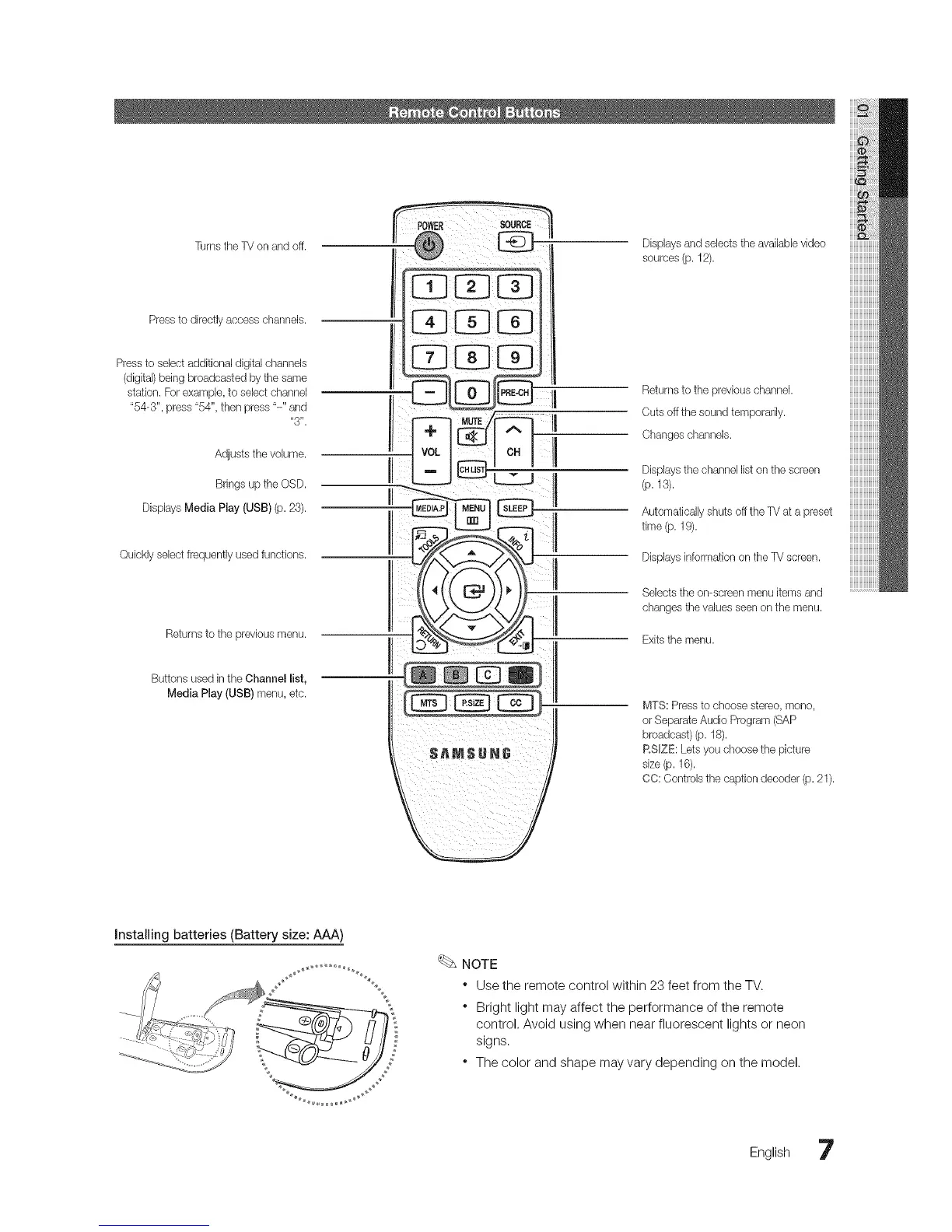
Turns the TV on and off. Displaysand selects the availaUevideo
sources(p. 12).
Press to directlyaccess channels.
Pressto select additional digital channels
(digital)being broadcasted by the same
station. Forexample, to select channel
"54-3", press "54", then press "-" and
"3".
Adjusts the volume.
Bringsup the OSD.
Displays Media Play (USB) (p. 23).
Quickly select frequently used functions.
Returnsto the previous menu.
Buttons used in the Channel list,
Media Play (USB) menu, etc.
Returnsto the previous channel.
Cuts off the sound temporarily.
Changeschannels.
Displaysthe channellist on tile screen
(p.13).
Automatically stluts off the TV at a preset
time (p. 19).
Displaysinformation on tile TV screen.
Selects the on-screen menu items and
changes the values seen on the menu.
Exitsthe menu.
MTS: Press to choose stereo, mono,
or Separate Audio Program (SAP
broadcast) (p. 18).
RSIZE: Letsyou choose the picture
size (p. 16).
CO: Controls the caption decoder (p.21).
Installing batteries (Battery size: AAA)
NOTE
* Use the remote control within 23 feet from the TV.
* Bright light may affect the performance of the remote
control. Avoid using when near fluorescent lights or neon
signs.
* The color and shape may vary depending on the model.
English 7




 To Next Page