English - 9
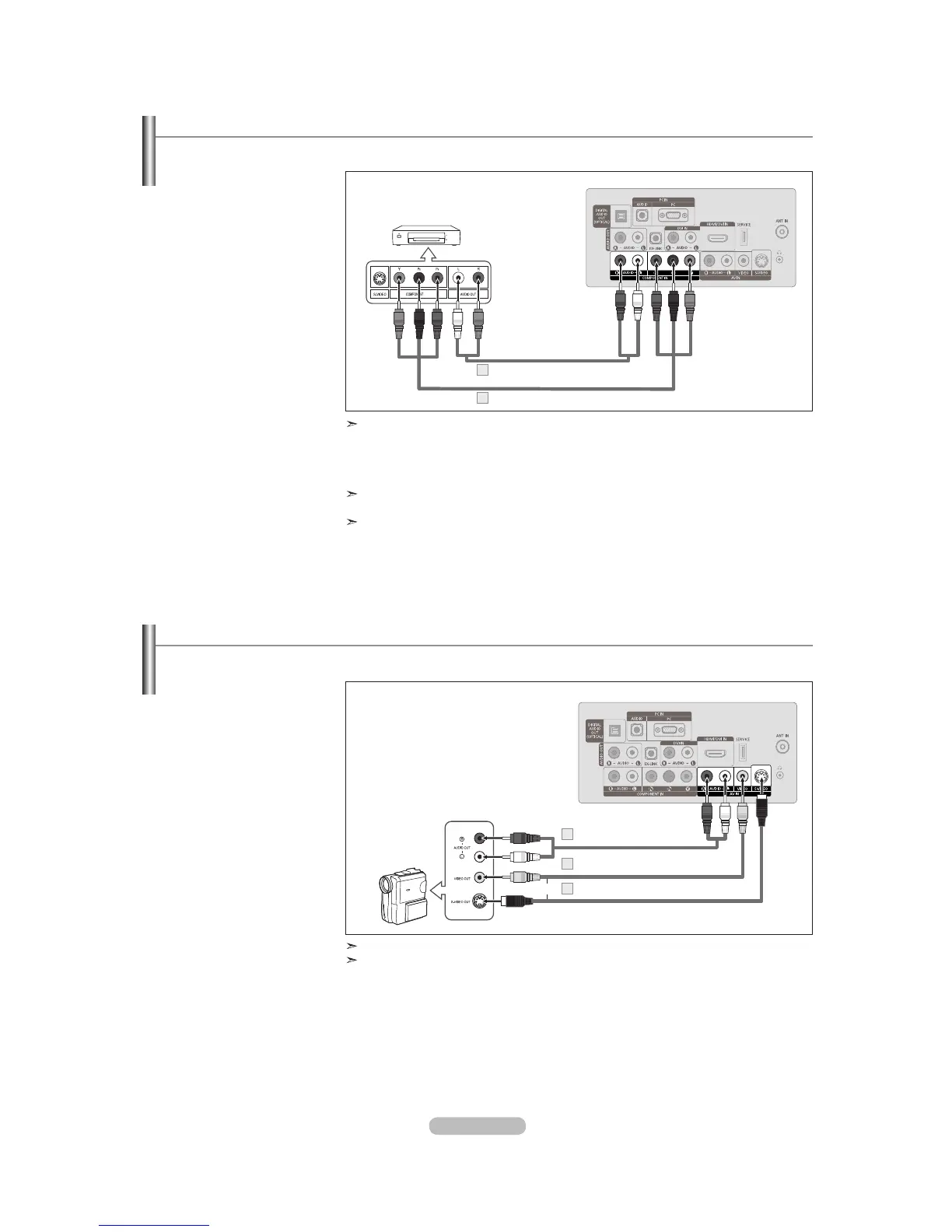
Connecting a DVD Player or Cable Box/Satellite receiver (Set-Top Box) via Component cables
The rear panel jacks on your TV make it easy to connect a DVD Player or Cable Box/Satellite receiver (Set-Top Box) to your TV.
1. Connect a Component Cable
between the COMPONENT
IN [Y, P
B, PR] jacks on the TV
and the COMPONENT [Y, P
B,
P
R] jacks on the DVD Player
or Cable Box/Satellite receiver
(Set-Top Box).
2. Connect Audio Cables between
the COMPONENT IN
[R-AUDIO-L] jacks on the TV
and the AUDIO OUT jacks
on the DVD Player or Cable
Box/Satellite receiver (Set-Top
Box).
Component video separates the video into Y (Luminance (brightness)), Pb (Blue) and
Pr (Red) for enhanced video quality.
Be sure to match the component video and audio connections.
For example, if connecting a Component video cable to COMPONENT IN, connect the
audio cable to COMPONENT
IN also.
Each DVD Player or Cable Box/Satellite receiver (Set-Top Box) has a different back panel
configuration.
When connecting a DVD Player or Cable Box/Satellite receiver (Set-Top Box), match the
color of the connection terminal to the cable.
Connecting a Camcorder
They allow you to view the camcorder tapes without using a VCR.
1. Connect a Video Cable
(or S-Video Cable) between
the AV IN [VIDEO] (or
S-VIDEO) jack on the
TV
and the VIDEO OUT jack on
the camcorder.
2.
Connect Audio Cables
between the AV IN
[R-AUDIO-L] jacks on the
TV
and the AUDIO OUT jacks
on the camcorder.
DVD Player or Cable Box /
Satellite receiver (Set-Top Box)
TV Rear Panel
Component Cable (Not supplied)
1
Audio Cable (Not supplied)
2
Each Camcorder has a different back panel configuration.
When connecting a Camcorder, match the color of the connection terminal to the cable.
TV Rear Panel
Camcorder
S-Video Cable (Not supplied)
1
Audio Cable (Not supplied)
2
Video Cable (Not supplied)
1
or



 To Next Page