English - 5
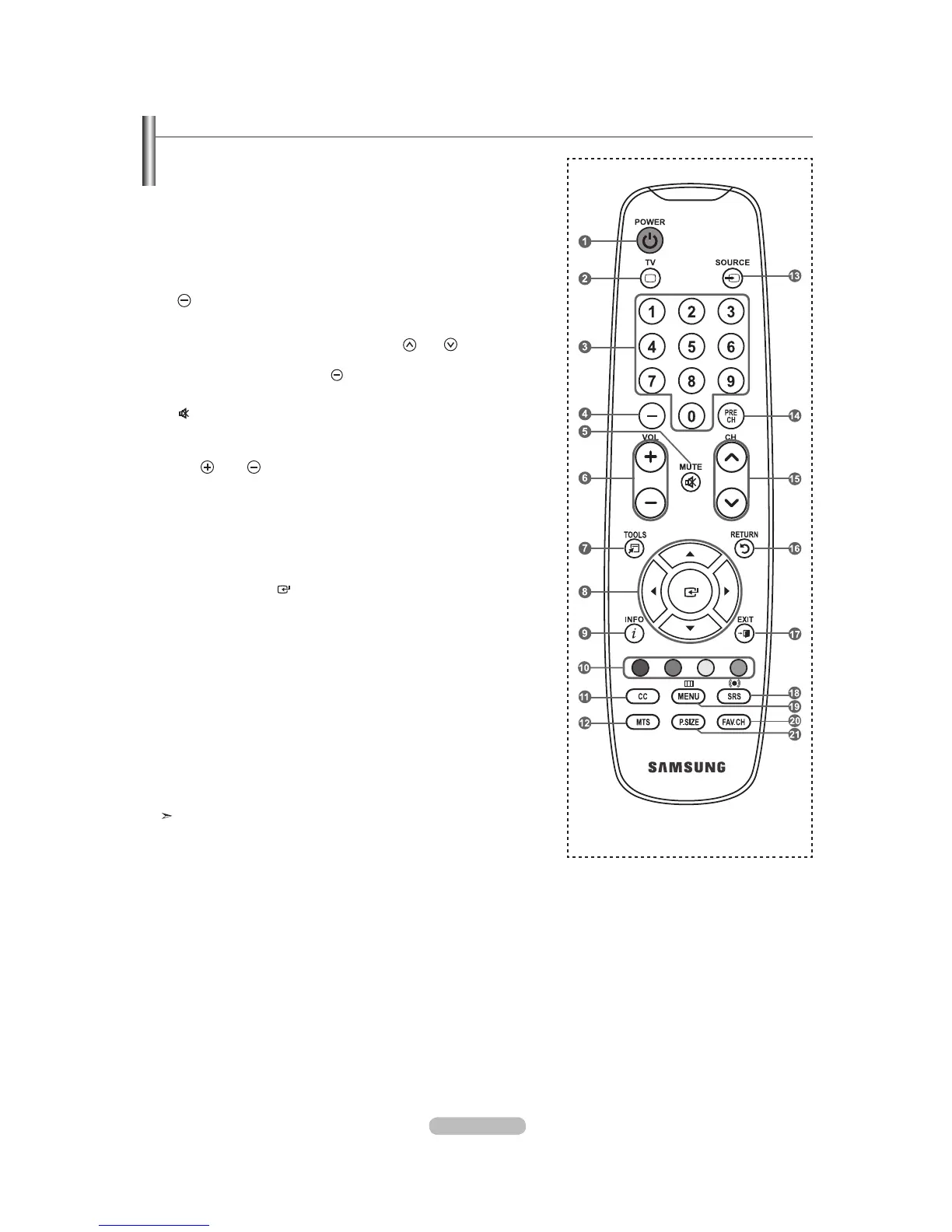
Remote Control
You can use the remote control up to a distance of about 23 feet from the TV.
The performance of the remote control may be affected by bright light.
1
POWER
Turns the TV on and off.
2
TV
Selects the TV mode directly.
3
NUMERIC BUTTONS
Press to change the channel.
4
Press to select additional
channels(digital and analog) being
broadcast by the same station.
For example, to select channel
“54-3”, press “54”, then press “
”
and “3”.
5 (
MUTE)
Press to temporarily cut off the
sound.
6
VOL
/ VOL
Press to increase or decrease
the volume.
7
TOOLS
Use to quickly select frequently
used functions.
8
UP / DOWN / LEFT
/
RIGHT
/ ENTER
Use to select on-screen menu
items and change menu values.
9
INFO
Press to display information on
the TV screen.
0
COLOR BUTTONS
Use these buttons in the
Channel list, etc.
!
CC
Controls the caption decoder.
@
MTS
Press to choose stereo, mono
or Separate Audio Program
(SAP broadcast).
#
SOURCE
Press to display and select the
available video sources.
$
PRE CH
Tunes to the previous channel.
%
CH
/ CH
Press to change channels.
^
RETURN
Returns to the previous menu.
&
EXIT
Press to exit the menu.
*
SRS
Selects SRS TruSurround XT
mode.
(
MENU
Displays the main on-screen
menu.
)
FAV.CH
Press to switch to your favorite
channels.
a
P.SIZE
Picture size selection.



 To Next Page