5-10 Troubleshooting and Maintenance
• Paper has not been loaded correctly. Remove the paper
cassette and reload the paper correctly.
• There is too much paper in the paper cassette. Remove
some of the paper from the cassette.
The paper is not fed into
the printer.
• The print cartridge is empty. Replace the print cartridge.
See page 5-16.
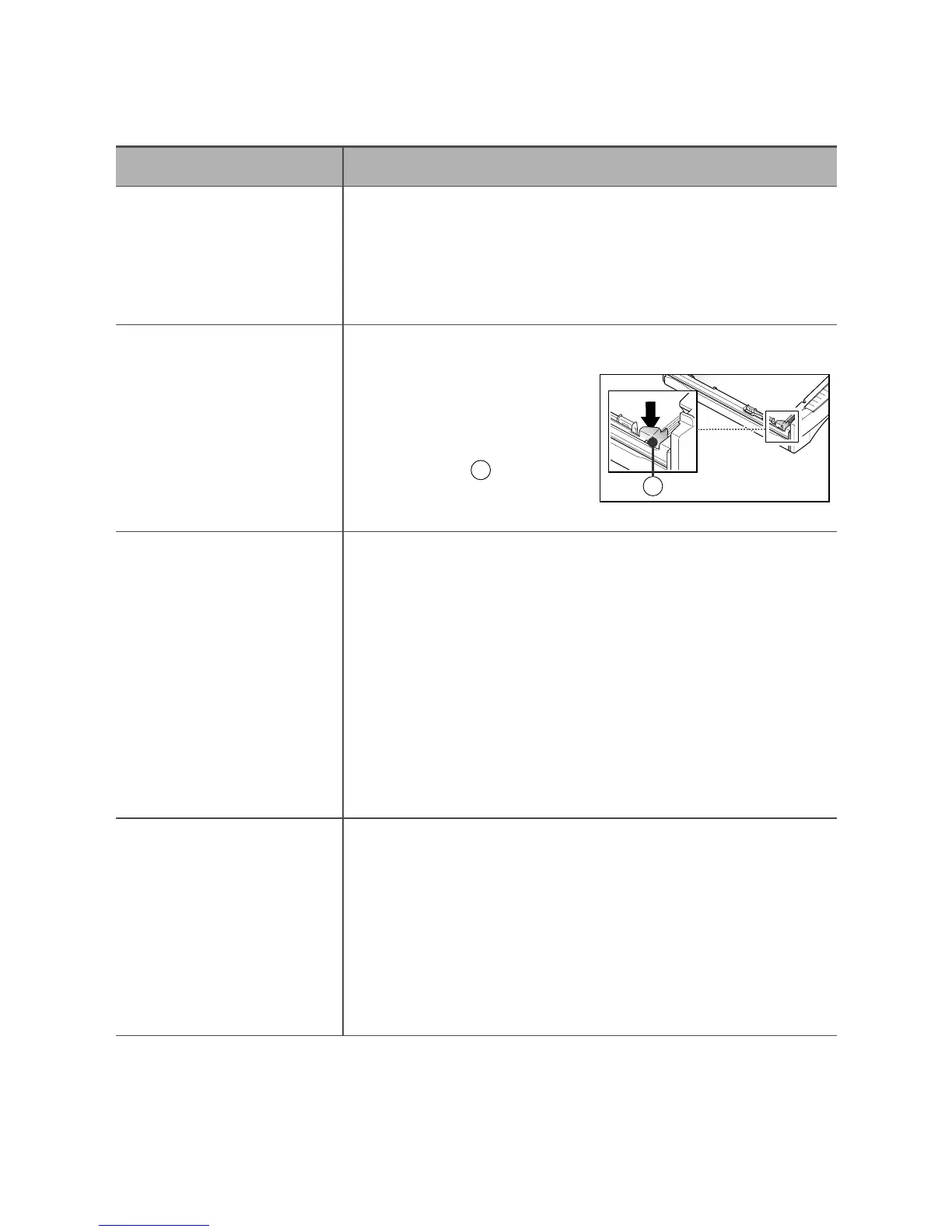
• When you load paper, make
sure that the paper stack
goes under the metal
retaining clip .
The printer ejects blank
pages.
• The page layout is too complex. Simplify the page layout
and remove any unnecessary graphics from the document
if possible. Install more memory. See page 6-5.
• The page orientation setting may be incorrect. Change the
page orientation in your application program.
• The paper size and the software paper size settings do not
match. Insert the correct paper into the printer or change
the software paper size settings.
• The printer cable specifications may be incorrect. Replace
with the cable with an IEEE-1284 rated cable.
Half of the page is blank.
• The printer cable is not connected properly. Check the
connection.
• There may be a problem with the printer driver software.
Exit Windows and reboot the computer. Turn the printer off
and then back on again.
• The printer cable specifications may be incorrect. Replace
with the cable with an IEEE-1284 rated cable.
The printer prints the
wrong data, or it prints
incorrect characters.
A
A
A
Problem Possible Cause and Remedy











 To Next Page